
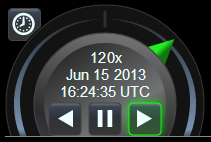
动画小部件 Animation widget
动画小部件提供了用于播放、暂停和反向的按钮,以及当前时间和日期,周围有一个用于控制动画速度的“梭环”。 The Animation widget provides buttons for play, pause, and reverse, along with the current time and date, surrounded by a "shuttle ring" for controlling the speed of animation.
“穿梭环”概念借鉴自视频编辑,其中通常可以旋转“慢速轮”以非常缓慢地移动经过各个动画帧,并且可以扭转周围的穿梭环以控制快速播放的方向和速度。 Cesium 通常将时间视为连续的(不会分解为预定义的动画帧),因此该小部件不提供滚轮。相反,梭环既可以快速播放也可以非常慢速播放。单击并拖动穿梭环指针本身(如上图以绿色显示),或单击环区域的其余部分,将指针微移至该方向的下一个预设速度。 The "shuttle ring" concept is borrowed from video editing, where typically a "jog wheel" can be rotated to move past individual animation frames very slowly, and a surrounding shuttle ring can be twisted to control direction and speed of fast playback. Cesium typically treats time as continuous (not broken into pre-defined animation frames), so this widget offers no jog wheel. Instead, the shuttle ring is capable of both fast and very slow playback. Click and drag the shuttle ring pointer itself (shown above in green), or click in the rest of the ring area to nudge the pointer to the next preset speed in that direction.
动画小部件还提供了一个“实时”按钮(位于左上角),使动画时间与最终用户的系统时钟保持同步,通常显示“今天”或“现在”。此模式不适用于 The Animation widget also provides a "realtime" button (in the upper-left) that keeps animation time in sync with the end user's system clock, typically displaying "today" or "right now." This mode is not available in
ClockRange.CLAMPED or
ClockRange.LOOP_STOP 模式如果当前时间超出 mode if the current time is outside of Clock的开始时间和结束时间。 's startTime and endTime.
| 名称 Name | 类型 Type | 说明 Description |
|---|---|---|
container |
Element | string | 将包含小部件的 DOM 元素或 ID。 The DOM element or ID that will contain the widget. |
viewModel |
AnimationViewModel | 该小部件使用的视图模型。 The view model used by this widget. |
抛出: Throws:
-
DeveloperError :文档中不存在 ID 为“container”的元素。 : Element with id "container" does not exist in the document.
示例: Example:
// In HTML head, include a link to Animation.css stylesheet,
// and in the body, include: <div id="animationContainer"></div>

const clock = new Cesium.Clock();
const clockViewModel = new Cesium.ClockViewModel(clock);
const viewModel = new Cesium.AnimationViewModel(clockViewModel);
const widget = new Cesium.Animation('animationContainer', viewModel);

function tick() {
    clock.tick();
    requestAnimationFrame(tick);
}
requestAnimationFrame(tick);
另见: See:
成员 Members
获取父容器。 Gets the parent container.
readonly viewModel : AnimationViewModel
获取视图模型。 Gets the view model.
方法 Methods
更新小部件以反映任何修改的 CSS 主题规则。 Updates the widget to reflect any modified CSS rules for theming.
示例: Example:
//Switch to the cesium-lighter theme.
document.body.className = 'cesium-lighter';
animation.applyThemeChanges();
销毁动画小部件。如果从布局中永久删除小部件,则应调用。 Destroys the animation widget. Should be called if permanently removing the widget from layout.
返回: Returns:
如果对象已被销毁,则为 true,否则为 false。 true if the object has been destroyed, false otherwise.
调整小部件的大小以匹配容器大小。每当容器大小更改时都应调用此函数。 Resizes the widget to match the container size. This function should be called whenever the container size is changed.