
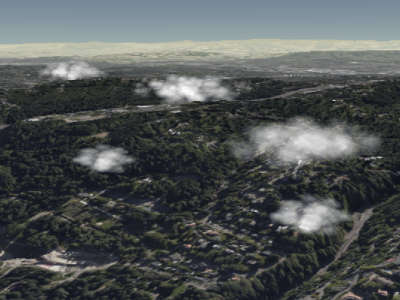
积云示例 Example cumulus clouds
使用以下方法在集合中添加和删除云 Clouds are added and removed from the collection using
CloudCollection#add
and CloudCollection#remove.
| 名称 Name | 类型 Type | 说明 Description | ||||||||||||||||||||||||
|---|---|---|---|---|---|---|---|---|---|---|---|---|---|---|---|---|---|---|---|---|---|---|---|---|---|---|
options |
object |
可选 optional
具有以下属性的对象: Object with the following properties:
|
示例: Example:
// Create a cloud collection with two cumulus clouds
const clouds = scene.primitives.add(new Cesium.CloudCollection());
clouds.add({
  position : new Cesium.Cartesian3(1.0, 2.0, 3.0),
  maximumSize: new Cesium.Cartesian3(20.0, 12.0, 8.0)
});
clouds.add({
  position : new Cesium.Cartesian3(4.0, 5.0, 6.0),
  maximumSize: new Cesium.Cartesian3(15.0, 9.0, 9.0),
  slice: 0.5
});
演示: Demo:
另见: See:
成员 Members
为了调试,用一种不透明的颜色渲染广告牌。 Renders the billboards with one opaque color for the sake of debugging.
-
默认值: Default Value:
false
Draws the clouds as opaque, monochrome ellipsoids for the sake of debugging.如果 Draws the clouds as opaque, monochrome ellipsoids for the sake of debugging. If debugBillboards 也是如此,那么椭圆体将绘制在广告牌的顶部。 is also true, then the ellipsoids will draw on top of the billboards.
-
默认值: Default Value:
false
控制在用于渲染积云的预先计算的噪声纹理中捕获的细节量。为了使纹理可平铺,该纹理必须是 2 的幂。为了获得最佳结果,请将其设置为 2 的幂 Controls the amount of detail captured in the precomputed noise texture used to render the cumulus clouds. In order for the texture to be tileable, this must be a power of two. For best results, set this to be a power of two between 8.0 and 32.0 (inclusive).
clouds.noiseDetail = 8.0;
|
clouds.noiseDetail = 32.0;
|
-
默认值: Default Value:
16.0
noiseOffset : Cartesian3
将平移应用于噪声纹理坐标以生成不同的数据。如果默认噪声不能生成好看的云,则可以修改此设置。 Applies a translation to noise texture coordinates to generate different data. This can be modified if the default noise does not generate good-looking clouds.
default
|
clouds.noiseOffset = new Cesium.Cartesian3(10, 20, 10);
|
-
默认值: Default Value:
Cartesian3.ZERO
-
默认值: Default Value:
true
方法 Methods
add(options) → CumulusCloud
性能: Performance:
Calling add 是预期的常数时间。然而,集合的顶点缓冲区被重写 is expected constant time. However, the collection's vertex buffer is rewritten - an O(n) 操作也会产生 CPU 到 GPU 的开销。为了获得最佳性能,请在调用之前添加尽可能多的云 operation that also incurs CPU to GPU overhead. For best performance, add as many clouds as possible before calling update.
| 名称 Name | 类型 Type | 说明 Description |
|---|---|---|
options |
object | 可选 optional 描述云属性的模板,如示例 1 所示。 A template describing the cloud's properties as shown in Example 1. |
返回: Returns:
抛出: Throws:
-
DeveloperError : This object was destroyed, i.e., destroy() was called.
示例: Examples:
// Example 1:  Add a cumulus cloud, specifying all the default values.
const c = clouds.add({
  show : true,
  position : Cesium.Cartesian3.ZERO,
  scale : new Cesium.Cartesian2(20.0, 12.0),
  maximumSize: new Cesium.Cartesian3(20.0, 12.0, 12.0),
  slice: -1.0,
  cloudType : CloudType.CUMULUS
});
// Example 2: Specify only the cloud's cartographic position.
const c = clouds.add({
position : Cesium.Cartesian3.fromDegrees(longitude, latitude, height)
});另见: See:
| 名称 Name | 类型 Type | 说明 Description |
|---|---|---|
cloud |
CumulusCloud | 可选 optional 要检查的云。 The cloud to check for. |
返回: Returns:
另见: See:
一旦对象被销毁,就不应再使用;调用除 Once an object is destroyed, it should not be used; calling any function other than
isDestroyed 将导致 will result in a DeveloperError 例外。因此,分配返回值( exception. Therefore, assign the return value (undefined) 到对象,如示例中所做的那样。 ) to the object as done in the example.
抛出: Throws:
-
DeveloperError : This object was destroyed, i.e., destroy() was called.
示例: Example:
clouds = clouds && clouds.destroy();另见: See:
get(index) → CumulusCloud
CloudCollection#length 迭代集合中的所有云。 to iterate over all the clouds in the collection.
性能: Performance:
预期时间恒定。如果云从集合中移除并且 Expected constant time. If clouds were removed from the collection and
CloudCollection#update 没有被调用,隐式的 was not called, an implicit O(n)
执行操作。 operation is performed.
| 名称 Name | 类型 Type | 说明 Description |
|---|---|---|
index |
number | 云的从零开始的索引。 The zero-based index of the cloud. |
返回: Returns:
抛出: Throws:
-
DeveloperError : This object was destroyed, i.e., destroy() was called.
示例: Example:
// Toggle the show property of every cloud in the collection
const len = clouds.length;
for (let i = 0; i < len; ++i) {
  const c = clouds.get(i);
  c.show = !c.show;
}
另见: See:
如果该对象被破坏,则不应使用它;调用除 If this object was destroyed, it should not be used; calling any function other than
isDestroyed 将导致 will result in a DeveloperError exception.
返回: Returns:
true 如果该物体被摧毁;否则, if this object was destroyed; otherwise, false.
另见: See:
| 名称 Name | 类型 Type | 说明 Description |
|---|---|---|
cloud |
CumulusCloud | 要删除的云。 The cloud to remove. |
返回: Returns:
true 如果云被移除; if the cloud was removed; false 如果在集合中没有找到云。 if the cloud was not found in the collection.
抛出: Throws:
-
DeveloperError : This object was destroyed, i.e., destroy() was called.
示例: Example:
const c = clouds.add(...);
clouds.remove(c);  // Returns true
另见: See:
性能: Performance:
O(n)。从集合中删除所有云然后添加新云比完全创建一个新集合更有效。 . It is more efficient to remove all the clouds from a collection and then add new ones than to create a new collection entirely.
抛出: Throws:
-
DeveloperError : This object was destroyed, i.e., destroy() was called.
示例: Example:
clouds.add(...);
clouds.add(...);
clouds.removeAll();