
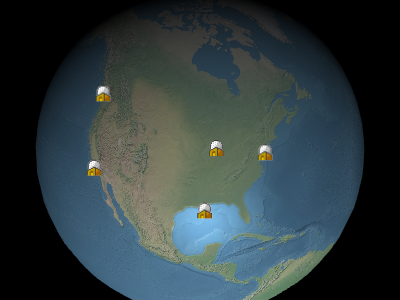
广告牌示例 Example billboards
使用以下方法在集合中添加和删除广告牌 Billboards are added and removed from the collection using
BillboardCollection#add
and BillboardCollection#remove。集合中的广告牌会自动共享具有相同标识符的图像的纹理。 . Billboards in a collection automatically share textures for images with the same identifier.
性能: Performance:
为了获得最佳性能,最好选择几个集合,每个集合都有许多广告牌,而不是多个集合,每个集合只有几个广告牌。整理集合,使更新频率相同的广告牌在同一个集合中,即不发生变化的广告牌应在一个集合中;每帧都改变的广告牌应该在另一个集合中;等等。 For best performance, prefer a few collections, each with many billboards, to many collections with only a few billboards each. Organize collections so that billboards with the same update frequency are in the same collection, i.e., billboards that do not change should be in one collection; billboards that change every frame should be in another collection; and so on.
| 名称 Name | 类型 Type | 说明 Description | ||||||||||||||||||||||||||||||||
|---|---|---|---|---|---|---|---|---|---|---|---|---|---|---|---|---|---|---|---|---|---|---|---|---|---|---|---|---|---|---|---|---|---|---|
options |
object |
可选 optional
具有以下属性的对象: Object with the following properties:
|
示例: Example:
// Create a billboard collection with two billboards
const billboards = scene.primitives.add(new Cesium.BillboardCollection());
billboards.add({
  position : new Cesium.Cartesian3(1.0, 2.0, 3.0),
  image : 'url/to/image'
});
billboards.add({
  position : new Cesium.Cartesian3(4.0, 5.0, 6.0),
  image : 'url/to/another/image'
});
演示: Demo:
另见: See:
成员 Members
blendOption : BlendOption
-
默认值: Default Value:
BlendOption.OPAQUE_AND_TRANSLUCENT
0,始终应用近似深度测试。当设置为 , the approximate depth test is always applied. When set to Number.POSITIVE_INFINITY,从不应用近似深度测试。 , the approximate depth test is never applied.
此设置仅适用于广告牌 This setting only applies when a billboard's
Billboard#disableDepthTestDistance 否则,该值将允许深度测试,即从相机到广告牌的距离小于广告牌的距离 value would otherwise allow depth testing—i.e., distance from the camera to the billboard is less than a billboard's Billboard#disableDepthTestDistance value.
Draws the bounding sphere for each draw command in the primitive.
-
默认值: Default Value:
false
将此 BillboardCollection 的纹理图集绘制为全屏四边形。 Draws the texture atlas for this BillboardCollection as a fullscreen quad.
-
默认值: Default Value:
false
BillboardCollection#get 迭代集合中的所有广告牌。 to iterate over all the billboards in the collection.
modelMatrix : Matrix4
Transforms.eastNorthUpToFixedFrame.
-
默认值: Default Value:
Matrix4.IDENTITY示例: Example:
const center = Cesium.Cartesian3.fromDegrees(-75.59777, 40.03883);
billboards.modelMatrix = Cesium.Transforms.eastNorthUpToFixedFrame(center);
billboards.add({
  image : 'url/to/image',
  position : new Cesium.Cartesian3(0.0, 0.0, 0.0) // center
});
billboards.add({
  image : 'url/to/image',
  position : new Cesium.Cartesian3(1000000.0, 0.0, 0.0) // east
});
billboards.add({
  image : 'url/to/image',
  position : new Cesium.Cartesian3(0.0, 1000000.0, 0.0) // north
});
billboards.add({
  image : 'url/to/image',
  position : new Cesium.Cartesian3(0.0, 0.0, 1000000.0) // up
});
另见: See:
-
默认值: Default Value:
true
Billboard#heightReference 的价值 value of HeightReference.CLAMP_TO_GROUND or HeightReference.CLAMP_TO_TERRAIN 针对三个关键点进行深度测试。这确保了如果广告牌的任何关键点可见,则整个广告牌都将可见。当设置为 are depth tested against three key points. This ensures that if any key point of the billboard is visible, the whole billboard will be visible. When set to 0,此功能被禁用,并且地形后面的广告牌部分被剪掉。 , this feature is disabled and portions of a billboards behind terrain be clipped.
此设置仅适用于广告牌 This setting only applies when a billboard's
Billboard#disableDepthTestDistance 否则,该值将允许深度测试,即从相机到广告牌的距离小于广告牌的距离 value would otherwise allow depth testing—i.e., distance from the camera to the billboard is less than a billboard's Billboard#disableDepthTestDistance value.
方法 Methods
add(options) → Billboard
性能: Performance:
Calling add 是预期的常数时间。然而,集合的顶点缓冲区被重写 is expected constant time. However, the collection's vertex buffer is rewritten - an O(n) 操作也会产生 CPU 到 GPU 的开销。为了获得最佳性能,请在调用之前添加尽可能多的广告牌 operation that also incurs CPU to GPU overhead. For best performance, add as many billboards as possible before calling update.
| 名称 Name | 类型 Type | 说明 Description |
|---|---|---|
options |
Billboard.ConstructorOptions | 可选 optional 描述广告牌属性的模板,如示例 1 所示。 A template describing the billboard's properties as shown in Example 1. |
返回: Returns:
抛出: Throws:
-
DeveloperError : This object was destroyed, i.e., destroy() was called.
示例: Examples:
// Example 1:  Add a billboard, specifying all the default values.
const b = billboards.add({
  show : true,
  position : Cesium.Cartesian3.ZERO,
  pixelOffset : Cesium.Cartesian2.ZERO,
  eyeOffset : Cesium.Cartesian3.ZERO,
  heightReference : Cesium.HeightReference.NONE,
  horizontalOrigin : Cesium.HorizontalOrigin.CENTER,
  verticalOrigin : Cesium.VerticalOrigin.CENTER,
  scale : 1.0,
  image : 'url/to/image',
  imageSubRegion : undefined,
  color : Cesium.Color.WHITE,
  id : undefined,
  rotation : 0.0,
  alignedAxis : Cesium.Cartesian3.ZERO,
  width : undefined,
  height : undefined,
  scaleByDistance : undefined,
  translucencyByDistance : undefined,
  pixelOffsetScaleByDistance : undefined,
  sizeInMeters : false,
  distanceDisplayCondition : undefined
});
// Example 2: Specify only the billboard's cartographic position.
const b = billboards.add({
position : Cesium.Cartesian3.fromDegrees(longitude, latitude, height)
});另见: See:
| 名称 Name | 类型 Type | 说明 Description |
|---|---|---|
billboard |
Billboard | 可选 optional 要检查的广告牌。 The billboard to check for. |
返回: Returns:
另见: See:
一旦对象被销毁,就不应再使用;调用除 Once an object is destroyed, it should not be used; calling any function other than
isDestroyed 将导致 will result in a DeveloperError 例外。因此,分配返回值( exception. Therefore, assign the return value (undefined) 到对象,如示例中所做的那样。 ) to the object as done in the example.
抛出: Throws:
-
DeveloperError : This object was destroyed, i.e., destroy() was called.
示例: Example:
billboards = billboards && billboards.destroy();另见: See:
get(index) → Billboard
BillboardCollection#length 迭代集合中的所有广告牌。 to iterate over all the billboards in the collection.
性能: Performance:
预期时间恒定。如果广告牌被从集合中移除并且 Expected constant time. If billboards were removed from the collection and
BillboardCollection#update 没有被调用,隐式的 was not called, an implicit O(n)
执行操作。 operation is performed.
| 名称 Name | 类型 Type | 说明 Description |
|---|---|---|
index |
number | 广告牌的从零开始的索引。 The zero-based index of the billboard. |
返回: Returns:
抛出: Throws:
-
DeveloperError : This object was destroyed, i.e., destroy() was called.
示例: Example:
// Toggle the show property of every billboard in the collection
const len = billboards.length;
for (let i = 0; i < len; ++i) {
  const b = billboards.get(i);
  b.show = !b.show;
}
另见: See:
如果该对象被破坏,则不应使用它;调用除 If this object was destroyed, it should not be used; calling any function other than
isDestroyed 将导致 will result in a DeveloperError exception.
返回: Returns:
true 如果该物体被摧毁;否则, if this object was destroyed; otherwise, false.
另见: See:
性能: Performance:
Calling remove 是预期的常数时间。然而,集合的顶点缓冲区被重写 is expected constant time. However, the collection's vertex buffer is rewritten - an O(n) 操作也会产生 CPU 到 GPU 的开销。为了获得最佳性能,请在调用之前删除尽可能多的广告牌 operation that also incurs CPU to GPU overhead. For best performance, remove as many billboards as possible before calling update。如果您打算暂时隐藏广告牌,通常拨打电话会更有效 . If you intend to temporarily hide a billboard, it is usually more efficient to call
Billboard#show 而不是删除并重新添加广告牌。 instead of removing and re-adding the billboard.
| 名称 Name | 类型 Type | 说明 Description |
|---|---|---|
billboard |
Billboard | 要移除的广告牌。 The billboard to remove. |
返回: Returns:
true 广告牌是否被拆除; if the billboard was removed; false 如果在集合中未找到广告牌。 if the billboard was not found in the collection.
抛出: Throws:
-
DeveloperError : This object was destroyed, i.e., destroy() was called.
示例: Example:
const b = billboards.add(...);
billboards.remove(b);  // Returns true
另见: See:
性能: Performance:
O(n)。从集合中删除所有广告牌然后添加新广告牌比完全创建新集合更有效。 . It is more efficient to remove all the billboards from a collection and then add new ones than to create a new collection entirely.
抛出: Throws:
-
DeveloperError : This object was destroyed, i.e., destroy() was called.
示例: Example:
billboards.add(...);
billboards.add(...);
billboards.removeAll();
另见: See:
Viewer or CesiumWidget 渲染场景以获取渲染此图元所需的绘制命令。 render the scene to get the draw commands needed to render this primitive.
不要直接调用该函数。记录此内容只是为了列出渲染场景时可能传播的异常: Do not call this function directly. This is documented just to list the exceptions that may be propagated when the scene is rendered:
抛出: Throws:
-
RuntimeError : 带有id的图片必须在图集中。 : image with id must be in the atlas.