
通过调用创建标签 Create labels by calling
LabelCollection#add。不要直接调用构造函数。 . Do not call the constructor directly.
| 名称 Name | 类型 Type | 说明 Description |
|---|---|---|
options |
Label.ConstructorOptions | 描述初始化选项的对象 Object describing initialization options |
labelCollection |
LabelCollection | LabelCollection 的实例 Instance of LabelCollection |
抛出: Throws:
-
DeveloperError :translucencyByDistance.far 必须大于 translucencyByDistance.near : translucencyByDistance.far must be greater than translucencyByDistance.near
-
DeveloperError :pixelOffsetScaleByDistance.far 必须大于 PixelOffsetScaleByDistance.near : pixelOffsetScaleByDistance.far must be greater than pixelOffsetScaleByDistance.near
-
DeveloperError :distanceDisplayCondition.far 必须大于 distanceDisplayCondition.near : distanceDisplayCondition.far must be greater than distanceDisplayCondition.near
演示: Demo:
另见: See:
成员 Members
确定是否运行将标签文本与从右到左语言匹配的算法 Determines whether or not run the algorithm, that match the text of the label to right-to-left languages
-
默认值: Default Value:
false
示例: Examples:
// Example 1.
// Set a label's rightToLeft before init
Cesium.Label.enableRightToLeftDetection = true;
const myLabelEntity = viewer.entities.add({
  label: {
    id: 'my label',
    text: 'זה טקסט בעברית \n ועכשיו יורדים שורה',
  }
});
// Example 2.
const myLabelEntity = viewer.entities.add({
label: {
id: 'my label',
text: 'English text'
}
});
// Set a label's rightToLeft after init
Cesium.Label.enableRightToLeftDetection = true;
myLabelEntity.text = 'טקסט חדש';backgroundColor : Color
获取或设置此标签的背景颜色。 Gets or sets the background color of this label.
-
默认值: Default Value:
new Color(0.165, 0.165, 0.165, 0.8)
backgroundPadding : Cartesian2
获取或设置此标签的背景填充(以像素为单位)。的 Gets or sets the background padding, in pixels, of this label. The
x 值控制水平填充,并且 value controls horizontal padding, and the y 值控制垂直填充。 value controls vertical padding.
-
默认值: Default Value:
new Cartesian2(7, 5)
获取或设置距相机的距离,超过该距离,深度测试将被禁用,例如,防止对地形进行裁剪。当设置为 Gets or sets the distance from the camera, beyond which, depth testing is disabled—to, for example, prevent clipping against terrain. When set to
undefined or
0,始终应用深度测试。当设置为数字时。 , the depth test is always applied. When set to Number.POSITIVE_INFINITY,从不应用深度测试。 , the depth test is never applied.
-
默认值: Default Value:
undefined
distanceDisplayCondition : DistanceDisplayCondition
获取或设置指定在距相机的距离处显示此标签的条件。 Gets or sets the condition specifying at what distance from the camera that this label will be displayed.
-
默认值: Default Value:
undefined
eyeOffset : Cartesian3
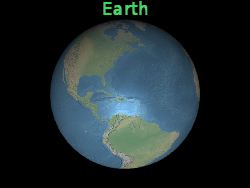
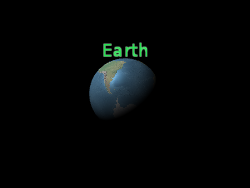
获取并设置在眼睛坐标中应用于此标签的 3D 笛卡尔偏移。眼坐标是左手坐标系,其中 Gets and sets the 3D Cartesian offset applied to this label in eye coordinates. Eye coordinates is a left-handed coordinate system, where
眼睛偏移通常用于将多个标签或对象排列在同一位置,例如,将标签排列在其相应的 3D 模型上方。 An eye offset is commonly used to arrange multiple label or objects at the same position, e.g., to arrange a label above its corresponding 3D model.
下面,标签位于地球中心,但眼睛偏移使其始终显示在地球顶部,无论观看者或地球的方向如何。 Below, the label is positioned at the center of the Earth but an eye offset makes it always appear on top of the Earth regardless of the viewer's or Earth's orientation.
x 指向观看者的右侧, points towards the viewer's right, y 点向上,并且 points up, and
z 点到屏幕上。眼睛坐标使用与世界坐标和模型坐标相同的比例,通常为米。 points into the screen. Eye coordinates use the same scale as world and model coordinates, which is typically meters.
眼睛偏移通常用于将多个标签或对象排列在同一位置,例如,将标签排列在其相应的 3D 模型上方。 An eye offset is commonly used to arrange multiple label or objects at the same position, e.g., to arrange a label above its corresponding 3D model.
下面,标签位于地球中心,但眼睛偏移使其始终显示在地球顶部,无论观看者或地球的方向如何。 Below, the label is positioned at the center of the Earth but an eye offset makes it always appear on top of the Earth regardless of the viewer's or Earth's orientation.
 |
 |
l.eyeOffset = new Cartesian3(0.0, 8000000.0, 0.0);-
默认值: Default Value:
Cartesian3.ZERO
fillColor : Color
获取或设置此标签的填充颜色。 Gets or sets the fill color of this label.
-
默认值: Default Value:
Color.WHITE
另见: See:
获取或设置用于绘制此标签的字体。字体使用与 CSS 'font' 属性相同的语法指定。 Gets or sets the font used to draw this label. Fonts are specified using the same syntax as the CSS 'font' property.
-
默认值: Default Value:
'30px sans-serif'
另见: See:
heightReference : HeightReference
获取或设置此广告牌的高度参考。 Gets or sets the height reference of this billboard.
-
默认值: Default Value:
HeightReference.NONE
horizontalOrigin : HorizontalOrigin
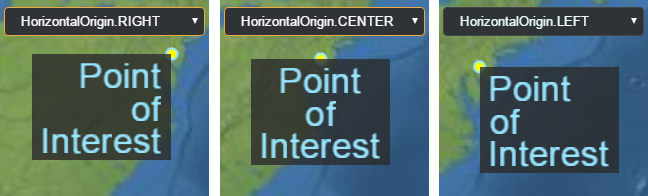
获取或设置此标签的水平原点,这确定标签是否绘制到其锚点位置的左侧、中心或右侧。 Gets or sets the horizontal origin of this label, which determines if the label is drawn to the left, center, or right of its anchor position.
-
默认值: Default Value:
HorizontalOrigin.LEFT
示例: Example:
// Use a top, right origin
l.horizontalOrigin = Cesium.HorizontalOrigin.RIGHT;
l.verticalOrigin = Cesium.VerticalOrigin.TOP;
获取或设置选取标签时返回的用户定义值。 Gets or sets the user-defined value returned when the label is picked.
outlineColor : Color
获取或设置此标签的轮廓颜色。 Gets or sets the outline color of this label.
-
默认值: Default Value:
Color.BLACK
另见: See:
获取或设置此标签的轮廓宽度。 Gets or sets the outline width of this label.
-
默认值: Default Value:
1.0
另见: See:
pixelOffset : Cartesian2
获取或设置屏幕空间中距此标签原点的像素偏移量。这通常用于在同一位置对齐多个标签和广告牌,例如图像和文本。屏幕空间原点是画布的左上角; Gets or sets the pixel offset in screen space from the origin of this label. This is commonly used to align multiple labels and billboards at the same position, e.g., an image and text. The screen space origin is the top, left corner of the canvas;
标签的来源由黄点指示。 The label's origin is indicated by the yellow point.
x 从左到右增加,并且 increases from left to right, and y 从上到下增加。 increases from top to bottom.
default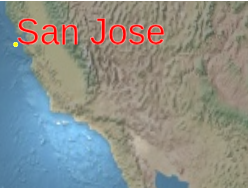 |
l.pixeloffset = new Cartesian2(25, 75);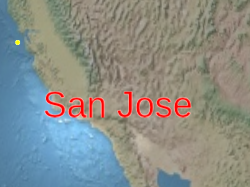 |
-
默认值: Default Value:
Cartesian2.ZERO
pixelOffsetScaleByDistance : NearFarScalar
根据 Label 与相机的距离获取或设置 Label 的近距和远距像素偏移缩放属性。标签的像素偏移将在 Gets or sets near and far pixel offset scaling properties of a Label based on the Label's distance from the camera. A label's pixel offset will be scaled between the
NearFarScalar#nearValue and
NearFarScalar#farValue 当相机距离落在指定的下限和上限内时 while the camera distance falls within the lower and upper bounds of the specified NearFarScalar#near and NearFarScalar#far。在这些范围之外,标签的像素偏移缩放仍然限制在最近的范围内。如果未定义,pixelOffsetScaleByDistance 将被禁用。 . Outside of these ranges the label's pixel offset scaling remains clamped to the nearest bound. If undefined, pixelOffsetScaleByDistance will be disabled.
示例: Examples:
// Example 1.
// Set a label's pixel offset scale to 0.0 when the
// camera is 1500 meters from the label and scale pixel offset to 10.0 pixels
// in the y direction the camera distance approaches 8.0e6 meters.
text.pixelOffset = new Cesium.Cartesian2(0.0, 1.0);
text.pixelOffsetScaleByDistance = new Cesium.NearFarScalar(1.5e2, 0.0, 8.0e6, 10.0);
// Example 2.
// disable pixel offset by distance
text.pixelOffsetScaleByDistance = undefined;position : Cartesian3
获取或设置此标签的笛卡尔位置。 Gets or sets the Cartesian position of this label.
获取或设置与标签大小(以像素为单位)相乘的统一比例。规模为 Gets or sets the uniform scale that is multiplied with the label's size in pixels. A scale of
应用较大的比例值可能会使标签像素化。要使文本更大而不像素化,请在调用时使用更大的字体大小 Applying a large scale value may pixelate the label. To make text larger without pixelation, use a larger font size when calling
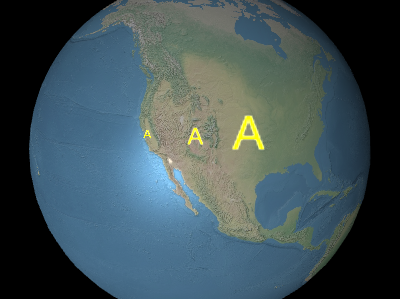
上图中从左到右,比例尺分别是 From left to right in the above image, the scales are
1.0 不改变标签的尺寸;规模大于 does not change the size of the label; a scale greater than
1.0 放大标签;正标度小于 enlarges the label; a positive scale less than 1.0 缩小标签。 shrinks the label.
应用较大的比例值可能会使标签像素化。要使文本更大而不像素化,请在调用时使用更大的字体大小 Applying a large scale value may pixelate the label. To make text larger without pixelation, use a larger font size when calling
Label#font instead.
上图中从左到右,比例尺分别是 From left to right in the above image, the scales are
0.5, 1.0, 和 , and 2.0.
-
默认值: Default Value:
1.0
scaleByDistance : NearFarScalar
根据标签与相机的距离获取或设置 Label 的近缩放属性和远缩放属性。标签的比例将在 Gets or sets near and far scaling properties of a Label based on the label's distance from the camera. A label's scale will interpolate between the
NearFarScalar#nearValue and
NearFarScalar#farValue 当相机距离落在指定的下限和上限内时 while the camera distance falls within the lower and upper bounds of the specified NearFarScalar#near and NearFarScalar#far。在这些范围之外,标签的比例仍然被限制在最近的范围内。 If undefined, scaleByDistance will be disabled. . Outside of these ranges the label's scale remains clamped to the nearest bound. If undefined, scaleByDistance will be disabled.
示例: Examples:
// Example 1.
// Set a label's scaleByDistance to scale by 1.5 when the
// camera is 1500 meters from the label and disappear as
// the camera distance approaches 8.0e6 meters.
label.scaleByDistance = new Cesium.NearFarScalar(1.5e2, 1.5, 8.0e6, 0.0);
// Example 2.
// disable scaling by distance
label.scaleByDistance = undefined;
确定是否显示此标签。使用它来隐藏或显示标签,而不是删除它并将其重新添加到集合中。 Determines if this label will be shown. Use this to hide or show a label, instead of removing it and re-adding it to the collection.
-
默认值: Default Value:
true
确定是否显示该标签后面的背景。 Determines if a background behind this label will be shown.
-
默认值: Default Value:
false
获取或设置此标签的样式。 Gets or sets the style of this label.
-
默认值: Default Value:
LabelStyle.FILL
获取或设置此标签的文本。 Gets or sets the text of this label.
获取标签的总比例,即标签的比例乘以计算出的所需字体相对于生成字形大小的相对大小。 Gets the total scale of the label, which is the label's scale multiplied by the computed relative size of the desired font compared to the generated glyph size.
-
默认值: Default Value:
1.0
translucencyByDistance : NearFarScalar
根据 Label 与相机的距离获取或设置 Label 的近和远半透明属性。标签的半透明度将在 Gets or sets near and far translucency properties of a Label based on the Label's distance from the camera. A label's translucency will interpolate between the
NearFarScalar#nearValue and
NearFarScalar#farValue 当相机距离落在指定的下限和上限内时 while the camera distance falls within the lower and upper bounds of the specified NearFarScalar#near and NearFarScalar#far。在这些范围之外,标签的半透明度仍然被限制在最近的范围内。如果未定义,translucencyByDistance 将被禁用。 . Outside of these ranges the label's translucency remains clamped to the nearest bound. If undefined, translucencyByDistance will be disabled.
示例: Examples:
// Example 1.
// Set a label's translucencyByDistance to 1.0 when the
// camera is 1500 meters from the label and disappear as
// the camera distance approaches 8.0e6 meters.
text.translucencyByDistance = new Cesium.NearFarScalar(1.5e2, 1.0, 8.0e6, 0.0);
// Example 2.
// disable translucency by distance
text.translucencyByDistance = undefined;verticalOrigin : VerticalOrigin
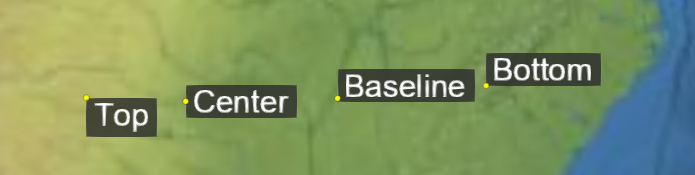
获取或设置此标签的垂直原点,它确定标签是在其锚点位置的上方、下方还是中心。 Gets or sets the vertical origin of this label, which determines if the label is to the above, below, or at the center of its anchor position.
-
默认值: Default Value:
VerticalOrigin.BASELINE
示例: Example:
// Use a top, right origin
l.horizontalOrigin = Cesium.HorizontalOrigin.RIGHT;
l.verticalOrigin = Cesium.VerticalOrigin.TOP;
方法 Methods
computeScreenSpacePosition(scene, result) → Cartesian2
考虑眼睛和像素偏移,计算标签原点的屏幕空间位置。屏幕空间原点是画布的左上角; Computes the screen-space position of the label's origin, taking into account eye and pixel offsets. The screen space origin is the top, left corner of the canvas;
x 从左到右增加,并且 increases from left to right, and y 从上到下增加。 increases from top to bottom.
| 名称 Name | 类型 Type | 说明 Description |
|---|---|---|
scene |
Scene | 标签所在的场景。 The scene the label is in. |
result |
Cartesian2 | 可选 optional 用于存储结果的对象。 The object onto which to store the result. |
返回: Returns:
标签的屏幕空间位置。 The screen-space position of the label.
示例: Example:
console.log(l.computeScreenSpacePosition(scene).toString());另见: See:
确定此标签是否等于另一个标签。如果标签的所有属性都相等,则它们是相等的。不同集合中的标签可以是相同的。 Determines if this label equals another label. Labels are equal if all their properties are equal. Labels in different collections can be equal.
| 名称 Name | 类型 Type | 说明 Description |
|---|---|---|
other |
Label | 可选 optional 用于比较是否相等的标签。 The label to compare for equality. |
返回: Returns:
true 如果标签相同;否则, if the labels are equal; otherwise, false.
如果该对象被销毁则返回 true;否则为假。 Returns true if this object was destroyed; otherwise, false.
如果该对象被破坏,则不应使用它;调用除 If this object was destroyed, it should not be used; calling any function other than
如果该对象被破坏,则不应使用它;调用除 If this object was destroyed, it should not be used; calling any function other than
isDestroyed 将导致 will result in a DeveloperError exception.
返回: Returns:
如果该对象被销毁,则为 True;否则为假。 True if this object was destroyed; otherwise, false.
类型定义 Type Definitions
Label 构造函数的初始化选项 Initialization options for the Label constructor
属性: Properties:
| 名称 Name | 类型 Type | Attributes | 默认值 Default | 说明 Description |
|---|---|---|---|---|
position |
Cartesian3 | 标签的笛卡尔位置。 The cartesian position of the label. | ||
id |
* |
<可选> <optional> |
选取标签时要返回的用户定义对象 A user-defined object to return when the label is picked with Scene#pick. |
|
show |
boolean |
<可选> <optional> |
true | 确定是否显示此标签。 Determines if this label will be shown. |
text |
string |
<可选> <optional> |
指定标签文本的字符串。 A string specifying the text of the label. | |
font |
string |
<可选> <optional> |
'30px 无衬线' '30px sans-serif' | 指定用于绘制此标签的字体的字符串。字体使用与 CSS 'font' 属性相同的语法指定。 A string specifying the font used to draw this label. Fonts are specified using the same syntax as the CSS 'font' property. |
style |
LabelStyle |
<可选> <optional> |
LabelStyle.FILL | A LabelStyle 指定标签的样式。 specifying the style of the label. |
scale |
number |
<可选> <optional> |
1.0 | 指定与标签大小相乘的统一比例的数字。 A number specifying the uniform scale that is multiplied with the label size. |
showBackground |
boolean |
<可选> <optional> |
false | 确定是否显示该标签后面的背景。 Determines if a background behind this label will be shown. |
backgroundColor |
Color |
<可选> <optional> |
新颜色(0.165, 0.165, 0.165, 0.8) new Color(0.165, 0.165, 0.165, 0.8) | A Color 指定标签的背景颜色。 specifying the background color of the label. |
backgroundPadding |
Cartesian2 |
<可选> <optional> |
新笛卡尔2(7, 5) new Cartesian2(7, 5) | A Cartesian2 指定水平和垂直背景填充(以像素为单位)。 Specifying the horizontal and vertical background padding in pixels. |
pixelOffset |
Cartesian2 |
<可选> <optional> |
Cartesian2.ZERO | A Cartesian2 指定屏幕空间中距此标签原点的像素偏移量。 specifying the pixel offset in screen space from the origin of this label. |
eyeOffset |
Cartesian3 |
<可选> <optional> |
Cartesian3.ZERO | A Cartesian3 指定在眼睛坐标中应用于此标签的 3D 笛卡尔偏移。 specifying the 3D Cartesian offset applied to this label in eye coordinates. |
horizontalOrigin |
HorizontalOrigin |
<可选> <optional> |
HorizontalOrigin.LEFT | A HorizontalOrigin 指定该标签的水平原点。 specifying the horizontal origin of this label. |
verticalOrigin |
VerticalOrigin |
<可选> <optional> |
VerticalOrigin.BASELINE | A VerticalOrigin 指定该标签的垂直原点。 specifying the vertical origin of this label. |
heightReference |
HeightReference |
<可选> <optional> |
HeightReference.NONE | A HeightReference 指定此标签的高度参考。 specifying the height reference of this label. |
fillColor |
Color |
<可选> <optional> |
Color.WHITE | A Color 指定标签的填充颜色。 specifying the fill color of the label. |
outlineColor |
Color |
<可选> <optional> |
Color.BLACK | A Color 指定标签的轮廓颜色。 specifying the outline color of the label. |
outlineWidth |
number |
<可选> <optional> |
1.0 | 指定标签轮廓宽度的数字。 A number specifying the outline width of the label. |
translucencyByDistance |
NearFarScalar |
<可选> <optional> |
A NearFarScalar 根据标签与相机的距离指定标签的近和远半透明属性。 specifying near and far translucency properties of the label based on the label's distance from the camera. |
|
pixelOffsetScaleByDistance |
NearFarScalar |
<可选> <optional> |
A NearFarScalar 根据标签与相机的距离指定标签的近和远像素偏移缩放属性。 specifying near and far pixel offset scaling properties of the label based on the label's distance from the camera. |
|
scaleByDistance |
NearFarScalar |
<可选> <optional> |
A NearFarScalar 根据标签与相机的距离指定标签的近和远缩放属性。 specifying near and far scaling properties of the label based on the label's distance from the camera. |
|
distanceDisplayCondition |
DistanceDisplayCondition |
<可选> <optional> |
A DistanceDisplayCondition 指定该标签将在距相机的距离处显示。 specifying at what distance from the camera that this label will be displayed. |
|
disableDepthTestDistance |
number |
<可选> <optional> |
距相机的距离,超过该距离,深度测试将被禁用,例如,防止地形剪切。 The distance from the camera, beyond which, depth testing is disabled—to, for example, prevent clipping against terrain. |