成员 Members
ArcGisBaseMapType 枚举默认支持的 ArcGIS 图像切片图层。 ArcGisBaseMapType enumerates the ArcGIS image tile layers that are supported by default.
属性: Properties:
| 名称 Name |
类型 Type |
说明 Description |
SATELLITE |
number
|
|
OCEANS |
number
|
|
HILLSHADE |
number
|
|
另见: See:
ArcType 定义了连接顶点的路径。 ArcType defines the path that should be taken connecting vertices.
属性: Properties:
| 名称 Name |
类型 Type |
说明 Description |
NONE |
number
|
不符合椭球面的直线。 Straight line that does not conform to the surface of the ellipsoid. |
GEODESIC |
number
|
遵循测地线路径。 Follow geodesic path. |
RHUMB |
number
|
遵循恒向或等角航线路径。 Follow rhumb or loxodrome path. |
包含图块集中可用图块的细节级别数。 The number of levels of detail containing available tiles in the tileset.
描述 x、y 和 z 轴以及辅助转换函数的枚举。 An enum describing the x, y, and z axes and helper conversion functions.
属性: Properties:
| 名称 Name |
类型 Type |
说明 Description |
X |
number
|
表示 x 轴。 Denotes the x-axis. |
Y |
number
|
表示 y 轴。 Denotes the y-axis. |
Z |
number
|
表示 z 轴。 Denotes the z-axis. |
Bing 地图提供的图像类型。 The types of imagery provided by Bing Maps.
属性: Properties:
| 名称 Name |
类型 Type |
说明 Description |
AERIAL |
string
|
航拍图像。 Aerial imagery. |
AERIAL_WITH_LABELS |
string
|
带有道路叠加层的航拍图像。 Aerial imagery with a road overlay. |
AERIAL_WITH_LABELS_ON_DEMAND |
string
|
带有道路叠加层的航拍图像。 Aerial imagery with a road overlay. |
ROAD |
string
|
没有额外图像的道路。 Roads without additional imagery. |
ROAD_ON_DEMAND |
string
|
没有额外图像的道路。 Roads without additional imagery. |
CANVAS_DARK |
string
|
路线图的深色版本。 A dark version of the road maps. |
CANVAS_LIGHT |
string
|
路线图的简化版本。 A lighter version of the road maps. |
CANVAS_GRAY |
string
|
路线图的灰度版本。 A grayscale version of the road maps. |
ORDNANCE_SURVEY |
string
|
军械测量图像。此图像仅在英国伦敦地区可见。 Ordnance Survey imagery. This imagery is visible only for the London, UK area. |
COLLINS_BART |
string
|
柯林斯巴特图像。 Collins Bart imagery. |
另见: See:
确定如何组合两个像素的值。 Determines how two pixels' values are combined.
属性: Properties:
| 名称 Name |
类型 Type |
说明 Description |
ADD |
number
|
像素值按分量相加。这用于添加剂混合以获得半透明度。 Pixel values are added componentwise. This is used in additive blending for translucency. |
SUBTRACT |
number
|
像素值按分量相减(源 - 目标)。这用于 alpha 混合以获得半透明度。 Pixel values are subtracted componentwise (source - destination). This is used in alpha blending for translucency. |
REVERSE_SUBTRACT |
number
|
像素值按分量相减(目标 - 源)。 Pixel values are subtracted componentwise (destination - source). |
MIN |
number
|
像素值被赋予最小函数(min(source,destination))。该方程对每个像素颜色分量进行运算。 Pixel values are given to the minimum function (min(source, destination)). This equation operates on each pixel color component. |
MAX |
number
|
像素值被赋予最大函数(max(源,目的地))。该方程对每个像素颜色分量进行运算。 Pixel values are given to the maximum function (max(source, destination)). This equation operates on each pixel color component. |
确定如何计算混合因子。 Determines how blending factors are computed.
属性: Properties:
| 名称 Name |
类型 Type |
说明 Description |
ZERO |
number
|
混合因子为零。 The blend factor is zero. |
ONE |
number
|
混合因子是一。 The blend factor is one. |
SOURCE_COLOR |
number
|
混合因子是源颜色。 The blend factor is the source color. |
ONE_MINUS_SOURCE_COLOR |
number
|
混合因子是一减去源颜色。 The blend factor is one minus the source color. |
DESTINATION_COLOR |
number
|
混合因子是目标颜色。 The blend factor is the destination color. |
ONE_MINUS_DESTINATION_COLOR |
number
|
混合因子是一减去目标颜色。 The blend factor is one minus the destination color. |
SOURCE_ALPHA |
number
|
混合因子是源 Alpha。 The blend factor is the source alpha. |
ONE_MINUS_SOURCE_ALPHA |
number
|
混合因子是 1 减去源 Alpha。 The blend factor is one minus the source alpha. |
DESTINATION_ALPHA |
number
|
混合因子是目标 alpha。 The blend factor is the destination alpha. |
ONE_MINUS_DESTINATION_ALPHA |
number
|
混合因子是 1 减去目标 alpha。 The blend factor is one minus the destination alpha. |
CONSTANT_COLOR |
number
|
混合因子是恒定的颜色。 The blend factor is the constant color. |
ONE_MINUS_CONSTANT_COLOR |
number
|
混合因子是一减去常量颜色。 The blend factor is one minus the constant color. |
CONSTANT_ALPHA |
number
|
混合因子是常数 alpha。 The blend factor is the constant alpha. |
ONE_MINUS_CONSTANT_ALPHA |
number
|
混合因子是一减去常数 alpha。 The blend factor is one minus the constant alpha. |
SOURCE_ALPHA_SATURATE |
number
|
混合因子是饱和源 alpha。 The blend factor is the saturated source alpha. |
确定广告牌、点和标签的不透明和半透明部分如何与场景混合。 Determines how opaque and translucent parts of billboards, points, and labels are blended with the scene.
属性: Properties:
| 名称 Name |
类型 Type |
说明 Description |
OPAQUE |
number
|
集合中的广告牌、点或标签是完全不透明的。 The billboards, points, or labels in the collection are completely opaque. |
TRANSLUCENT |
number
|
集合中的广告牌、点或标签是完全半透明的。 The billboards, points, or labels in the collection are completely translucent. |
OPAQUE_AND_TRANSLUCENT |
number
|
集合中的广告牌、点或标签都是不透明和半透明的。 The billboards, points, or labels in the collection are both opaque and translucent. |
枚举用于与相机交互的可用输入。 Enumerates the available input for interacting with the camera.
属性: Properties:
| 名称 Name |
类型 Type |
说明 Description |
LEFT_DRAG |
number
|
按下鼠标左键,然后移动鼠标并释放按钮。 A left mouse button press followed by moving the mouse and releasing the button. |
RIGHT_DRAG |
number
|
按下鼠标右键,然后移动鼠标并释放按钮。 A right mouse button press followed by moving the mouse and releasing the button. |
MIDDLE_DRAG |
number
|
按下鼠标中键,然后移动鼠标并释放按钮。 A middle mouse button press followed by moving the mouse and releasing the button. |
WHEEL |
number
|
滚动鼠标中键。 Scrolling the middle mouse button. |
PINCH |
number
|
用两根手指触摸触摸表面。 A two-finger touch on a touch surface. |
定义从 Cesium API 或声明式样式设置的每个功能颜色如何与原始功能的源颜色混合,例如glTF 材质或图块中的每点颜色。
Defines how per-feature colors set from the Cesium API or declarative styling blend with the source colors from the original feature, e.g. glTF material or per-point color in the tile.
When REPLACE or MIX 使用并且源颜色是 glTF 材质,该技术必须指定 are used and the source color is a glTF material, the technique must assign the
_3DTILESDIFFUSE 漫反射颜色参数的语义。否则仅 semantic to the diffuse color parameter. Otherwise only HIGHLIGHT 是支持的。 is supported.
无论图块集的颜色混合模式如何,颜色计算结果为白色(1.0、1.0、1.0)的要素始终在不进行颜色混合的情况下进行渲染。 A feature whose color evaluates to white (1.0, 1.0, 1.0) is always rendered without color blending, regardless of the tileset's color blend mode.
"techniques": {
  "technique0": {
    "parameters": {
      "diffuse": {
        "semantic": "_3DTILESDIFFUSE",
        "type": 35666
      }
    }
  }
}
属性: Properties:
| 名称 Name |
类型 Type |
说明 Description |
HIGHLIGHT |
number
|
将源颜色乘以特征颜色。 Multiplies the source color by the feature color. |
REPLACE |
number
|
将源颜色替换为特征颜色。 Replaces the source color with the feature color. |
MIX |
number
|
将源颜色和特征颜色混合在一起。 Blends the source color and feature color together. |
包含用于检查提供的参数是否属于指定类型或满足指定条件的函数 Contains functions for checking that supplied arguments are of a specified type or meet specified conditions
分类是否影响地形、3D Tiles或两者。 Whether a classification affects terrain, 3D Tiles or both.
属性: Properties:
| 名称 Name |
类型 Type |
说明 Description |
TERRAIN |
number
|
仅地形会被分类。 Only terrain will be classified. |
CESIUM_3D_TILE |
number
|
仅 3D Tiles 会被分类。 Only 3D Tiles will be classified. |
BOTH |
number
|
地形和 3D 图块都将被分类。 Both terrain and 3D Tiles will be classified. |
属性: Properties:
另见: See:
用于确定每次调用时前进多少时间的常量
Constants to determine how much time advances with each call to Clock#tick.
属性: Properties:
| 名称 Name |
类型 Type |
说明 Description |
TICK_DEPENDENT |
number
|
Clock#tick 将当前时间前进固定步长,即由以下参数指定的秒数 advances the current time by a fixed step, which is the number of seconds specified by Clock#multiplier. |
SYSTEM_CLOCK_MULTIPLIER |
number
|
Clock#tick 将当前时间提前自上次调用以来经过的系统时间乘以 advances the current time by the amount of system time elapsed since the previous call multiplied by Clock#multiplier. |
SYSTEM_CLOCK |
number
|
Clock#tick 将时钟设置为当前系统时间;忽略所有其他设置。 sets the clock to the current system time; ignoring all other settings. |
另见: See:
属性: Properties:
| 名称 Name |
类型 Type |
说明 Description |
CUMULUS |
number
|
积云。 Cumulus cloud. |
定义目标颜色和图元源颜色之间混合的不同模式。 HIGHLIGHT 将源颜色乘以目标颜色 REPLACE 将源颜色替换为目标颜色 MIX 将源颜色和目标颜色混合在一起 Defines different modes for blending between a target color and a primitive's source color. HIGHLIGHT multiplies the source color by the target color REPLACE replaces the source color with the target color MIX blends the source color and target color together
属性: Properties:
| 名称 Name |
类型 Type |
说明 Description |
HIGHLIGHT |
number
|
|
REPLACE |
number
|
|
MIX |
number
|
|
另见: See:
WebGL 组件数据类型。组件是内在函数,它们形成属性,属性形成顶点。 WebGL component datatypes. Components are intrinsics, which form attributes, which form vertices.
属性: Properties:
| 名称 Name |
类型 Type |
说明 Description |
BYTE |
number
|
8位有符号字节对应 8-bit signed byte corresponding to gl.BYTE 和元素的类型 and the type of an element in Int8Array. |
UNSIGNED_BYTE |
number
|
8位无符号字节对应 8-bit unsigned byte corresponding to UNSIGNED_BYTE 和元素的类型 and the type of an element in Uint8Array. |
SHORT |
number
|
16 位有符号短值对应于 16-bit signed short corresponding to SHORT 和元素的类型 and the type of an element in Int16Array. |
UNSIGNED_SHORT |
number
|
16位无符号短整型对应于 16-bit unsigned short corresponding to UNSIGNED_SHORT 和元素的类型 and the type of an element in Uint16Array. |
INT |
number
|
32位有符号整型对应 32-bit signed int corresponding to INT 和元素的类型 and the type of an element in Int32Array. |
UNSIGNED_INT |
number
|
32位无符号整型对应 32-bit unsigned int corresponding to UNSIGNED_INT 和元素的类型 and the type of an element in Uint32Array. |
FLOAT |
number
|
32位浮点数对应 32-bit floating-point corresponding to FLOAT 和元素的类型 and the type of an element in Float32Array. |
DOUBLE |
number
|
64位浮点数对应 64-bit floating-point corresponding to gl.DOUBLE (在桌面 OpenGL 中;这在 WebGL 中不受支持,在 Cesium 中通过模拟 (in Desktop OpenGL; this is not supported in WebGL, and is emulated in Cesium via GeometryPipeline.encodeAttribute) 和元素的类型 ) and the type of an element in Float64Array. |
角的样式选项。 Style options for corners.
属性: Properties:
| 名称 Name |
类型 Type |
说明 Description |
ROUNDED |
number
|
 角部具有光滑的边缘。 Corner has a smooth edge.
 |
MITERED |
number
|
 角点是相邻边的交点。 Corner point is the intersection of adjacent edges.
 |
BEVELED |
number
|
 角被剪掉了。 Corner is clipped.
 |
演示: Demo:
确定剔除哪些三角形(如果有)。 Determines which triangles, if any, are culled.
属性: Properties:
| 名称 Name |
类型 Type |
说明 Description |
FRONT |
number
|
正面三角形被剔除。 Front-facing triangles are culled. |
BACK |
number
|
背面的三角形被剔除。 Back-facing triangles are culled. |
FRONT_AND_BACK |
number
|
正面和背面的三角形都被剔除。 Both front-facing and back-facing triangles are culled. |
一个描述如何
An enum describing how the CustomShader 将被添加到片段着色器中。这决定了着色器如何与材质交互。
will be added to the fragment shader. This determines how the shader interacts with the material.
属性: Properties:
| 名称 Name |
类型 Type |
说明 Description |
MODIFY_MATERIAL |
string
|
自定义着色器将用于在应用照明之前修改材质阶段的结果。 The custom shader will be used to modify the results of the material stage before lighting is applied. |
REPLACE_MATERIAL |
string
|
将使用自定义着色器代替材质阶段。这是优化材质处理代码的提示。 The custom shader will be used instead of the material stage. This is a hint to optimize out the material processing code. |
实验性 Experimental
此功能使用的是 3D Tiles 规范的一部分,该规范不是最终版本,并且可能会在没有 Cesium 的标准弃用政策的情况下进行更改。 This feature is using part of the 3D Tiles spec that is not final and is subject to change without Cesium's standard deprecation policy.
用于控制方式的枚举
An enum for controling how CustomShader 与原始基元相比处理半透明。
handles translucency compared with the original primitive.
属性: Properties:
| 名称 Name |
类型 Type |
说明 Description |
INHERIT |
number
|
从图元材质继承半透明设置。如果图元使用半透明材质,则自定义着色器也将被视为半透明。如果图元使用不透明材质,则自定义着色器将被视为不透明。 Inherit translucency settings from the primitive's material. If the primitive used a translucent material, the custom shader will also be considered translucent. If the primitive used an opaque material, the custom shader will be considered opaque. |
OPAQUE |
number
|
强制图元将图元渲染为不透明,忽略任何材质设置。 Force the primitive to render the primitive as opaque, ignoring any material settings. |
TRANSLUCENT |
number
|
强制图元将图元渲染为半透明,忽略任何材质设置。 Force the primitive to render the primitive as translucent, ignoring any material settings. |
实验性 Experimental
此功能使用的是 3D Tiles 规范的一部分,该规范不是最终版本,并且可能会在没有 Cesium 的标准弃用政策的情况下进行更改。 This feature is using part of the 3D Tiles spec that is not final and is subject to change without Cesium's standard deprecation policy.
确定用于比较深度测试的两个深度的函数。 Determines the function used to compare two depths for the depth test.
属性: Properties:
| 名称 Name |
类型 Type |
说明 Description |
NEVER |
number
|
深度测试永远不会通过。 The depth test never passes. |
LESS |
number
|
如果传入深度小于存储深度,则深度测试通过。 The depth test passes if the incoming depth is less than the stored depth. |
EQUAL |
number
|
如果传入深度等于存储深度,则深度测试通过。 The depth test passes if the incoming depth is equal to the stored depth. |
LESS_OR_EQUAL |
number
|
如果传入深度小于或等于存储深度,则深度测试通过。 The depth test passes if the incoming depth is less than or equal to the stored depth. |
GREATER |
number
|
如果传入深度大于存储深度,则深度测试通过。 The depth test passes if the incoming depth is greater than the stored depth. |
NOT_EQUAL |
number
|
如果传入深度不等于存储深度,则深度测试通过。 The depth test passes if the incoming depth is not equal to the stored depth. |
GREATER_OR_EQUAL |
number
|
如果传入深度大于或等于存储深度,则深度测试通过。 The depth test passes if the incoming depth is greater than or equal to the stored depth. |
ALWAYS |
number
|
深度测试总会通过。 The depth test always passes. |
BoundingSphere 已计算出来。 The BoundingSphere has been computed.
可以使用来自太阳或其他随时间变化的光源的动态照明来进一步修改大气照明效果(天空大气、地面大气、雾)。该枚举决定使用哪个光源。 Atmosphere lighting effects (sky atmosphere, ground atmosphere, fog) can be further modified with dynamic lighting from the sun or other light source that changes over time. This enum determines which light source to use.
属性: Properties:
| 名称 Name |
类型 Type |
说明 Description |
NONE |
number
|
不要使用动态气氛照明。气氛照明效果将从正上方照亮,而不是使用场景的光源。 Do not use dynamic atmosphere lighting. Atmosphere lighting effects will be lit from directly above rather than using the scene's light source. |
SCENE_LIGHT |
number
|
使用场景的当前光源进行动态气氛照明。 Use the scene's current light source for dynamic atmosphere lighting. |
SUNLIGHT |
number
|
强制动态气氛照明始终使用阳光方向,即使场景使用不同的光源也是如此。 Force the dynamic atmosphere lighting to always use the sunlight direction, even if the scene uses a different light source. |
已知 EPSG 代码不包括反向轴阶数,并且在 4000-5000 范围内。 EPSG codes known to not include reverse axis orders, and are within 4000-5000.
用于确定在查询可用数据范围之外时如何推断内插值的常量。 Constants to determine how an interpolated value is extrapolated when querying outside the bounds of available data.
属性: Properties:
| 名称 Name |
类型 Type |
说明 Description |
NONE |
number
|
不会发生外推。 No extrapolation occurs. |
HOLD |
number
|
当超出样本数据范围时,使用第一个或最后一个值。 The first or last value is used when outside the range of sample data. |
EXTRAPOLATE |
number
|
该值是推断出来的。 The value is extrapolated. |
另见: See:
BoundingSphere 不存在。 The BoundingSphere does not exist.
属性: Properties:
| 名称 Name |
类型 Type |
说明 Description |
SEARCH |
number
|
在输入被视为完整的情况下执行搜索。 Perform a search where the input is considered complete. |
AUTOCOMPLETE |
number
|
使用部分输入执行自动完成,通常保留用于在用户键入时提供可能的结果。 Perform an auto-complete using partial input, typically reserved for providing possible results as a user is typing. |
另见: See:
用于高度图的编码 The encoding that is used for a heightmap
属性: Properties:
| 名称 Name |
类型 Type |
说明 Description |
NONE |
number
|
无编码 No encoding |
LERC |
number
|
LERC编码 LERC encoding |
表示相对于地形的位置。 Represents the position relative to the terrain.
属性: Properties:
| 名称 Name |
类型 Type |
说明 Description |
NONE |
number
|
地位是绝对的。 The position is absolute. |
CLAMP_TO_GROUND |
number
|
该位置被固定到地形和 3D Tiles上。当夹紧到 3D 图块集(例如照片级真实感 3D 图块)时,请确保图块集具有 The position is clamped to the terrain and 3D Tiles. When clamping to 3D Tilesets such as photorealistic 3D Tiles, ensure the tileset has Cesium3DTileset#enableCollision 设置为 set to true。否则,实体可能无法正确夹紧到图块集表面。 . Otherwise, the entity may not be correctly clamped to the tileset surface. |
RELATIVE_TO_GROUND |
number
|
位置高度是地形和 3D Tiles上方的高度。 The position height is the height above the terrain and 3D Tiles. |
CLAMP_TO_TERRAIN |
number
|
该位置被固定在地形上。 The position is clamped to terain. |
RELATIVE_TO_TERRAIN |
number
|
位置高度是高于地形的高度。 The position height is the height above terrain. |
CLAMP_TO_3D_TILE |
number
|
该位置被固定到 3D Tiles。 The position is clamped to 3D Tiles. |
RELATIVE_TO_3D_TILE |
number
|
位置高度是 3D Tiles 上方的高度。 The position height is the height above 3D Tiles. |
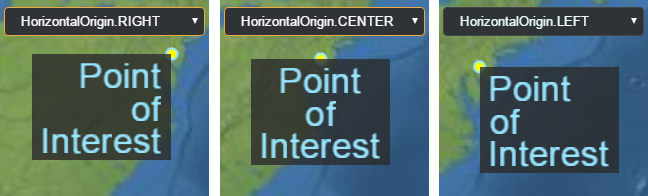
原点相对于物体的水平位置,例如,
The horizontal location of an origin relative to an object, e.g., a Billboard
or
Label。例如,将水平原点设置为
. For example, setting the horizontal origin to LEFT
or
RIGHT 将在锚点位置的左侧或右侧(在屏幕空间中)显示一个广告牌。
will display a billboard to the left or right (in screen space) of the anchor position.
属性: Properties:
| 名称 Name |
类型 Type |
说明 Description |
CENTER |
number
|
原点位于对象的水平中心。 The origin is at the horizontal center of the object. |
LEFT |
number
|
原点位于对象的左侧。 The origin is on the left side of the object. |
RIGHT |
number
|
原点位于对象的右侧。 The origin is on the right side of the object. |
另见: See:
已知 EPSG 代码包含反向轴阶数,但不在 4000-5000 范围内。 EPSG codes known to include reverse axis orders, but are not within 4000-5000.
WebGL 索引数据类型的常量。这些对应于
Constants for WebGL index datatypes. These corresponds to the
type 的参数
parameter of drawElements.
属性: Properties:
| 名称 Name |
类型 Type |
说明 Description |
UNSIGNED_BYTE |
number
|
8位无符号字节对应 8-bit unsigned byte corresponding to UNSIGNED_BYTE 和元素的类型 and the type of an element in Uint8Array. |
UNSIGNED_SHORT |
number
|
16位无符号短整型对应于 16-bit unsigned short corresponding to UNSIGNED_SHORT 和元素的类型 and the type of an element in Uint16Array. |
UNSIGNED_INT |
number
|
32位无符号整型对应 32-bit unsigned int corresponding to UNSIGNED_INT 和元素的类型 and the type of an element in Uint32Array. |
该枚举类型用于确定对象相对于截锥体的位置。对象可以完全包含在平截头体内(内部)、部分包含在平截头体内部且部分位于平截头体外部(相交),或者完全包含在平截头体的 6 个平面之外的某个位置(外部)。 This enumerated type is used in determining where, relative to the frustum, an object is located. The object can either be fully contained within the frustum (INSIDE), partially inside the frustum and partially outside (INTERSECTING), or somewhere entirely outside of the frustum's 6 planes (OUTSIDE).
属性: Properties:
| 名称 Name |
类型 Type |
说明 Description |
OUTSIDE |
number
|
表示对象不包含在截锥体内。 Represents that an object is not contained within the frustum. |
INTERSECTING |
number
|
表示对象与截锥体的一个平面相交。 Represents that an object intersects one of the frustum's planes. |
INSIDE |
number
|
表示对象完全位于截锥体内。 Represents that an object is fully within the frustum. |
可通过 Cesium ion 使用的底层地理编码服务。 Underlying geocoding services that can be used via Cesium ion.
属性: Properties:
| 名称 Name |
类型 Type |
说明 Description |
GOOGLE |
string
|
Google 地理编码器,用于 Google 数据。 Google geocoder, for use with Google data. |
BING |
string
|
Bing 地理编码器,用于 Bing 数据。 Bing geocoder, for use with Bing data. |
DEFAULT |
string
|
使用服务器上设置的默认地理编码器。当不使用 Bing 或 Google 数据时使用。 Use the default geocoder as set on the server. Used when neither Bing or Google data is used. |
提供的图像类型 The types of imagery provided by createWorldImagery.
属性: Properties:
| 名称 Name |
类型 Type |
说明 Description |
AERIAL |
number
|
航拍图像。 Aerial imagery. |
AERIAL_WITH_LABELS |
number
|
带有道路叠加层的航拍图像。 Aerial imagery with a road overlay. |
ROAD |
number
|
没有额外图像的道路。 Roads without additional imagery. |
该枚举类型用于表示键盘修饰符。除了其他事件类型之外,还需要按住这些键。 This enumerated type is for representing keyboard modifiers. These are keys that are held down in addition to other event types.
属性: Properties:
| 名称 Name |
类型 Type |
说明 Description |
SHIFT |
number
|
表示按住 Shift 键。 Represents the shift key being held down. |
CTRL |
number
|
表示按住控制键。 Represents the control key being held down. |
ALT |
number
|
表示按住 alt 键。 Represents the alt key being held down. |
描述如何绘制标签。 Describes how to draw a label.
属性: Properties:
| 名称 Name |
类型 Type |
说明 Description |
FILL |
number
|
填充标签的文本,但不要画出轮廓。 Fill the text of the label, but do not outline. |
OUTLINE |
number
|
勾勒出标签文本的轮廓,但不要填充。 Outline the text of the label, but do not fill. |
FILL_AND_OUTLINE |
number
|
填充并勾勒出标签文本的轮廓。 Fill and outline the text of the label. |
另见: See:
用于照明的照明模型
The lighting model to use for lighting a Model.
属性: Properties:
| 名称 Name |
类型 Type |
说明 Description |
UNLIT |
number
|
使用无光照着色,即跳过光照计算。计算时直接使用模型的漫反射颜色(假设是线性RGB,不是sRGB) Use unlit shading, i.e. skip lighting calculations. The model's diffuse color (assumed to be linear RGB, not sRGB) is used directly when computing out_FragColor。仍然应用 Alpha 模式。 . The alpha mode is still applied. |
PBR |
number
|
使用基于物理的渲染照明计算。这包括 PBR 金属粗糙度和 PBR 镜面光泽度。如果可能的话,也会应用基于图像的照明。 Use physically-based rendering lighting calculations. This includes both PBR metallic roughness and PBR specular glossiness. Image-based lighting is also applied when possible. |
实验性 Experimental
此功能使用的是 3D Tiles 规范的一部分,该规范不是最终版本,并且可能会在没有 Cesium 的标准弃用政策的情况下进行更改。 This feature is using part of the 3D Tiles spec that is not final and is subject to change without Cesium's standard deprecation policy.
描述地图如何在 2D 中运行。 Describes how the map will operate in 2D.
属性: Properties:
| 名称 Name |
类型 Type |
说明 Description |
ROTATE |
number
|
2D 地图可以绕 z 轴旋转。 The 2D map can be rotated about the z axis. |
INFINITE_SCROLL |
number
|
2D地图可以在水平方向无限滚动。 The 2D map can be scrolled infinitely in the horizontal direction. |
该体素内容的元数据。元数据是一组类型化数组,每个字段一个。一个字段的数据是一个扁平 3D 数组,按 X、Y、Z 排序。 The metadata for this voxel content. The metadata is an array of typed arrays, one for each field. The data for one field is a flattened 3D array ordered by X, then Y, then Z.
元数据组件类型的枚举。 An enum of metadata component types.
属性: Properties:
| 名称 Name |
类型 Type |
说明 Description |
INT8 |
string
|
8 位有符号整数 An 8-bit signed integer |
UINT8 |
string
|
8 位无符号整数 An 8-bit unsigned integer |
INT16 |
string
|
16 位有符号整数 A 16-bit signed integer |
UINT16 |
string
|
16 位无符号整数 A 16-bit unsigned integer |
INT32 |
string
|
32 位有符号整数 A 32-bit signed integer |
UINT32 |
string
|
32 位无符号整数 A 32-bit unsigned integer |
INT64 |
string
|
64 位有符号整数。 A 64-bit signed integer. |
UINT64 |
string
|
64 位有符号整数。 A 64-bit signed integer. |
FLOAT32 |
string
|
32 位(单精度)浮点数 A 32-bit (single precision) floating point number |
FLOAT64 |
string
|
64 位(双精度)浮点数 A 64-bit (double precision) floating point number |
实验性 Experimental
此功能使用的是 3D Tiles 规范的一部分,该规范不是最终版本,并且可能会在没有 Cesium 的标准弃用政策的情况下进行更改。 This feature is using part of the 3D Tiles spec that is not final and is subject to change without Cesium's standard deprecation policy.
元数据类型的枚举。这些元数据类型是包含一个或多个类型组件的容器
An enum of metadata types. These metadata types are containers containing one or more components of type MetadataComponentType
属性: Properties:
| 名称 Name |
类型 Type |
说明 Description |
SCALAR |
string
|
单个组件 A single component |
VEC2 |
string
|
具有两个分量的向量 A vector with two components |
VEC3 |
string
|
具有三个分量的向量 A vector with three components |
VEC4 |
string
|
具有四个分量的向量 A vector with four components |
MAT2 |
string
|
2x2 矩阵,以列优先格式存储。 A 2x2 matrix, stored in column-major format. |
MAT3 |
string
|
3x3 矩阵,以列优先格式存储。 A 3x3 matrix, stored in column-major format. |
MAT4 |
string
|
4x4 矩阵,以列优先格式存储。 A 4x4 matrix, stored in column-major format. |
BOOLEAN |
string
|
布尔(真/假)值 A boolean (true/false) value |
STRING |
string
|
UTF-8 编码的字符串值 A UTF-8 encoded string value |
ENUM |
string
|
一个枚举值。该类型与 An enumerated value. This type is used in conjunction with a MetadataEnum 来描述有效值。 to describe the valid values. |
实验性 Experimental
此功能使用的是 3D Tiles 规范的一部分,该规范不是最终版本,并且可能会在没有 Cesium 的标准弃用政策的情况下进行更改。 This feature is using part of the 3D Tiles spec that is not final and is subject to change without Cesium's standard deprecation policy.
确定 glTF 动画是否循环以及如何循环。 Determines if and how a glTF animation is looped.
属性: Properties:
| 名称 Name |
类型 Type |
说明 Description |
NONE |
number
|
播放一次动画;不要循环它。 Play the animation once; do not loop it. |
REPEAT |
number
|
动画停止后立即从头开始循环播放。 Loop the animation playing it from the start immediately after it stops. |
MIRRORED_REPEAT |
number
|
循环播放动画。首先,向前播放,然后向后播放,然后向前播放,依此类推。 Loop the animation. First, playing it forward, then in reverse, then forward, and so on. |
另见: See:
The
CesiumWidget#scene tileset将在其中渲染,对于指定tileset是必需的
that the tileset will be rendered in, required for tilesets that specify a heightReference 将 3D 切片矢量数据内容(例如点、线和标签)固定到地形或 3D 切片的值。
value for clamping 3D Tiles vector data content- like points, lines, and labels- to terrain or 3D tiles.
undefined
BoundingSphere 仍在计算中。 The BoundingSphere is still being computed.
像素的数据类型。 The data type of a pixel.
属性: Properties:
| 名称 Name |
类型 Type |
说明 Description |
UNSIGNED_BYTE |
number
|
|
UNSIGNED_SHORT |
number
|
|
UNSIGNED_INT |
number
|
|
FLOAT |
number
|
|
HALF_FLOAT |
number
|
|
UNSIGNED_INT_24_8 |
number
|
|
UNSIGNED_SHORT_4_4_4_4 |
number
|
|
UNSIGNED_SHORT_5_5_5_1 |
number
|
|
UNSIGNED_SHORT_5_6_5 |
number
|
|
另见: See:
像素的格式,即它具有的组件数量及其代表的内容。 The format of a pixel, i.e., the number of components it has and what they represent.
属性: Properties:
| 名称 Name |
类型 Type |
说明 Description |
DEPTH_COMPONENT |
number
|
包含深度值的像素格式。 A pixel format containing a depth value. |
DEPTH_STENCIL |
number
|
包含深度和模板值的像素格式,最常与 A pixel format containing a depth and stencil value, most often used with PixelDatatype.UNSIGNED_INT_24_8. |
ALPHA |
number
|
包含 Alpha 通道的像素格式。 A pixel format containing an alpha channel. |
RED |
number
|
包含红色通道的像素格式 A pixel format containing a red channel |
RG |
number
|
包含红色和绿色通道的像素格式。 A pixel format containing red and green channels. |
RGB |
number
|
包含红色、绿色和蓝色通道的像素格式。 A pixel format containing red, green, and blue channels. |
RGBA |
number
|
包含红色、绿色、蓝色和 Alpha 通道的像素格式。 A pixel format containing red, green, blue, and alpha channels. |
RED_INTEGER |
number
|
包含红色通道作为整数的像素格式。 A pixel format containing a red channel as an integer. |
RG_INTEGER |
number
|
包含红色和绿色通道作为整数的像素格式。 A pixel format containing red and green channels as integers. |
RGB_INTEGER |
number
|
包含红色、绿色和蓝色通道作为整数的像素格式。 A pixel format containing red, green, and blue channels as integers. |
RGBA_INTEGER |
number
|
包含红色、绿色、蓝色和 Alpha 通道作为整数的像素格式。 A pixel format containing red, green, blue, and alpha channels as integers. |
LUMINANCE |
number
|
包含亮度(强度)通道的像素格式。 A pixel format containing a luminance (intensity) channel. |
LUMINANCE_ALPHA |
number
|
包含亮度(强度)和 Alpha 通道的像素格式。 A pixel format containing luminance (intensity) and alpha channels. |
RGB_DXT1 |
number
|
包含红色、绿色和蓝色通道的像素格式,经过 DXT1 压缩。 A pixel format containing red, green, and blue channels that is DXT1 compressed. |
RGBA_DXT1 |
number
|
包含红色、绿色、蓝色和 Alpha 通道的像素格式,经过 DXT1 压缩。 A pixel format containing red, green, blue, and alpha channels that is DXT1 compressed. |
RGBA_DXT3 |
number
|
包含红色、绿色、蓝色和 Alpha 通道的像素格式,采用 DXT3 压缩。 A pixel format containing red, green, blue, and alpha channels that is DXT3 compressed. |
RGBA_DXT5 |
number
|
包含红色、绿色、蓝色和 Alpha 通道的像素格式,经过 DXT5 压缩。 A pixel format containing red, green, blue, and alpha channels that is DXT5 compressed. |
RGB_PVRTC_4BPPV1 |
number
|
包含红色、绿色和蓝色通道的像素格式,采用 PVR 4bpp 压缩。 A pixel format containing red, green, and blue channels that is PVR 4bpp compressed. |
RGB_PVRTC_2BPPV1 |
number
|
包含红色、绿色和蓝色通道的像素格式,采用 PVR 2bpp 压缩。 A pixel format containing red, green, and blue channels that is PVR 2bpp compressed. |
RGBA_PVRTC_4BPPV1 |
number
|
包含红色、绿色、蓝色和 Alpha 通道的像素格式,采用 PVR 4bpp 压缩。 A pixel format containing red, green, blue, and alpha channels that is PVR 4bpp compressed. |
RGBA_PVRTC_2BPPV1 |
number
|
包含红色、绿色、蓝色和 Alpha 通道的像素格式,采用 PVR 2bpp 压缩。 A pixel format containing red, green, blue, and alpha channels that is PVR 2bpp compressed. |
RGBA_ASTC |
number
|
包含红色、绿色、蓝色和 Alpha 通道的像素格式,经过 ASTC 压缩。 A pixel format containing red, green, blue, and alpha channels that is ASTC compressed. |
RGB_ETC1 |
number
|
包含红色、绿色和蓝色通道的像素格式,经过 ETC1 压缩。 A pixel format containing red, green, and blue channels that is ETC1 compressed. |
RGB8_ETC2 |
number
|
包含红色、绿色和蓝色通道的像素格式,经过 ETC2 压缩。 A pixel format containing red, green, and blue channels that is ETC2 compressed. |
RGBA8_ETC2_EAC |
number
|
包含红、绿、蓝和 Alpha 通道的像素格式,经过 ETC2 压缩。 A pixel format containing red, green, blue, and alpha channels that is ETC2 compressed. |
RGBA_BC7 |
number
|
包含红色、绿色、蓝色和 Alpha 通道的像素格式,经过 BC7 压缩。 A pixel format containing red, green, blue, and alpha channels that is BC7 compressed. |
属性: Properties:
| 名称 Name |
类型 Type |
说明 Description |
NEAREST |
number
|
通过返回最接近的纹素对纹理进行采样。 Samples the texture by returning the closest texel. |
LINEAR |
number
|
通过四个最近的纹素的双线性插值对纹理进行采样。 Samples the texture through bi-linear interpolation of the four nearest texels. |
几何基元的类型,即点、线和三角形。 The type of a geometric primitive, i.e., points, lines, and triangles.
属性: Properties:
| 名称 Name |
类型 Type |
说明 Description |
POINTS |
number
|
点基元,其中每个顶点(或索引)都是一个单独的点。 Points primitive where each vertex (or index) is a separate point. |
LINES |
number
|
线基元,其中每两个顶点(或索引)都是一条线段。线段不一定相连。 Lines primitive where each two vertices (or indices) is a line segment. Line segments are not necessarily connected. |
LINE_LOOP |
number
|
线循环基元,其中第一个顶点之后的每个顶点(或索引)将一条线连接到前一个顶点,最后一个顶点隐式连接到第一个顶点。 Line loop primitive where each vertex (or index) after the first connects a line to the previous vertex, and the last vertex implicitly connects to the first. |
LINE_STRIP |
number
|
线带基元,其中第一个顶点之后的每个顶点(或索引)都将一条线连接到前一个顶点。 Line strip primitive where each vertex (or index) after the first connects a line to the previous vertex. |
TRIANGLES |
number
|
三角形基元,其中每三个顶点(或索引)都是一个三角形。三角形不一定共享边。 Triangles primitive where each three vertices (or indices) is a triangle. Triangles do not necessarily share edges. |
TRIANGLE_STRIP |
number
|
三角形带基元,其中前两个顶点之后的每个顶点(或索引)连接到前两个顶点,形成三角形。例如,这可以用于对墙进行建模。 Triangle strip primitive where each vertex (or index) after the first two connect to the previous two vertices forming a triangle. For example, this can be used to model a wall. |
TRIANGLE_FAN |
number
|
三角形扇基元,其中前两个顶点(或索引)之后的每个顶点(或索引)连接到前一个顶点和第一个顶点,形成三角形。例如,这可用于对圆锥体或圆进行建模。 Triangle fan primitive where each vertex (or index) after the first two connect to the previous vertex and the first vertex forming a triangle. For example, this can be used to model a cone or circle. |
用于识别众所周知的参考系的常量。 Constants for identifying well-known reference frames.
属性: Properties:
| 名称 Name |
类型 Type |
说明 Description |
FIXED |
number
|
固定框架。 The fixed frame. |
INERTIAL |
number
|
惯性系。 The inertial frame. |
请求的状态。 State of the request.
属性: Properties:
| 名称 Name |
类型 Type |
说明 Description |
UNISSUED |
number
|
初始未发行状态。 Initial unissued state. |
ISSUED |
number
|
已发布但尚未激活。当空位可用时将变为活动状态。 Issued but not yet active. Will become active when open slots are available. |
ACTIVE |
number
|
实际的http请求已经发送。 Actual http request has been sent. |
RECEIVED |
number
|
请求成功完成。 Request completed successfully. |
CANCELLED |
number
|
由于优先级较低,请求被显式或自动取消。 Request was cancelled, either explicitly or automatically because of low priority. |
FAILED |
number
|
请求失败。 Request failed. |
标识请求类型的枚举。用于更细粒度的日志记录和优先级排序。 An enum identifying the type of request. Used for finer grained logging and priority sorting.
属性: Properties:
| 名称 Name |
类型 Type |
说明 Description |
TERRAIN |
number
|
地形请求。 Terrain request. |
IMAGERY |
number
|
图片请求。 Imagery request. |
TILES3D |
number
|
3D Tiles请求。 3D Tiles request. |
OTHER |
number
|
其他要求。 Other request. |
指示场景是在 3D、2D 还是 2.5D 哥伦布视图中查看。 Indicates if the scene is viewed in 3D, 2D, or 2.5D Columbus view.
属性: Properties:
| 名称 Name |
类型 Type |
说明 Description |
MORPHING |
number
|
在模式之间变换,例如 3D 到 2D。 Morphing between mode, e.g., 3D to 2D. |
COLUMBUS_VIEW |
number
|
哥伦布视图模式。 2.5D 透视图,其中地图平铺,并在其上方绘制非零高度的对象。 Columbus View mode. A 2.5D perspective view where the map is laid out flat and objects with non-zero height are drawn above it. |
SCENE2D |
number
|
2D 模式。该地图是通过正交投影自上而下查看的。 2D mode. The map is viewed top-down with an orthographic projection. |
SCENE3D |
number
|
3D 模式。传统的地球 3D 透视图。 3D mode. A traditional 3D perspective view of the globe. |
另见: See:
该枚举类型用于对鼠标事件进行分类:向下、向上、单击、双击、移动以及按住按钮时移动。 This enumerated type is for classifying mouse events: down, up, click, double click, move and move while a button is held down.
属性: Properties:
| 名称 Name |
类型 Type |
说明 Description |
LEFT_DOWN |
number
|
表示鼠标左键按下事件。 Represents a mouse left button down event. |
LEFT_UP |
number
|
代表鼠标左键按下事件。 Represents a mouse left button up event. |
LEFT_CLICK |
number
|
代表鼠标左键单击事件。 Represents a mouse left click event. |
LEFT_DOUBLE_CLICK |
number
|
代表鼠标左键双击事件。 Represents a mouse left double click event. |
RIGHT_DOWN |
number
|
表示鼠标左键按下事件。 Represents a mouse left button down event. |
RIGHT_UP |
number
|
代表鼠标右键按下事件。 Represents a mouse right button up event. |
RIGHT_CLICK |
number
|
代表鼠标右键单击事件。 Represents a mouse right click event. |
MIDDLE_DOWN |
number
|
表示鼠标中键按下事件。 Represents a mouse middle button down event. |
MIDDLE_UP |
number
|
代表鼠标中键弹起事件。 Represents a mouse middle button up event. |
MIDDLE_CLICK |
number
|
代表鼠标中键单击事件。 Represents a mouse middle click event. |
MOUSE_MOVE |
number
|
代表鼠标移动事件。 Represents a mouse move event. |
WHEEL |
number
|
代表鼠标滚轮事件。 Represents a mouse wheel event. |
PINCH_START |
number
|
表示触摸表面上两指事件的开始。 Represents the start of a two-finger event on a touch surface. |
PINCH_END |
number
|
表示触摸表面上的两指事件的结束。 Represents the end of a two-finger event on a touch surface. |
PINCH_MOVE |
number
|
表示触摸表面上两指事件的变化。 Represents a change of a two-finger event on a touch surface. |
用于指示要显示传感器体积的哪一部分的常量。 Constants used to indicated what part of the sensor volume to display.
属性: Properties:
| 名称 Name |
类型 Type |
说明 Description |
COMPLETE |
number
|
0x0000。显示完整的传感器体积。 0x0000. Display the complete sensor volume. |
BELOW_ELLIPSOID_HORIZON |
number
|
0x0001。显示位于椭球体真实地平线以下的传感器体积部分。 0x0001. Display the portion of the sensor volume that lies below the true horizon of the ellipsoid. |
ABOVE_ELLIPSOID_HORIZON |
number
|
0x0002。显示位于椭球真实地平线上方的传感器体积部分。 0x0002. Display the portion of the sensor volume that lies above the true horizon of the ellipsoid. |
指定启用阴影时对象是否投射或接收来自光源的阴影。 Specifies whether the object casts or receives shadows from light sources when shadows are enabled.
属性: Properties:
| 名称 Name |
类型 Type |
说明 Description |
DISABLED |
number
|
该对象不投射或接收阴影。 The object does not cast or receive shadows. |
ENABLED |
number
|
对象投射并接收阴影。 The object casts and receives shadows. |
CAST_ONLY |
number
|
该对象仅投射阴影。 The object casts shadows only. |
RECEIVE_ONLY |
number
|
该对象仅接收阴影。 The object receives shadows only. |
确定是否显示天空盒。 Determines if the sky box will be shown.
true
显示图元或 ImageryLayer 相对于
The direction to display a primitive or ImageryLayer relative to the Scene#splitPosition.
属性: Properties:
| 名称 Name |
类型 Type |
说明 Description |
LEFT |
number
|
将图元或 ImageryLayer 显示在左侧 Display the primitive or ImageryLayer to the left of the Scene#splitPosition. |
NONE |
number
|
始终显示图元或 ImageryLayer。 Always display the primitive or ImageryLayer. |
RIGHT |
number
|
在右侧显示图元或 ImageryLayer Display the primitive or ImageryLayer to the right of the Scene#splitPosition. |
另见: See:
确定用于比较模板测试的模板值的函数。 Determines the function used to compare stencil values for the stencil test.
属性: Properties:
| 名称 Name |
类型 Type |
说明 Description |
NEVER |
number
|
模板测试永远不会通过。 The stencil test never passes. |
LESS |
number
|
当屏蔽参考值小于屏蔽模板值时,模板测试通过。 The stencil test passes when the masked reference value is less than the masked stencil value. |
EQUAL |
number
|
当屏蔽参考值等于屏蔽模板值时,模板测试通过。 The stencil test passes when the masked reference value is equal to the masked stencil value. |
LESS_OR_EQUAL |
number
|
当屏蔽参考值小于或等于屏蔽模板值时,模板测试通过。 The stencil test passes when the masked reference value is less than or equal to the masked stencil value. |
GREATER |
number
|
当屏蔽参考值大于屏蔽模板值时,模板测试通过。 The stencil test passes when the masked reference value is greater than the masked stencil value. |
NOT_EQUAL |
number
|
当屏蔽参考值不等于屏蔽模板值时,模板测试通过。 The stencil test passes when the masked reference value is not equal to the masked stencil value. |
GREATER_OR_EQUAL |
number
|
当屏蔽参考值大于或等于屏蔽模板值时,模板测试通过。 The stencil test passes when the masked reference value is greater than or equal to the masked stencil value. |
ALWAYS |
number
|
模板测试总是通过。 The stencil test always passes. |
根据模板测试的结果确定采取的操作。 Determines the action taken based on the result of the stencil test.
属性: Properties:
| 名称 Name |
类型 Type |
说明 Description |
ZERO |
number
|
将模板缓冲区值设置为零。 Sets the stencil buffer value to zero. |
KEEP |
number
|
不更改模板缓冲区。 Does not change the stencil buffer. |
REPLACE |
number
|
将模板缓冲区值替换为参考值。 Replaces the stencil buffer value with the reference value. |
INCREMENT |
number
|
增加模板缓冲区值,限制为无符号字节。 Increments the stencil buffer value, clamping to unsigned byte. |
DECREMENT |
number
|
减少模板缓冲区值,钳位为零。 Decrements the stencil buffer value, clamping to zero. |
INVERT |
number
|
按位反转现有模板缓冲区值。 Bitwise inverts the existing stencil buffer value. |
INCREMENT_WRAP |
number
|
增加模板缓冲区值,当超出无符号字节范围时回绕到零。 Increments the stencil buffer value, wrapping to zero when exceeding the unsigned byte range. |
DECREMENT_WRAP |
number
|
递减模板缓冲区值,换行至最大无符号字节而不是低于零。 Decrements the stencil buffer value, wrapping to the maximum unsigned byte instead of going below zero. |
协方差信息的存储类型的枚举。这反映了“gltfGpmLocal.storageType”的定义
An enum of storage types for covariance information. This reflects the `gltfGpmLocal.storageType` definition of the
NGA_gpm_local .glTF 扩展名
glTF extension.
属性: Properties:
| 名称 Name |
类型 Type |
说明 Description |
Direct |
string
|
存储锚点的完整误差协方差,以包括互协方差项 Store the full error covariance of the anchor points, to include the cross-covariance terms |
Indirect |
string
|
为每个锚点存储完整的协方差矩阵。然而,在这种情况下,不直接存储互协方差项,而是可以通过存储在元数据中的一组空间相关函数参数来计算。 A full covariance matrix is stored for each of the anchor points. However, in this case the cross-covariance terms are not directly stored, but can be computed by a set of spatial correlation function parameters which are stored in the metadata. |
实验性 Experimental
此功能不是最终版本,可能会在没有 Cesium 标准弃用政策的情况下进行更改。 This feature is not final and is subject to change without Cesium's standard deprecation policy.
属性: Properties:
| 名称 Name |
类型 Type |
说明 Description |
HORIZONTAL |
number
|
水平方向。 Horizontal orientation. |
VERTICAL |
number
|
垂直方向。 Vertical orientation. |
对分配的 SVG 大小(以像素为单位)的任意限制。光栅图像使用图像分辨率。 Arbitrary limit on allocated SVG size, in pixels. Raster images use image resolution.
枚举放大 WebGL 纹理时使用的所有可能的过滤器。 Enumerates all possible filters used when magnifying WebGL textures.
属性: Properties:
| 名称 Name |
类型 Type |
说明 Description |
NEAREST |
number
|
通过返回最接近的像素对纹理进行采样。 Samples the texture by returning the closest pixel. |
LINEAR |
number
|
通过四个最近像素的双线性插值对纹理进行采样。这会产生比以下更平滑的结果 Samples the texture through bi-linear interpolation of the four nearest pixels. This produces smoother results than NEAREST filtering. |
另见: See:
枚举缩小 WebGL 纹理时使用的所有可能的过滤器。 Enumerates all possible filters used when minifying WebGL textures.
属性: Properties:
| 名称 Name |
类型 Type |
说明 Description |
NEAREST |
number
|
通过返回最接近的像素对纹理进行采样。 Samples the texture by returning the closest pixel. |
LINEAR |
number
|
通过四个最近像素的双线性插值对纹理进行采样。这会产生比以下更平滑的结果 Samples the texture through bi-linear interpolation of the four nearest pixels. This produces smoother results than NEAREST filtering. |
NEAREST_MIPMAP_NEAREST |
number
|
选择最近的 mip 级别并在该级别内应用最近的采样。 Selects the nearest mip level and applies nearest sampling within that level.
要求纹理具有 mipmap。 mip 级别是根据纹理的视角和屏幕空间大小来选择的。 Requires that the texture has a mipmap. The mip level is chosen by the view angle and screen-space size of the texture.
|
LINEAR_MIPMAP_NEAREST |
number
|
选择最近的 mip 级别并在该级别内应用线性采样。 Selects the nearest mip level and applies linear sampling within that level.
要求纹理具有 mipmap。 mip 级别是根据纹理的视角和屏幕空间大小来选择的。 Requires that the texture has a mipmap. The mip level is chosen by the view angle and screen-space size of the texture.
|
NEAREST_MIPMAP_LINEAR |
number
|
从两个相邻的 mip 级别读取具有最近采样的纹理值,并对结果进行线性插值。 Read texture values with nearest sampling from two adjacent mip levels and linearly interpolate the results.
从 mipmap 纹理采样时,此选项提供了视觉质量和速度的良好平衡。 This option provides a good balance of visual quality and speed when sampling from a mipmapped texture.
要求纹理具有 mipmap。 mip 级别是根据纹理的视角和屏幕空间大小来选择的。 Requires that the texture has a mipmap. The mip level is chosen by the view angle and screen-space size of the texture.
|
LINEAR_MIPMAP_LINEAR |
number
|
使用线性采样从两个相邻的 mip 级别读取纹理值并对结果进行线性插值。 Read texture values with linear sampling from two adjacent mip levels and linearly interpolate the results.
从 mipmap 纹理采样时,此选项提供了视觉质量和速度的良好平衡。 This option provides a good balance of visual quality and speed when sampling from a mipmapped texture.
要求纹理具有 mipmap。 mip 级别是根据纹理的视角和屏幕空间大小来选择的。 Requires that the texture has a mipmap. The mip level is chosen by the view angle and screen-space size of the texture.
|
另见: See:
Creates a spatial hash key for the given longitude, latitude, and tile level.
The precision is adjusted based on the tile level and extent to achieve finer precision at higher levels.
This function calculates the spatial hash key by first determining the precision at the given tile for the current maximum screenspace error (MAX_ERROR_PX),
and then rounding the longitude and latitude to that precision for consistency.
The steps for computing the level precision are as follows:
1. Compute the resolution (meters per pixel) at the given level:
level_resolution_m = (2 * PI * RADIUS) / (2^level * TILE_SIZE)
2. Compute the target precision in meters:
level_precision_m = level_resolution_m * MAX_ERROR_PX
3. Compute the target precision to radians:
level_precision_rad = level_precision_m / BODY_RADIUS
This simplifies to:
level_precision_rad = (2 * PI * MAX_ERROR_PX) / (2^level * TILE_SIZE)
which can also be written as:
level_precision_rad = (PI * MAX_ERROR_PX) / (2^(level-1) * TILE_SIZE)
The computed level_precision_rad is then used to round the input longitude and latitude,
ensuring that positions that fall within the same spatial bin produce the same hash key.
The constants below are computed once since they are fixed for the given configuration.
提供 JulianDate 可以作为输入的时间标准类型。 Provides the type of time standards which JulianDate can take as input.
属性: Properties:
| 名称 Name |
类型 Type |
说明 Description |
UTC |
number
|
表示协调世界时 (UTC) 时间标准。根据关系,UTC 与 TAI 相关 Represents the coordinated Universal Time (UTC) time standard. UTC is related to TAI according to the relationship
UTC = TAI - deltaT where deltaT 是 TAI 中当时引入的闰秒数。 is the number of leap seconds which have been introduced as of the time in TAI. |
TAI |
number
|
代表国际原子时 (TAI) 时间标准。 TAI 是与其他时间标准相关的主要时间标准。 Represents the International Atomic Time (TAI) time standard. TAI is the principal time standard to which the other time standards are related. |
另见: See:
高动态范围渲染时的色调映射算法。 A tonemapping algorithm when rendering with high dynamic range.
属性: Properties:
| 名称 Name |
类型 Type |
说明 Description |
REINHARD |
string
|
使用莱因哈德色调映射。 Use the Reinhard tonemapping. |
MODIFIED_REINHARD |
string
|
使用修改后的 Reinhard 色调映射。 Use the modified Reinhard tonemapping. |
FILMIC |
string
|
使用电影色调映射。 Use the Filmic tonemapping. |
ACES |
string
|
使用 ACES 色调映射。 Use the ACES tonemapping. |
PBR_NEUTRAL |
string
|
使用 PBR 中性色调映射 Use the PBR Neutral tonemapping from Khronos. |
用于识别众所周知的跟踪参考系的常量。 Constants for identifying well-known tracking reference frames.
属性: Properties:
| 名称 Name |
类型 Type |
说明 Description |
AUTODETECT |
number
|
自动检测算法。用于跟踪实体的参考系将根据其轨迹自动选择:近地表缓慢移动的物体将在实体的本地东北向上参考系中进行跟踪,而卫星等较快的物体将使用 VVLH(车辆速度,局部水平)。 Auto-detect algorithm. The reference frame used to track the Entity will be automatically selected based on its trajectory: near-surface slow moving objects will be tracked in the entity's local east-north-up reference frame, while faster objects like satellites will use VVLH (Vehicle Velocity, Local Horizontal). |
ENU |
number
|
实体的本地东北向上参考系。 The entity's local East-North-Up reference frame. |
INERTIAL |
number
|
实体的惯性参考系。如果实体没有定义的方向属性,它将回退到自动检测算法。 The entity's inertial reference frame. If entity has no defined orientation property, it falls back to auto-detect algorithm. |
VELOCITY |
number
|
实体的惯性参考系,其方向固定在其上 The entity's inertial reference frame with orientation fixed to its
VelocityOrientationProperty,忽略了自身的方向。 , ignoring its own orientation. |
基本 GLSL 统一类型的枚举。这些可以与
An enum of the basic GLSL uniform types. These can be used with
CustomShader 声明用户定义的制服。
to declare user-defined uniforms.
属性: Properties:
| 名称 Name |
类型 Type |
说明 Description |
FLOAT |
string
|
单个浮点值。 A single floating point value. |
VEC2 |
string
|
2 个浮点值的向量。 A vector of 2 floating point values. |
VEC3 |
string
|
3 个浮点值的向量。 A vector of 3 floating point values. |
VEC4 |
string
|
4 个浮点值的向量。 A vector of 4 floating point values. |
INT |
string
|
单个整数值 A single integer value |
INT_VEC2 |
string
|
由 2 个整数值组成的向量。 A vector of 2 integer values. |
INT_VEC3 |
string
|
由 3 个整数值组成的向量。 A vector of 3 integer values. |
INT_VEC4 |
string
|
由 4 个整数值组成的向量。 A vector of 4 integer values. |
BOOL |
string
|
单个布尔值。 A single boolean value. |
BOOL_VEC2 |
string
|
2 个布尔值的向量。 A vector of 2 boolean values. |
BOOL_VEC3 |
string
|
3 个布尔值的向量。 A vector of 3 boolean values. |
BOOL_VEC4 |
string
|
4 个布尔值的向量。 A vector of 4 boolean values. |
MAT2 |
string
|
浮点值的 2x2 矩阵。 A 2x2 matrix of floating point values. |
MAT3 |
string
|
浮点值的 3x3 矩阵。 A 3x3 matrix of floating point values. |
MAT4 |
string
|
浮点值的 4x4 矩阵。 A 4x4 matrix of floating point values. |
SAMPLER_2D |
string
|
2D 采样纹理。 A 2D sampled texture. |
SAMPLER_CUBE |
string
|
|
实验性 Experimental
此功能使用的是 3D Tiles 规范的一部分,该规范不是最终版本,并且可能会在没有 Cesium 的标准弃用政策的情况下进行更改。 This feature is using part of the 3D Tiles spec that is not final and is subject to change without Cesium's standard deprecation policy.
GLSL 变化类型的枚举。这些可用于声明变化
An enum for the GLSL varying types. These can be used for declaring varyings in CustomShader
属性: Properties:
| 名称 Name |
类型 Type |
说明 Description |
FLOAT |
string
|
单个浮点值。 A single floating point value. |
VEC2 |
string
|
2 个浮点值的向量。 A vector of 2 floating point values. |
VEC3 |
string
|
3 个浮点值的向量。 A vector of 3 floating point values. |
VEC4 |
string
|
4 个浮点值的向量。 A vector of 4 floating point values. |
MAT2 |
string
|
浮点值的 2x2 矩阵。 A 2x2 matrix of floating point values. |
MAT3 |
string
|
浮点值的 3x3 矩阵。 A 3x3 matrix of floating point values. |
MAT4 |
string
|
浮点值的 4x4 矩阵。 A 4x4 matrix of floating point values. |
实验性 Experimental
此功能使用的是 3D Tiles 规范的一部分,该规范不是最终版本,并且可能会在没有 Cesium 的标准弃用政策的情况下进行更改。 This feature is using part of the 3D Tiles spec that is not final and is subject to change without Cesium's standard deprecation policy.
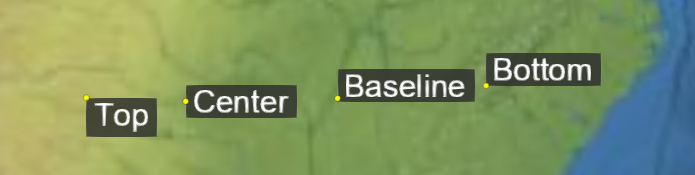
原点相对于物体的垂直位置,例如,
The vertical location of an origin relative to an object, e.g., a Billboard
or
Label。例如,将垂直原点设置为
. For example, setting the vertical origin to TOP
or
BOTTOM 将在锚点位置上方或下方(在屏幕空间中)显示一个广告牌。
will display a billboard above or below (in screen space) the anchor position.
属性: Properties:
| 名称 Name |
类型 Type |
说明 Description |
CENTER |
number
|
原点位于之间的垂直中心 The origin is at the vertical center between BASELINE and TOP. |
BOTTOM |
number
|
原点位于对象的底部。 The origin is at the bottom of the object. |
BASELINE |
number
|
如果对象包含文本,则原点位于文本的基线,否则原点位于对象的底部。 If the object contains text, the origin is at the baseline of the text, else the origin is at the bottom of the object. |
TOP |
number
|
原点位于对象的顶部。 The origin is at the top of the object. |
另见: See:
此枚举类型用于确定对象(被遮挡者)在水平剔除期间可见的程度。遮挡物可以完全遮挡被遮挡物,在这种情况下它没有可见性,也可以部分遮挡被遮挡物的视野,或者根本不遮挡被遮挡物,从而导致完全可见。 This enumerated type is used in determining to what extent an object, the occludee, is visible during horizon culling. An occluder may fully block an occludee, in which case it has no visibility, may partially block an occludee from view, or may not block it at all, leading to full visibility.
属性: Properties:
| 名称 Name |
类型 Type |
说明 Description |
NONE |
number
|
表示对象的任何部分都不可见。 Represents that no part of an object is visible. |
PARTIAL |
number
|
表示对象的一部分(但不是全部)可见 Represents that part, but not all, of an object is visible |
FULL |
number
|
表示对象整体可见。 Represents that an object is visible in its entirety. |
体素形状的枚举。形状控制体素网格如何映射到 3D 空间。 An enum of voxel shapes. The shape controls how the voxel grid is mapped to 3D space.
属性: Properties:
| 名称 Name |
类型 Type |
说明 Description |
BOX |
string
|
呈盒子形状。 A box shape. |
ELLIPSOID |
string
|
呈椭球体形状。 An ellipsoid shape. |
CYLINDER |
string
|
呈圆筒状。 A cylinder shape. |
实验性 Experimental
此功能不是最终版本,可能会在没有 Cesium 标准弃用政策的情况下进行更改。 This feature is not final and is subject to change without Cesium's standard deprecation policy.
按名称包含 WebGL 常量值的枚举。在没有活动的 WebGL 上下文的情况下使用,或者在某些常量无法使用 WebGL 上下文的情况下使用(例如,在
Enum containing WebGL Constant values by name. for use without an active WebGL context, or in cases where certain constants are unavailable using the WebGL context (For example, in Safari 9)。这些与来自的常量匹配
). These match the constants from the WebGL 1.0
and
WebGL 2.0
specifications.
属性: Properties:
| 名称 Name |
类型 Type |
说明 Description |
DEPTH_BUFFER_BIT |
number
|
|
STENCIL_BUFFER_BIT |
number
|
|
COLOR_BUFFER_BIT |
number
|
|
POINTS |
number
|
|
LINES |
number
|
|
LINE_LOOP |
number
|
|
LINE_STRIP |
number
|
|
TRIANGLES |
number
|
|
TRIANGLE_STRIP |
number
|
|
TRIANGLE_FAN |
number
|
|
ZERO |
number
|
|
ONE |
number
|
|
SRC_COLOR |
number
|
|
ONE_MINUS_SRC_COLOR |
number
|
|
SRC_ALPHA |
number
|
|
ONE_MINUS_SRC_ALPHA |
number
|
|
DST_ALPHA |
number
|
|
ONE_MINUS_DST_ALPHA |
number
|
|
DST_COLOR |
number
|
|
ONE_MINUS_DST_COLOR |
number
|
|
SRC_ALPHA_SATURATE |
number
|
|
FUNC_ADD |
number
|
|
BLEND_EQUATION |
number
|
|
BLEND_EQUATION_RGB |
number
|
|
BLEND_EQUATION_ALPHA |
number
|
|
FUNC_SUBTRACT |
number
|
|
FUNC_REVERSE_SUBTRACT |
number
|
|
BLEND_DST_RGB |
number
|
|
BLEND_SRC_RGB |
number
|
|
BLEND_DST_ALPHA |
number
|
|
BLEND_SRC_ALPHA |
number
|
|
CONSTANT_COLOR |
number
|
|
ONE_MINUS_CONSTANT_COLOR |
number
|
|
CONSTANT_ALPHA |
number
|
|
ONE_MINUS_CONSTANT_ALPHA |
number
|
|
BLEND_COLOR |
number
|
|
ARRAY_BUFFER |
number
|
|
ELEMENT_ARRAY_BUFFER |
number
|
|
ARRAY_BUFFER_BINDING |
number
|
|
ELEMENT_ARRAY_BUFFER_BINDING |
number
|
|
STREAM_DRAW |
number
|
|
STATIC_DRAW |
number
|
|
DYNAMIC_DRAW |
number
|
|
BUFFER_SIZE |
number
|
|
BUFFER_USAGE |
number
|
|
CURRENT_VERTEX_ATTRIB |
number
|
|
FRONT |
number
|
|
BACK |
number
|
|
FRONT_AND_BACK |
number
|
|
CULL_FACE |
number
|
|
BLEND |
number
|
|
DITHER |
number
|
|
STENCIL_TEST |
number
|
|
DEPTH_TEST |
number
|
|
SCISSOR_TEST |
number
|
|
POLYGON_OFFSET_FILL |
number
|
|
SAMPLE_ALPHA_TO_COVERAGE |
number
|
|
SAMPLE_COVERAGE |
number
|
|
NO_ERROR |
number
|
|
INVALID_ENUM |
number
|
|
INVALID_VALUE |
number
|
|
INVALID_OPERATION |
number
|
|
OUT_OF_MEMORY |
number
|
|
CW |
number
|
|
CCW |
number
|
|
LINE_WIDTH |
number
|
|
ALIASED_POINT_SIZE_RANGE |
number
|
|
ALIASED_LINE_WIDTH_RANGE |
number
|
|
CULL_FACE_MODE |
number
|
|
FRONT_FACE |
number
|
|
DEPTH_RANGE |
number
|
|
DEPTH_WRITEMASK |
number
|
|
DEPTH_CLEAR_VALUE |
number
|
|
DEPTH_FUNC |
number
|
|
STENCIL_CLEAR_VALUE |
number
|
|
STENCIL_FUNC |
number
|
|
STENCIL_FAIL |
number
|
|
STENCIL_PASS_DEPTH_FAIL |
number
|
|
STENCIL_PASS_DEPTH_PASS |
number
|
|
STENCIL_REF |
number
|
|
STENCIL_VALUE_MASK |
number
|
|
STENCIL_WRITEMASK |
number
|
|
STENCIL_BACK_FUNC |
number
|
|
STENCIL_BACK_FAIL |
number
|
|
STENCIL_BACK_PASS_DEPTH_FAIL |
number
|
|
STENCIL_BACK_PASS_DEPTH_PASS |
number
|
|
STENCIL_BACK_REF |
number
|
|
STENCIL_BACK_VALUE_MASK |
number
|
|
STENCIL_BACK_WRITEMASK |
number
|
|
VIEWPORT |
number
|
|
SCISSOR_BOX |
number
|
|
COLOR_CLEAR_VALUE |
number
|
|
COLOR_WRITEMASK |
number
|
|
UNPACK_ALIGNMENT |
number
|
|
PACK_ALIGNMENT |
number
|
|
MAX_TEXTURE_SIZE |
number
|
|
MAX_VIEWPORT_DIMS |
number
|
|
SUBPIXEL_BITS |
number
|
|
RED_BITS |
number
|
|
GREEN_BITS |
number
|
|
BLUE_BITS |
number
|
|
ALPHA_BITS |
number
|
|
DEPTH_BITS |
number
|
|
STENCIL_BITS |
number
|
|
POLYGON_OFFSET_UNITS |
number
|
|
POLYGON_OFFSET_FACTOR |
number
|
|
TEXTURE_BINDING_2D |
number
|
|
SAMPLE_BUFFERS |
number
|
|
SAMPLES |
number
|
|
SAMPLE_COVERAGE_VALUE |
number
|
|
SAMPLE_COVERAGE_INVERT |
number
|
|
COMPRESSED_TEXTURE_FORMATS |
number
|
|
DONT_CARE |
number
|
|
FASTEST |
number
|
|
NICEST |
number
|
|
GENERATE_MIPMAP_HINT |
number
|
|
BYTE |
number
|
|
UNSIGNED_BYTE |
number
|
|
SHORT |
number
|
|
UNSIGNED_SHORT |
number
|
|
INT |
number
|
|
UNSIGNED_INT |
number
|
|
FLOAT |
number
|
|
DEPTH_COMPONENT |
number
|
|
ALPHA |
number
|
|
RGB |
number
|
|
RGBA |
number
|
|
LUMINANCE |
number
|
|
LUMINANCE_ALPHA |
number
|
|
UNSIGNED_SHORT_4_4_4_4 |
number
|
|
UNSIGNED_SHORT_5_5_5_1 |
number
|
|
UNSIGNED_SHORT_5_6_5 |
number
|
|
FRAGMENT_SHADER |
number
|
|
VERTEX_SHADER |
number
|
|
MAX_VERTEX_ATTRIBS |
number
|
|
MAX_VERTEX_UNIFORM_VECTORS |
number
|
|
MAX_VARYING_VECTORS |
number
|
|
MAX_COMBINED_TEXTURE_IMAGE_UNITS |
number
|
|
MAX_VERTEX_TEXTURE_IMAGE_UNITS |
number
|
|
MAX_TEXTURE_IMAGE_UNITS |
number
|
|
MAX_FRAGMENT_UNIFORM_VECTORS |
number
|
|
SHADER_TYPE |
number
|
|
DELETE_STATUS |
number
|
|
LINK_STATUS |
number
|
|
VALIDATE_STATUS |
number
|
|
ATTACHED_SHADERS |
number
|
|
ACTIVE_UNIFORMS |
number
|
|
ACTIVE_ATTRIBUTES |
number
|
|
SHADING_LANGUAGE_VERSION |
number
|
|
CURRENT_PROGRAM |
number
|
|
NEVER |
number
|
|
LESS |
number
|
|
EQUAL |
number
|
|
LEQUAL |
number
|
|
GREATER |
number
|
|
NOTEQUAL |
number
|
|
GEQUAL |
number
|
|
ALWAYS |
number
|
|
KEEP |
number
|
|
REPLACE |
number
|
|
INCR |
number
|
|
DECR |
number
|
|
INVERT |
number
|
|
INCR_WRAP |
number
|
|
DECR_WRAP |
number
|
|
VENDOR |
number
|
|
RENDERER |
number
|
|
VERSION |
number
|
|
NEAREST |
number
|
|
LINEAR |
number
|
|
NEAREST_MIPMAP_NEAREST |
number
|
|
LINEAR_MIPMAP_NEAREST |
number
|
|
NEAREST_MIPMAP_LINEAR |
number
|
|
LINEAR_MIPMAP_LINEAR |
number
|
|
TEXTURE_MAG_FILTER |
number
|
|
TEXTURE_MIN_FILTER |
number
|
|
TEXTURE_WRAP_S |
number
|
|
TEXTURE_WRAP_T |
number
|
|
TEXTURE_2D |
number
|
|
TEXTURE |
number
|
|
TEXTURE_CUBE_MAP |
number
|
|
TEXTURE_BINDING_CUBE_MAP |
number
|
|
TEXTURE_CUBE_MAP_POSITIVE_X |
number
|
|
TEXTURE_CUBE_MAP_NEGATIVE_X |
number
|
|
TEXTURE_CUBE_MAP_POSITIVE_Y |
number
|
|
TEXTURE_CUBE_MAP_NEGATIVE_Y |
number
|
|
TEXTURE_CUBE_MAP_POSITIVE_Z |
number
|
|
TEXTURE_CUBE_MAP_NEGATIVE_Z |
number
|
|
MAX_CUBE_MAP_TEXTURE_SIZE |
number
|
|
TEXTURE0 |
number
|
|
TEXTURE1 |
number
|
|
TEXTURE2 |
number
|
|
TEXTURE3 |
number
|
|
TEXTURE4 |
number
|
|
TEXTURE5 |
number
|
|
TEXTURE6 |
number
|
|
TEXTURE7 |
number
|
|
TEXTURE8 |
number
|
|
TEXTURE9 |
number
|
|
TEXTURE10 |
number
|
|
TEXTURE11 |
number
|
|
TEXTURE12 |
number
|
|
TEXTURE13 |
number
|
|
TEXTURE14 |
number
|
|
TEXTURE15 |
number
|
|
TEXTURE16 |
number
|
|
TEXTURE17 |
number
|
|
TEXTURE18 |
number
|
|
TEXTURE19 |
number
|
|
TEXTURE20 |
number
|
|
TEXTURE21 |
number
|
|
TEXTURE22 |
number
|
|
TEXTURE23 |
number
|
|
TEXTURE24 |
number
|
|
TEXTURE25 |
number
|
|
TEXTURE26 |
number
|
|
TEXTURE27 |
number
|
|
TEXTURE28 |
number
|
|
TEXTURE29 |
number
|
|
TEXTURE30 |
number
|
|
TEXTURE31 |
number
|
|
ACTIVE_TEXTURE |
number
|
|
REPEAT |
number
|
|
CLAMP_TO_EDGE |
number
|
|
MIRRORED_REPEAT |
number
|
|
FLOAT_VEC2 |
number
|
|
FLOAT_VEC3 |
number
|
|
FLOAT_VEC4 |
number
|
|
INT_VEC2 |
number
|
|
INT_VEC3 |
number
|
|
INT_VEC4 |
number
|
|
BOOL |
number
|
|
BOOL_VEC2 |
number
|
|
BOOL_VEC3 |
number
|
|
BOOL_VEC4 |
number
|
|
FLOAT_MAT2 |
number
|
|
FLOAT_MAT3 |
number
|
|
FLOAT_MAT4 |
number
|
|
SAMPLER_2D |
number
|
|
SAMPLER_CUBE |
number
|
|
VERTEX_ATTRIB_ARRAY_ENABLED |
number
|
|
VERTEX_ATTRIB_ARRAY_SIZE |
number
|
|
VERTEX_ATTRIB_ARRAY_STRIDE |
number
|
|
VERTEX_ATTRIB_ARRAY_TYPE |
number
|
|
VERTEX_ATTRIB_ARRAY_NORMALIZED |
number
|
|
VERTEX_ATTRIB_ARRAY_POINTER |
number
|
|
VERTEX_ATTRIB_ARRAY_BUFFER_BINDING |
number
|
|
IMPLEMENTATION_COLOR_READ_TYPE |
number
|
|
IMPLEMENTATION_COLOR_READ_FORMAT |
number
|
|
COMPILE_STATUS |
number
|
|
LOW_FLOAT |
number
|
|
MEDIUM_FLOAT |
number
|
|
HIGH_FLOAT |
number
|
|
LOW_INT |
number
|
|
MEDIUM_INT |
number
|
|
HIGH_INT |
number
|
|
FRAMEBUFFER |
number
|
|
RENDERBUFFER |
number
|
|
RGBA4 |
number
|
|
RGB5_A1 |
number
|
|
RGB565 |
number
|
|
DEPTH_COMPONENT16 |
number
|
|
STENCIL_INDEX |
number
|
|
STENCIL_INDEX8 |
number
|
|
DEPTH_STENCIL |
number
|
|
RENDERBUFFER_WIDTH |
number
|
|
RENDERBUFFER_HEIGHT |
number
|
|
RENDERBUFFER_INTERNAL_FORMAT |
number
|
|
RENDERBUFFER_RED_SIZE |
number
|
|
RENDERBUFFER_GREEN_SIZE |
number
|
|
RENDERBUFFER_BLUE_SIZE |
number
|
|
RENDERBUFFER_ALPHA_SIZE |
number
|
|
RENDERBUFFER_DEPTH_SIZE |
number
|
|
RENDERBUFFER_STENCIL_SIZE |
number
|
|
FRAMEBUFFER_ATTACHMENT_OBJECT_TYPE |
number
|
|
FRAMEBUFFER_ATTACHMENT_OBJECT_NAME |
number
|
|
FRAMEBUFFER_ATTACHMENT_TEXTURE_LEVEL |
number
|
|
FRAMEBUFFER_ATTACHMENT_TEXTURE_CUBE_MAP_FACE |
number
|
|
COLOR_ATTACHMENT0 |
number
|
|
DEPTH_ATTACHMENT |
number
|
|
STENCIL_ATTACHMENT |
number
|
|
DEPTH_STENCIL_ATTACHMENT |
number
|
|
NONE |
number
|
|
FRAMEBUFFER_COMPLETE |
number
|
|
FRAMEBUFFER_INCOMPLETE_ATTACHMENT |
number
|
|
FRAMEBUFFER_INCOMPLETE_MISSING_ATTACHMENT |
number
|
|
FRAMEBUFFER_INCOMPLETE_DIMENSIONS |
number
|
|
FRAMEBUFFER_UNSUPPORTED |
number
|
|
FRAMEBUFFER_BINDING |
number
|
|
RENDERBUFFER_BINDING |
number
|
|
MAX_RENDERBUFFER_SIZE |
number
|
|
INVALID_FRAMEBUFFER_OPERATION |
number
|
|
UNPACK_FLIP_Y_WEBGL |
number
|
|
UNPACK_PREMULTIPLY_ALPHA_WEBGL |
number
|
|
CONTEXT_LOST_WEBGL |
number
|
|
UNPACK_COLORSPACE_CONVERSION_WEBGL |
number
|
|
BROWSER_DEFAULT_WEBGL |
number
|
|
COMPRESSED_RGB_S3TC_DXT1_EXT |
number
|
|
COMPRESSED_RGBA_S3TC_DXT1_EXT |
number
|
|
COMPRESSED_RGBA_S3TC_DXT3_EXT |
number
|
|
COMPRESSED_RGBA_S3TC_DXT5_EXT |
number
|
|
COMPRESSED_RGB_PVRTC_4BPPV1_IMG |
number
|
|
COMPRESSED_RGB_PVRTC_2BPPV1_IMG |
number
|
|
COMPRESSED_RGBA_PVRTC_4BPPV1_IMG |
number
|
|
COMPRESSED_RGBA_PVRTC_2BPPV1_IMG |
number
|
|
COMPRESSED_RGBA_ASTC_4x4_WEBGL |
number
|
|
COMPRESSED_RGB_ETC1_WEBGL |
number
|
|
COMPRESSED_RGBA_BPTC_UNORM |
number
|
|
HALF_FLOAT_OES |
number
|
|
DOUBLE |
number
|
|
READ_BUFFER |
number
|
|
UNPACK_ROW_LENGTH |
number
|
|
UNPACK_SKIP_ROWS |
number
|
|
UNPACK_SKIP_PIXELS |
number
|
|
PACK_ROW_LENGTH |
number
|
|
PACK_SKIP_ROWS |
number
|
|
PACK_SKIP_PIXELS |
number
|
|
COLOR |
number
|
|
DEPTH |
number
|
|
STENCIL |
number
|
|
RED |
number
|
|
RGB8 |
number
|
|
RGBA8 |
number
|
|
RGB10_A2 |
number
|
|
TEXTURE_BINDING_3D |
number
|
|
UNPACK_SKIP_IMAGES |
number
|
|
UNPACK_IMAGE_HEIGHT |
number
|
|
TEXTURE_3D |
number
|
|
TEXTURE_WRAP_R |
number
|
|
MAX_3D_TEXTURE_SIZE |
number
|
|
UNSIGNED_INT_2_10_10_10_REV |
number
|
|
MAX_ELEMENTS_VERTICES |
number
|
|
MAX_ELEMENTS_INDICES |
number
|
|
TEXTURE_MIN_LOD |
number
|
|
TEXTURE_MAX_LOD |
number
|
|
TEXTURE_BASE_LEVEL |
number
|
|
TEXTURE_MAX_LEVEL |
number
|
|
MIN |
number
|
|
MAX |
number
|
|
DEPTH_COMPONENT24 |
number
|
|
MAX_TEXTURE_LOD_BIAS |
number
|
|
TEXTURE_COMPARE_MODE |
number
|
|
TEXTURE_COMPARE_FUNC |
number
|
|
CURRENT_QUERY |
number
|
|
QUERY_RESULT |
number
|
|
QUERY_RESULT_AVAILABLE |
number
|
|
STREAM_READ |
number
|
|
STREAM_COPY |
number
|
|
STATIC_READ |
number
|
|
STATIC_COPY |
number
|
|
DYNAMIC_READ |
number
|
|
DYNAMIC_COPY |
number
|
|
MAX_DRAW_BUFFERS |
number
|
|
DRAW_BUFFER0 |
number
|
|
DRAW_BUFFER1 |
number
|
|
DRAW_BUFFER2 |
number
|
|
DRAW_BUFFER3 |
number
|
|
DRAW_BUFFER4 |
number
|
|
DRAW_BUFFER5 |
number
|
|
DRAW_BUFFER6 |
number
|
|
DRAW_BUFFER7 |
number
|
|
DRAW_BUFFER8 |
number
|
|
DRAW_BUFFER9 |
number
|
|
DRAW_BUFFER10 |
number
|
|
DRAW_BUFFER11 |
number
|
|
DRAW_BUFFER12 |
number
|
|
DRAW_BUFFER13 |
number
|
|
DRAW_BUFFER14 |
number
|
|
DRAW_BUFFER15 |
number
|
|
MAX_FRAGMENT_UNIFORM_COMPONENTS |
number
|
|
MAX_VERTEX_UNIFORM_COMPONENTS |
number
|
|
SAMPLER_3D |
number
|
|
SAMPLER_2D_SHADOW |
number
|
|
FRAGMENT_SHADER_DERIVATIVE_HINT |
number
|
|
PIXEL_PACK_BUFFER |
number
|
|
PIXEL_UNPACK_BUFFER |
number
|
|
PIXEL_PACK_BUFFER_BINDING |
number
|
|
PIXEL_UNPACK_BUFFER_BINDING |
number
|
|
FLOAT_MAT2x3 |
number
|
|
FLOAT_MAT2x4 |
number
|
|
FLOAT_MAT3x2 |
number
|
|
FLOAT_MAT3x4 |
number
|
|
FLOAT_MAT4x2 |
number
|
|
FLOAT_MAT4x3 |
number
|
|
SRGB |
number
|
|
SRGB8 |
number
|
|
SRGB8_ALPHA8 |
number
|
|
COMPARE_REF_TO_TEXTURE |
number
|
|
RGBA32F |
number
|
|
RGB32F |
number
|
|
RGBA16F |
number
|
|
RGB16F |
number
|
|
VERTEX_ATTRIB_ARRAY_INTEGER |
number
|
|
MAX_ARRAY_TEXTURE_LAYERS |
number
|
|
MIN_PROGRAM_TEXEL_OFFSET |
number
|
|
MAX_PROGRAM_TEXEL_OFFSET |
number
|
|
MAX_VARYING_COMPONENTS |
number
|
|
TEXTURE_2D_ARRAY |
number
|
|
TEXTURE_BINDING_2D_ARRAY |
number
|
|
R11F_G11F_B10F |
number
|
|
UNSIGNED_INT_10F_11F_11F_REV |
number
|
|
RGB9_E5 |
number
|
|
UNSIGNED_INT_5_9_9_9_REV |
number
|
|
TRANSFORM_FEEDBACK_BUFFER_MODE |
number
|
|
MAX_TRANSFORM_FEEDBACK_SEPARATE_COMPONENTS |
number
|
|
TRANSFORM_FEEDBACK_VARYINGS |
number
|
|
TRANSFORM_FEEDBACK_BUFFER_START |
number
|
|
TRANSFORM_FEEDBACK_BUFFER_SIZE |
number
|
|
TRANSFORM_FEEDBACK_PRIMITIVES_WRITTEN |
number
|
|
RASTERIZER_DISCARD |
number
|
|
MAX_TRANSFORM_FEEDBACK_INTERLEAVED_COMPONENTS |
number
|
|
MAX_TRANSFORM_FEEDBACK_SEPARATE_ATTRIBS |
number
|
|
INTERLEAVED_ATTRIBS |
number
|
|
SEPARATE_ATTRIBS |
number
|
|
TRANSFORM_FEEDBACK_BUFFER |
number
|
|
TRANSFORM_FEEDBACK_BUFFER_BINDING |
number
|
|
RGBA32UI |
number
|
|
RGB32UI |
number
|
|
RGBA16UI |
number
|
|
RGB16UI |
number
|
|
RGBA8UI |
number
|
|
RGB8UI |
number
|
|
RGBA32I |
number
|
|
RGB32I |
number
|
|
RGBA16I |
number
|
|
RGB16I |
number
|
|
RGBA8I |
number
|
|
RGB8I |
number
|
|
RED_INTEGER |
number
|
|
RGB_INTEGER |
number
|
|
RGBA_INTEGER |
number
|
|
SAMPLER_2D_ARRAY |
number
|
|
SAMPLER_2D_ARRAY_SHADOW |
number
|
|
SAMPLER_CUBE_SHADOW |
number
|
|
UNSIGNED_INT_VEC2 |
number
|
|
UNSIGNED_INT_VEC3 |
number
|
|
UNSIGNED_INT_VEC4 |
number
|
|
INT_SAMPLER_2D |
number
|
|
INT_SAMPLER_3D |
number
|
|
INT_SAMPLER_CUBE |
number
|
|
INT_SAMPLER_2D_ARRAY |
number
|
|
UNSIGNED_INT_SAMPLER_2D |
number
|
|
UNSIGNED_INT_SAMPLER_3D |
number
|
|
UNSIGNED_INT_SAMPLER_CUBE |
number
|
|
UNSIGNED_INT_SAMPLER_2D_ARRAY |
number
|
|
DEPTH_COMPONENT32F |
number
|
|
DEPTH32F_STENCIL8 |
number
|
|
FLOAT_32_UNSIGNED_INT_24_8_REV |
number
|
|
FRAMEBUFFER_ATTACHMENT_COLOR_ENCODING |
number
|
|
FRAMEBUFFER_ATTACHMENT_COMPONENT_TYPE |
number
|
|
FRAMEBUFFER_ATTACHMENT_RED_SIZE |
number
|
|
FRAMEBUFFER_ATTACHMENT_GREEN_SIZE |
number
|
|
FRAMEBUFFER_ATTACHMENT_BLUE_SIZE |
number
|
|
FRAMEBUFFER_ATTACHMENT_ALPHA_SIZE |
number
|
|
FRAMEBUFFER_ATTACHMENT_DEPTH_SIZE |
number
|
|
FRAMEBUFFER_ATTACHMENT_STENCIL_SIZE |
number
|
|
FRAMEBUFFER_DEFAULT |
number
|
|
UNSIGNED_INT_24_8 |
number
|
|
DEPTH24_STENCIL8 |
number
|
|
UNSIGNED_NORMALIZED |
number
|
|
DRAW_FRAMEBUFFER_BINDING |
number
|
|
READ_FRAMEBUFFER |
number
|
|
DRAW_FRAMEBUFFER |
number
|
|
READ_FRAMEBUFFER_BINDING |
number
|
|
RENDERBUFFER_SAMPLES |
number
|
|
FRAMEBUFFER_ATTACHMENT_TEXTURE_LAYER |
number
|
|
MAX_COLOR_ATTACHMENTS |
number
|
|
COLOR_ATTACHMENT1 |
number
|
|
COLOR_ATTACHMENT2 |
number
|
|
COLOR_ATTACHMENT3 |
number
|
|
COLOR_ATTACHMENT4 |
number
|
|
COLOR_ATTACHMENT5 |
number
|
|
COLOR_ATTACHMENT6 |
number
|
|
COLOR_ATTACHMENT7 |
number
|
|
COLOR_ATTACHMENT8 |
number
|
|
COLOR_ATTACHMENT9 |
number
|
|
COLOR_ATTACHMENT10 |
number
|
|
COLOR_ATTACHMENT11 |
number
|
|
COLOR_ATTACHMENT12 |
number
|
|
COLOR_ATTACHMENT13 |
number
|
|
COLOR_ATTACHMENT14 |
number
|
|
COLOR_ATTACHMENT15 |
number
|
|
FRAMEBUFFER_INCOMPLETE_MULTISAMPLE |
number
|
|
MAX_SAMPLES |
number
|
|
HALF_FLOAT |
number
|
|
RG |
number
|
|
RG_INTEGER |
number
|
|
R8 |
number
|
|
RG8 |
number
|
|
R16F |
number
|
|
R32F |
number
|
|
RG16F |
number
|
|
RG32F |
number
|
|
R8I |
number
|
|
R8UI |
number
|
|
R16I |
number
|
|
R16UI |
number
|
|
R32I |
number
|
|
R32UI |
number
|
|
RG8I |
number
|
|
RG8UI |
number
|
|
RG16I |
number
|
|
RG16UI |
number
|
|
RG32I |
number
|
|
RG32UI |
number
|
|
VERTEX_ARRAY_BINDING |
number
|
|
R8_SNORM |
number
|
|
RG8_SNORM |
number
|
|
RGB8_SNORM |
number
|
|
RGBA8_SNORM |
number
|
|
SIGNED_NORMALIZED |
number
|
|
COPY_READ_BUFFER |
number
|
|
COPY_WRITE_BUFFER |
number
|
|
COPY_READ_BUFFER_BINDING |
number
|
|
COPY_WRITE_BUFFER_BINDING |
number
|
|
UNIFORM_BUFFER |
number
|
|
UNIFORM_BUFFER_BINDING |
number
|
|
UNIFORM_BUFFER_START |
number
|
|
UNIFORM_BUFFER_SIZE |
number
|
|
MAX_VERTEX_UNIFORM_BLOCKS |
number
|
|
MAX_FRAGMENT_UNIFORM_BLOCKS |
number
|
|
MAX_COMBINED_UNIFORM_BLOCKS |
number
|
|
MAX_UNIFORM_BUFFER_BINDINGS |
number
|
|
MAX_UNIFORM_BLOCK_SIZE |
number
|
|
MAX_COMBINED_VERTEX_UNIFORM_COMPONENTS |
number
|
|
MAX_COMBINED_FRAGMENT_UNIFORM_COMPONENTS |
number
|
|
UNIFORM_BUFFER_OFFSET_ALIGNMENT |
number
|
|
ACTIVE_UNIFORM_BLOCKS |
number
|
|
UNIFORM_TYPE |
number
|
|
UNIFORM_SIZE |
number
|
|
UNIFORM_BLOCK_INDEX |
number
|
|
UNIFORM_OFFSET |
number
|
|
UNIFORM_ARRAY_STRIDE |
number
|
|
UNIFORM_MATRIX_STRIDE |
number
|
|
UNIFORM_IS_ROW_MAJOR |
number
|
|
UNIFORM_BLOCK_BINDING |
number
|
|
UNIFORM_BLOCK_DATA_SIZE |
number
|
|
UNIFORM_BLOCK_ACTIVE_UNIFORMS |
number
|
|
UNIFORM_BLOCK_ACTIVE_UNIFORM_INDICES |
number
|
|
UNIFORM_BLOCK_REFERENCED_BY_VERTEX_SHADER |
number
|
|
UNIFORM_BLOCK_REFERENCED_BY_FRAGMENT_SHADER |
number
|
|
INVALID_INDEX |
number
|
|
MAX_VERTEX_OUTPUT_COMPONENTS |
number
|
|
MAX_FRAGMENT_INPUT_COMPONENTS |
number
|
|
MAX_SERVER_WAIT_TIMEOUT |
number
|
|
OBJECT_TYPE |
number
|
|
SYNC_CONDITION |
number
|
|
SYNC_STATUS |
number
|
|
SYNC_FLAGS |
number
|
|
SYNC_FENCE |
number
|
|
SYNC_GPU_COMMANDS_COMPLETE |
number
|
|
UNSIGNALED |
number
|
|
SIGNALED |
number
|
|
ALREADY_SIGNALED |
number
|
|
TIMEOUT_EXPIRED |
number
|
|
CONDITION_SATISFIED |
number
|
|
WAIT_FAILED |
number
|
|
SYNC_FLUSH_COMMANDS_BIT |
number
|
|
VERTEX_ATTRIB_ARRAY_DIVISOR |
number
|
|
ANY_SAMPLES_PASSED |
number
|
|
ANY_SAMPLES_PASSED_CONSERVATIVE |
number
|
|
SAMPLER_BINDING |
number
|
|
RGB10_A2UI |
number
|
|
INT_2_10_10_10_REV |
number
|
|
TRANSFORM_FEEDBACK |
number
|
|
TRANSFORM_FEEDBACK_PAUSED |
number
|
|
TRANSFORM_FEEDBACK_ACTIVE |
number
|
|
TRANSFORM_FEEDBACK_BINDING |
number
|
|
COMPRESSED_R11_EAC |
number
|
|
COMPRESSED_SIGNED_R11_EAC |
number
|
|
COMPRESSED_RG11_EAC |
number
|
|
COMPRESSED_SIGNED_RG11_EAC |
number
|
|
COMPRESSED_RGB8_ETC2 |
number
|
|
COMPRESSED_SRGB8_ETC2 |
number
|
|
COMPRESSED_RGB8_PUNCHTHROUGH_ALPHA1_ETC2 |
number
|
|
COMPRESSED_SRGB8_PUNCHTHROUGH_ALPHA1_ETC2 |
number
|
|
COMPRESSED_RGBA8_ETC2_EAC |
number
|
|
COMPRESSED_SRGB8_ALPHA8_ETC2_EAC |
number
|
|
TEXTURE_IMMUTABLE_FORMAT |
number
|
|
MAX_ELEMENT_INDEX |
number
|
|
TEXTURE_IMMUTABLE_LEVELS |
number
|
|
MAX_TEXTURE_MAX_ANISOTROPY_EXT |
number
|
|
缠绕顺序定义了被视为正面的三角形的顶点顺序。 Winding order defines the order of vertices for a triangle to be considered front-facing.
属性: Properties:
| 名称 Name |
类型 Type |
说明 Description |
CLOCKWISE |
number
|
顶点按顺时针顺序排列。 Vertices are in clockwise order. |
COUNTER_CLOCKWISE |
number
|
顶点按逆时针顺序排列。 Vertices are in counter-clockwise order. |
方法 Methods
addDrillPickedResults(pickedResults, limit, results, pickedPrimitives, pickedAttributes, pickedFeatures) → boolean
| 名称 Name |
类型 Type |
说明 Description |
pickedResults |
Array.<object>
|
pickCallback 的结果 the results from the pickCallback |
limit |
number
|
如果提供,请在收集这么多镐后停止钻孔。 If supplied, stop drilling after collecting this many picks. |
results |
Array.<object>
|
|
pickedPrimitives |
Array.<object>
|
|
pickedAttributes |
Array.<object>
|
|
pickedFeatures |
Array.<object>
|
|
返回: Returns:
拣选是否结束 whether picking should end
计算点相对于三角形的重心坐标。 Computes the barycentric coordinates for a point with respect to a triangle.
| 名称 Name |
类型 Type |
说明 Description |
point |
Cartesian2
|
Cartesian3
|
要测试的点。 The point to test. |
p0 |
Cartesian2
|
Cartesian3
|
三角形的第一个点,对应于重心 x 轴。 The first point of the triangle, corresponding to the barycentric x-axis. |
p1 |
Cartesian2
|
Cartesian3
|
三角形的第二个点,对应于重心 y 轴。 The second point of the triangle, corresponding to the barycentric y-axis. |
p2 |
Cartesian2
|
Cartesian3
|
三角形的第三个点,对应于重心 z 轴。 The third point of the triangle, corresponding to the barycentric z-axis. |
result |
Cartesian3
|
可选 optional
用于存储结果的对象。 The object onto which to store the result. |
返回: Returns:
修改后的结果参数或新的 Cartesian3 实例(如果未提供)。如果三角形是退化的,该函数将返回未定义。 The modified result parameter or a new Cartesian3 instance if one was not provided. If the triangle is degenerate the function will return undefined.
示例: Example:
// Returns Cartesian3.UNIT_X
const p = new Cesium.Cartesian3(-1.0, 0.0, 0.0);
const b = Cesium.barycentricCoordinates(p,
  new Cesium.Cartesian3(-1.0, 0.0, 0.0),
  new Cesium.Cartesian3( 1.0, 0.0, 0.0),
  new Cesium.Cartesian3( 0.0, 1.0, 1.0));
在已排序的数组中查找项目。 Finds an item in a sorted array.
| 名称 Name |
类型 Type |
说明 Description |
array |
Array
|
Int8Array
|
Uint8Array
|
Int16Array
|
Uint16Array
|
Int32Array
|
Uint32Array
|
Float32Array
|
Float64Array
|
要搜索的排序数组。 The sorted array to search. |
itemToFind |
*
|
要在数组中查找的项目。 The item to find in the array. |
comparator |
binarySearchComparator
|
用于将项目与数组中的元素进行比较的函数。 The function to use to compare the item to elements in the array. |
返回: Returns:
的索引为 The index of itemToFind 在数组中(如果存在)。如果 in the array, if it exists. If itemToFind
不存在,返回值是一个负数,它是索引的按位补码 (~),应在该索引之前插入 itemToFind 以保持数组的排序顺序。 does not exist, the return value is a negative number which is the bitwise complement (~) of the index before which the itemToFind should be inserted in order to maintain the sorted order of the array.
示例: Example:
// Create a comparator function to search through an array of numbers.
function comparator(a, b) {
    return a - b;
};
const numbers = [0, 2, 4, 6, 8];
const index = Cesium.binarySearch(numbers, 6, comparator); // 3
给定 Cesium 基本 URL 下的相对 URL,返回绝对 URL。 Given a relative URL under the Cesium base URL, returns an absolute URL.
| 名称 Name |
类型 Type |
说明 Description |
relativeUrl |
string
|
相对路径。 The relative path. |
返回: Returns:
所提供路径的绝对 URL 表示形式。 The absolutely URL representation of the provided path.
示例: Example:
const viewer = new Cesium.Viewer("cesiumContainer", {
  baseLayer: Cesium.ImageryLayer.fromProviderAsync(
    Cesium.TileMapServiceImageryProvider.fromUrl(
      Cesium.buildModuleUrl("Assets/Textures/NaturalEarthII"),
    )),
  baseLayerPicker: false,
});
克隆一个对象,返回一个包含相同属性的新对象。 Clones an object, returning a new object containing the same properties.
| 名称 Name |
类型 Type |
默认值 Default |
说明 Description |
object |
object
|
|
要克隆的对象。 The object to clone. |
deep |
boolean
|
false
|
可选 optional
如果为 true,则所有属性都将递归地深度克隆。 If true, all properties will be deep cloned recursively. |
返回: Returns:
克隆的对象。 The cloned object.
合并两个对象,将其属性复制到新的组合对象上。当两个对象具有相同的属性时,将使用第一个对象的属性值。如果任一对象未定义,它将被视为空对象。 Merges two objects, copying their properties onto a new combined object. When two objects have the same property, the value of the property on the first object is used. If either object is undefined, it will be treated as an empty object.
| 名称 Name |
类型 Type |
默认值 Default |
说明 Description |
object1 |
object
|
|
可选 optional
第一个要合并的对象。 The first object to merge. |
object2 |
object
|
|
可选 optional
要合并的第二个对象。 The second object to merge. |
deep |
boolean
|
false
|
可选 optional
执行递归合并。 Perform a recursive merge. |
返回: Returns:
包含两个对象的所有属性的组合对象。 The combined object containing all properties from both objects.
示例: Example:
const object1 = {
    propOne : 1,
    propTwo : {
        value1 : 10
    }
}
const object2 = {
    propTwo : 2
}
const final = Cesium.combine(object1, object2);

// final === {
//     propOne : 1,
//     propTwo : {
//         value1 : 10
//     }
// }
计算描述与拾取相关的绘图缓冲区部分的矩形。 Compute the rectangle that describes the part of the drawing buffer that is relevant for picking.
| 名称 Name |
类型 Type |
说明 Description |
drawingBufferHeight |
number
|
绘图缓冲区的高度 The height of the drawing buffer |
position |
Cartesian2
|
绘图缓冲区内的位置 The position inside the drawing buffer |
width |
number
|
undefined
|
矩形的宽度,假设为奇整数,默认:3.0 The width of the rectangle, assumed to be an odd integer number, default : 3.0 |
height |
number
|
undefined
|
矩形的高度。如果未指定,高度将默认为 The height of the rectangle. If unspecified, height will default to the value of width |
result |
BoundingRectangle
|
结果矩形 The result rectangle |
返回: Returns:
结果矩形 The result rectangle
计算给定时间位置属性的车辆速度、局部水平 (VVLH) 变换。 VVLH 轴根据所提供位置点的运动定义如下: - X 轴在运动方向上指向该点的速度矢量。 - Y 轴沿着角动量矢量。 - Z 轴沿着位置矢量。 Compute the vehicle velocity, local horizontal (VVLH) transform for a position property at a given time. The VVLH axes is defined based on the motion of the provided position point as follows: - The X axis is directed toward the point's velocity vector, in the direction of motion. - The Y axis is along the angular momentum vector. - The Z axis is along the position vector.
| 名称 Name |
类型 Type |
说明 Description |
time |
JulianDate
|
计算 VVLH 变换的时间。 The time at which to compute the VVLH transform. |
positionProperty |
PositionProperty
|
计算 VVLH 帧的位置。 The position to compute the VVLH frame for. |
result |
Matrix4
|
用于存储结果的对象。 The object onto which to store the result. |
返回: Returns:
VVLH 变换。 The VVLH transform.
返回给定数组的深层副本。如果输入未定义,则 Returns a deep copy of the given array. If the input is undefined, then undefined 被返回。否则,结果将是给定数组的副本,其中每个元素都通过复制 is returned. Otherwise, the result will be a copy of the given array, where each element is copied with Cartesian3.clone.
| 名称 Name |
类型 Type |
说明 Description |
input |
Array.<Cartesian3>
|
undefined
|
输入数组 The input array |
返回: Returns:
副本 The copy
在给定的树空间坐标和级别为四叉树节点创建轴对齐的边界框。这个AABB位于树的局部空间中(其中树的根节点是其自己的局部空间中的单位立方体)。 Creates an axis-aligned bounding box for a quadtree node at the given tree-space coordinates and level. This AABB is in the tree's local space (where the root node of the tree is a unit cube in its own local space).
| 名称 Name |
类型 Type |
说明 Description |
x |
number
|
节点的 x 坐标。 The x coordinate of the node. |
y |
number
|
节点的 y 坐标。 The y coordinate of the node. |
level |
number
|
节点的级别。 The level of the node. |
返回: Returns:
节点的轴对齐边界框。 The axis-aligned bounding box for the node.
从给定的 JSON 表示创建一个 `AnchorPointDirect` Creates an `AnchorPointDirect` from the given JSON representation
| 名称 Name |
类型 Type |
说明 Description |
anchorPointDirectJson |
object
|
输入 JSON The input JSON |
返回: Returns:
直接锚点 The direct anchor point
根据给定的 JSON 表示创建一个 `AnchorPointIndirect` Creates an `AnchorPointIndirect` from the given JSON representation
| 名称 Name |
类型 Type |
说明 Description |
anchorPointIndirectJson |
object
|
输入 JSON The input JSON |
返回: Returns:
间接锚点 The indirect anchor point
从给定函数创建一个命令,以便与 ViewModel 一起使用。命令是一个带有额外功能的函数 Create a Command from a given function, for use with ViewModels. A Command is a function with an extra canExecute observable 属性来判断命令是否可以执行。执行时,命令函数将检查 observable property to determine whether the command can be executed. When executed, a Command function will check the value of canExecute 如果为假则抛出。它还提供命令已执行或即将执行的事件。 and throw if false. It also provides events for when a command has been or is about to be executed.
| 名称 Name |
类型 Type |
默认值 Default |
说明 Description |
func |
function
|
|
要执行的函数。 The function to execute. |
canExecute |
boolean
|
true
|
可选 optional
一个布尔值,指示当前是否可以执行该函数。 A boolean indicating whether the function can currently be executed. |
根据给定的 JSON 表示创建一个“CorrelationGroup” Creates a `CorrelationGroup` from the given JSON representation
| 名称 Name |
类型 Type |
说明 Description |
correlationGroupJson |
object
|
输入 JSON The input JSON |
返回: Returns:
相关组 The correlation group
创建一个 Matrix3,它以列优先顺序描述包含上三角形的数组的协方差矩阵(对称)。 Creates a Matrix3 that describes a covariance matrix (which is symmetric) from the array containing the upper triangle, in column-major order.
| 名称 Name |
类型 Type |
说明 Description |
array |
Array.<number>
|
输入数组 The input array |
返回: Returns:
黑客帝国3 The Matrix3
创建一个
Creates a Material 它结合了多层颜色/渐变带并将它们映射到地形高度。着色器对所有高度进行二分搜索,以找出哪些颜色高于和低于给定高度,并在它们之间进行插值以获得最终颜色。该材料相对便宜地支持数百个条目。
that combines multiple layers of color/gradient bands and maps them to terrain heights. The shader does a binary search over all the heights to find out which colors are above and below a given height, and interpolates between them for the final color. This material supports hundreds of entries relatively cheaply.
| 名称 Name |
类型 Type |
说明 Description |
options |
object
|
具有以下属性的对象: Object with the following properties:
| 名称 Name |
类型 Type |
说明 Description |
scene |
Scene
|
可视化发生的场景。 The scene where the visualization is taking place. |
layers |
Array.<createElevationBandMaterialBand>
|
优先级从最低到最高排序的频段列表。 A list of bands ordered from lowest to highest precedence. |
|
返回: Returns:
示例: Example:
scene.globe.material = Cesium.createElevationBandMaterial({
    scene : scene,
    layers : [{
        entries : [{
            height : 4200.0,
            color : new Cesium.Color(0.0, 0.0, 0.0, 1.0)
        }, {
            height : 8848.0,
            color : new Cesium.Color(1.0, 1.0, 1.0, 1.0)
        }],
        extendDownwards : true,
        extendUpwards : true,
    }, {
        entries : [{
            height : 7000.0,
            color : new Cesium.Color(1.0, 0.0, 0.0, 0.5)
        }, {
            height : 7100.0,
            color : new Cesium.Color(1.0, 0.0, 0.0, 0.5)
        }]
    }]
});
演示: Demo:
创建一个
Creates a Cesium3DTileset Google Photorealistic 3D Tiles 瓷砖集的实例。 Google Photorealistic 3D Tiles 只能与 Google 地理编码器一起使用。要确认您了解此限制,请将 `usingOnlyWithGoogleGeocoder: true` 传递给 apiOptions。否则,调用此函数时将显示一次性警告。
instance for the Google Photorealistic 3D Tiles tileset. Google Photorealistic 3D Tiles can only be used with the Google geocoder. To confirm that you are aware of this restriction pass `usingOnlyWithGoogleGeocoder: true` to the apiOptions. Otherwise a one time warning will be displayed when this function is called.
| 名称 Name |
类型 Type |
说明 Description |
apiOptions |
object
|
可选 optional
| 名称 Name |
类型 Type |
默认值 Default |
说明 Description |
key |
string
|
GoogleMaps.defaultApiKey
|
可选 optional
用于访问 Google Photorealistic 3D Tiles 的 API 密钥。参见 Your API key to access Google Photorealistic 3D Tiles. See https://developers.google.com/maps/documentation/javascript/get-api-key 有关如何创建您自己的密钥的说明。 for instructions on how to create your own key. |
onlyUsingWithGoogleGeocoder |
true
|
|
可选 optional
确认此图块集仅与 Google 地理编码器一起使用。 Confirmation that this tileset will only be used with the Google geocoder. |
|
tilesetOptions |
Cesium3DTileset.ConstructorOptions
|
可选 optional
描述初始化选项的对象。 An object describing initialization options. |
返回: Returns:
示例: Examples:
const viewer = new Cesium.Viewer("cesiumContainer", {
  geocoder: Cesium.IonGeocodeProviderType.GOOGLE
});

try {
  const tileset = await Cesium.createGooglePhotorealistic3DTileset({
     onlyUsingWithGoogleGeocoder: true,
  });
  viewer.scene.primitives.add(tileset));
} catch (error) {
  console.log(`Error creating tileset: ${error}`);
}
// Use your own Google Maps API key
Cesium.GoogleMaps.defaultApiKey = "your-api-key";

const viewer = new Cesium.Viewer("cesiumContainer". {
  geocoder: Cesium.IonGeocodeProviderType.GOOGLE
});

try {
  const tileset = await Cesium.createGooglePhotorealistic3DTileset({
     onlyUsingWithGoogleGeocoder: true,
  });
  viewer.scene.primitives.add(tileset));
} catch (error) {
  console.log(`Error creating tileset: ${error}`);
}
另见: See:
创建全局唯一标识符 (GUID) 字符串。 GUID的长度为128位,可以保证跨空间和时间的唯一性。 Creates a Globally unique identifier (GUID) string. A GUID is 128 bits long, and can guarantee uniqueness across space and time.
返回: Returns:
示例: Example:
this.guid = Cesium.createGuid();
另见: See:
| 名称 Name |
类型 Type |
说明 Description |
options |
object
|
可选 optional
施工选项。任何允许的选项 Construction options. Any options allowed by the Cesium3DTileset 可以在此处指定构造函数。除此之外,还支持以下属性: constructor may be specified here. In addition to those, the following properties are supported:
| 名称 Name |
类型 Type |
默认值 Default |
说明 Description |
defaultColor |
Color
|
Color.WHITE
|
可选 optional
用于没有颜色的建筑物的默认颜色。如果出现以下情况,则忽略此参数 The default color to use for buildings that do not have a color. This parameter is ignored if options.style 已指定。 is specified. |
style |
Cesium3DTileStyle
|
|
可选 optional
与图块集一起使用的样式。如果未指定,则使用默认样式,为每个建筑物或建筑物部分提供从其 OpenStreetMap 推断的颜色 The style to use with the tileset. If not specified, a default style is used which gives each building or building part a color inferred from its OpenStreetMap tags。如果无法推断出颜色, . If no color can be inferred,
options.defaultColor 被使用。 is used. |
enableShowOutline |
boolean
|
true
|
可选 optional
如果为 true,则启用渲染轮廓。可以将其设置为 false 以避免在加载时对几何体进行额外的处理。 If true, enable rendering outlines. This can be set to false to avoid the additional processing of geometry at load time. |
showOutline |
boolean
|
true
|
可选 optional
是否显示建筑物周围的轮廓。如果为 true,则显示轮廓。如果为 false,则不显示轮廓。 Whether to show outlines around buildings. When true, outlines are displayed. When false, outlines are not displayed. |
|
返回: Returns:
示例: Examples:
// Create Cesium OSM Buildings with default styling
const viewer = new Cesium.Viewer("cesiumContainer");
try {
  const tileset = await Cesium.createOsmBuildingsAsync();
  viewer.scene.primitives.add(tileset));
} catch (error) {
  console.log(`Error creating tileset: ${error}`);
}
// Create Cesium OSM Buildings with a custom style highlighting
// schools and hospitals.
const viewer = new Cesium.Viewer("cesiumContainer");
try {
  const tileset = await Cesium.createOsmBuildingsAsync({
    style: new Cesium.Cesium3DTileStyle({
      color: {
        conditions: [
          ["${feature['building']} === 'hospital'", "color('#0000FF')"],
          ["${feature['building']} === 'school'", "color('#00FF00')"],
          [true, "color('#ffffff')"]
        ]
      }
    })
  });
  viewer.scene.primitives.add(tileset));
} catch (error) {
  console.log(`Error creating tileset: ${error}`);
}
另见: See:
创建一个
Creates a Primitive 可视化众所周知的向量顶点属性:
to visualize well-known vector vertex attributes:
normal,
tangent, 和
, and bitangent。正常为红色;切线为绿色;双切线是蓝色的。 If an attribute is not present, it is not drawn.
. Normal is red; tangent is green; and bitangent is blue. If an attribute is not present, it is not drawn.
| 名称 Name |
类型 Type |
说明 Description |
options |
object
|
具有以下属性的对象: Object with the following properties:
| 名称 Name |
类型 Type |
默认值 Default |
说明 Description |
geometry |
Geometry
|
|
The Geometry 具有属性的实例。 instance with the attribute. |
length |
number
|
10000.0
|
可选 optional
每条线段的长度(以米为单位)。这可以是负数,使向量指向相反的方向。 The length of each line segment in meters. This can be negative to point the vector in the opposite direction. |
modelMatrix |
Matrix4
|
Matrix4.IDENTITY
|
可选 optional
模型矩阵,用于将几何体从模型变换到世界坐标。 The model matrix that transforms to transform the geometry from model to world coordinates. |
|
返回: Returns:
一个新的 A new Primitive 具有向量几何形状的实例。 instance with geometry for the vectors.
示例: Example:
scene.primitives.add(Cesium.createTangentSpaceDebugPrimitive({
   geometry : instance.geometry,
   length : 100000.0,
   modelMatrix : instance.modelMatrix
}));
| 名称 Name |
类型 Type |
说明 Description |
options |
object
|
可选 optional
具有以下属性的对象: Object with the following properties:
| 名称 Name |
类型 Type |
默认值 Default |
说明 Description |
requestVertexNormals |
boolean
|
false
|
可选 optional
指示客户端是否应从服务器请求附加照明信息(如果可用)的标志。 Flag that indicates if the client should request additional lighting information from the server if available. |
|
返回: Returns:
解析为创建的 CesiumTerrainProvider 的承诺 A promise that resolves to the created CesiumTerrainProvider
示例: Examples:
// Create Cesium World Bathymetry with default settings
try {
  const viewer = new Cesium.Viewer("cesiumContainer", {
    terrainProvider: await Cesium.createWorldBathymetryAsync();
  });
} catch (error) {
  console.log(error);
}
// Create Cesium World Bathymetry with normals.
try {
  const viewer1 = new Cesium.Viewer("cesiumContainer", {
    terrainProvider: await Cesium.createWorldBathymetryAsync({
      requestVertexNormals: true
    });
  });
} catch (error) {
  console.log(error);
}
另见: See:
创建一个
Creates an IonImageryProvider ion 的默认全局基础图像图层(当前为 Bing 地图)的实例。
instance for ion's default global base imagery layer, currently Bing Maps.
| 名称 Name |
类型 Type |
说明 Description |
options |
object
|
可选 optional
具有以下属性的对象: Object with the following properties:
| 名称 Name |
类型 Type |
默认值 Default |
说明 Description |
style |
IonWorldImageryStyle
|
IonWorldImageryStyle
|
可选 optional
基础影像的样式,目前仅支持 AERIAL、AERIAL_WITH_LABELS 和 ROAD。 The style of base imagery, only AERIAL, AERIAL_WITH_LABELS, and ROAD are currently supported. |
|
返回: Returns:
示例: Examples:
// Create a Cesium World Imagery base layer with default settings
try {
  const imageryProvider = await Cesium.createWorldImageryAsync();
} catch (error) {
  console.log(`There was an error creating world imagery: ${error}`);
}
// Create Cesium World Imagery with different style
try {
  const imageryProvider = await Cesium.createWorldImageryAsync({
        style: Cesium.IonWorldImageryStyle.AERIAL_WITH_LABELS
  });
} catch (error) {
  console.log(`There was an error creating world imagery: ${error}`);
}
另见: See:
| 名称 Name |
类型 Type |
说明 Description |
options |
object
|
可选 optional
具有以下属性的对象: Object with the following properties:
| 名称 Name |
类型 Type |
默认值 Default |
说明 Description |
requestVertexNormals |
boolean
|
false
|
可选 optional
指示客户端是否应从服务器请求附加照明信息(如果可用)的标志。 Flag that indicates if the client should request additional lighting information from the server if available. |
requestWaterMask |
boolean
|
false
|
可选 optional
指示客户端是否应从服务器请求每个图块水掩模(如果可用)的标志。 Flag that indicates if the client should request per tile water masks from the server if available. |
|
返回: Returns:
解析为创建的 CesiumTerrainProvider 的承诺 A promise that resolves to the created CesiumTerrainProvider
示例: Examples:
// Create Cesium World Terrain with default settings
try {
  const viewer = new Cesium.Viewer("cesiumContainer", {
    terrainProvider: await Cesium.createWorldTerrainAsync();
  });
} catch (error) {
  console.log(error);
}
// Create Cesium World Terrain with water and normals.
try {
  const viewer1 = new Cesium.Viewer("cesiumContainer", {
    terrainProvider: await Cesium.createWorldTerrainAsync({
      requestWaterMask: true,
      requestVertexNormals: true
    });
  });
} catch (error) {
  console.log(error);
}
另见: See:
| 名称 Name |
类型 Type |
说明 Description |
value |
*
|
对象。 The object. |
返回: Returns:
如果定义了对象,则返回 true,否则返回 false。 Returns true if the object is defined, returns false otherwise.
示例: Example:
if (Cesium.defined(positions)) {
     doSomething();
} else {
     doSomethingElse();
}
摧毁一个物体。对象的每个函数(包括其原型中的函数)都被替换为抛出异常的函数
Destroys an object. Each of the object's functions, including functions in its prototype, is replaced with a function that throws a DeveloperError,除了对象的
, except for the object's
isDestroyed 函数,它被设置为返回的函数
function, which is set to a function that returns true。对象的属性被删除
. The object's properties are removed with delete.
该函数由持有本机资源的对象使用,例如需要显式释放的 WebGL 资源。客户端代码调用对象的
This function is used by objects that hold native resources, e.g., WebGL resources, which need to be explicitly released. Client code calls an object's destroy 函数,然后释放本机资源并调用
function, which then releases the native resource and calls destroyObject 使自己处于被摧毁的状态。
to put itself in a destroyed state.
| 名称 Name |
类型 Type |
说明 Description |
object |
object
|
要销毁的对象。 The object to destroy. |
message |
string
|
可选 optional
调用已销毁对象的函数时抛出的异常中包含的消息。 The message to include in the exception that is thrown if a destroyed object's function is called. |
示例: Example:
// How a texture would destroy itself.
this.destroy = function () {
    _gl.deleteTexture(_texture);
    return Cesium.destroyObject(this);
};
另见: See:
通过重复调用给定的“pickCallback”来钻取拾取,每次都剥离先前拾取的对象。 Drill pick by repeatedly calling a given `pickCallback`, each time stripping away the previously picked objects.
| 名称 Name |
类型 Type |
默认值 Default |
说明 Description |
pickCallback |
function
|
|
选择回调来执行每次迭代 Pick callback to execute each iteration |
limit |
number
|
Number.MAX_VALUE
|
可选 optional
如果提供,在收集这么多镐后停止钻孔 If supplied, stop drilling after collecting this many picks |
返回: Returns:
筛选结果列表 List of picked results
返回给定数组的组件是否相等。当两个数组都未定义时,则 Returns whether the given arrays are component-wise equal. When both arrays are undefined, then true 被返回。当只定义一个数组,或者两者都定义但长度不同时,则 is returned. When only one array is defined, or they are both defined but have different lengths, then false 被返回。否则,返回数组的相应元素是否相等,截至 is returned. Otherwise, returns whether the corresponding elements of the arrays are equal, as of Cartesian3.equals.
| 名称 Name |
类型 Type |
说明 Description |
a |
Array.<Cartesian3>
|
undefined
|
第一个数组 The first array |
b |
Array.<Cartesian3>
|
undefined
|
第二个数组 The second array |
返回: Returns:
数组是否相等 Whether the arrays are equal
将 EntityCollection 导出为 KML 文档。仅导出点、广告牌、模型、路径、多边形、折线几何图形。请注意,实体属性与 KML 要素属性之间不存在 1 对 1 的映射。例如,时间动态但在 KML 中不能动态的实体属性将以其在 options.time 或 EntityCollection 时间间隔开始时的值(如果未指定)导出。对于 KML 支持的时间动态属性,如果它是
Exports an EntityCollection as a KML document. Only Point, Billboard, Model, Path, Polygon, Polyline geometries will be exported. Note that there is not a 1 to 1 mapping of Entity properties to KML Feature properties. For example, entity properties that are time dynamic but cannot be dynamic in KML are exported with their values at options.time or the beginning of the EntityCollection's time interval if not specified. For time-dynamic properties that are supported in KML, we use the samples if it is a SampledProperty 否则,我们使用 options.sampleDuration 对值进行采样。具有时间动态位置的点、广告牌、模型和路径几何图形将导出为 gx:Track Features。并非所有材质都可以用 KML 表示,因此对于更高级的材质,仅使用原色。画布对象导出为 PNG 图像。
otherwise we sample the value using the options.sampleDuration. Point, Billboard, Model and Path geometries with time-dynamic positions will be exported as gx:Track Features. Not all Materials are representable in KML, so for more advanced Materials just the primary color is used. Canvas objects are exported as PNG images.
| 名称 Name |
类型 Type |
说明 Description |
options |
object
|
具有以下属性的对象: An object with the following properties:
| 名称 Name |
类型 Type |
默认值 Default |
说明 Description |
entities |
EntityCollection
|
|
要导出为 KML 的 EntityCollection。 The EntityCollection to export as KML. |
ellipsoid |
Ellipsoid
|
Ellipsoid.default
|
可选 optional
输出文件的椭球体。 The ellipsoid for the output file. |
modelCallback |
exportKmlModelCallback
|
|
可选 optional
将通过以下方式调用的回调 A callback that will be called with a ModelGraphics 实例并应返回要在 KML 中使用的 URI。如果实体集合中存在模型,则为必需。 instance and should return the URI to use in the KML. Required if a model exists in the entity collection. |
time |
JulianDate
|
entities.computeAvailability().start
|
可选 optional
用于获取 KML 中不随时间变化的属性的时间值。 The time value to use to get properties that are not time varying in KML. |
defaultAvailability |
TimeInterval
|
entities.computeAvailability()
|
可选 optional
如果实体不可用,则进行采样的时间间隔。 The interval that will be sampled if an entity doesn't have an availability. |
sampleDuration |
number
|
60
|
可选 optional
对 KML 中不同的属性进行采样的秒数。 The number of seconds to sample properties that are varying in KML. |
kmz |
boolean
|
false
|
可选 optional
如果是真KML,外部文件会被压缩成kmz文件。 If true KML and external files will be compressed into a kmz file. |
|
返回: Returns:
解析为包含 KML 字符串和外部文件 blob 字典的对象,或解析为 blob 的 kmz 文件(如果 options.kmz 为 true)的 Promise。 A promise that resolved to an object containing the KML string and a dictionary of external file blobs, or a kmz file as a blob if options.kmz is true.
示例: Example:
Cesium.exportKml({
     entities: entityCollection
 })
  .then(function(result) {
    // The XML string is in result.kml

    const externalFiles = result.externalFiles
    for(const file in externalFiles) {
      // file is the name of the file used in the KML document as the href
      // externalFiles[file] is a blob with the contents of the file
    }
  });
演示: Demo:
将错误对象格式化为字符串。如果可用,则使用名称、消息和堆栈属性,否则,则依靠 toString()。 Formats an error object into a String. If available, uses name, message, and stack properties, otherwise, falls back on toString().
| 名称 Name |
类型 Type |
说明 Description |
object |
*
|
要在数组中查找的项目。 The item to find in the array. |
返回: Returns:
包含格式错误的字符串。 A string containing the formatted error.
给定相对 Uri 和基本 Uri,返回相对 Uri 的绝对 Uri。 Given a relative Uri and a base Uri, returns the absolute Uri of the relative Uri.
| 名称 Name |
类型 Type |
说明 Description |
relative |
string
|
相对的 Uri。 The relative Uri. |
base |
string
|
可选 optional
基础 Uri。 The base Uri. |
返回: Returns:
给定相对 Uri 的绝对 Uri。 The absolute Uri of the given relative Uri.
示例: Example:
//absolute Uri will be "https://test.com/awesome.png";
const absoluteUri = Cesium.getAbsoluteUri('awesome.png', 'https://test.com');
给定 URI,返回 URI 的基本路径。 Given a URI, returns the base path of the URI.
| 名称 Name |
类型 Type |
默认值 Default |
说明 Description |
uri |
string
|
|
乌里. The Uri. |
includeQuery |
boolean
|
false
|
可选 optional
是否包含 uri 中的查询字符串和片段 Whether or not to include the query string and fragment form the uri |
返回: Returns:
Uri 的基本路径。 The base path of the Uri.
示例: Example:
// basePath will be "/Gallery/";
const basePath = Cesium.getBaseUri('/Gallery/simple.czml?value=true&example=false');

// basePath will be "/Gallery/?value=true&example=false";
const basePath = Cesium.getBaseUri('/Gallery/simple.czml?value=true&example=false', true);
给定 URI,返回 URI 的扩展名。 Given a URI, returns the extension of the URI.
| 名称 Name |
类型 Type |
说明 Description |
uri |
string
|
乌里. The Uri. |
返回: Returns:
Uri 的扩展。 The extension of the Uri.
示例: Example:
//extension will be "czml";
const extension = Cesium.getExtensionFromUri('/Gallery/simple.czml?value=true&example=false');
给定 URI,返回 URI 的最后一段,删除任何路径或查询信息。 Given a URI, returns the last segment of the URI, removing any path or query information.
| 名称 Name |
类型 Type |
说明 Description |
uri |
string
|
乌里. The Uri. |
返回: Returns:
Uri 的最后一段。 The last segment of the Uri.
示例: Example:
//fileName will be"simple.czml";
const fileName = Cesium.getFilenameFromUri('/Gallery/simple.czml?value=true&example=false');
从加载的图像中提取像素数组。将图像绘制到画布中,以便它可以读回像素。 Extract a pixel array from a loaded image. Draws the image into a canvas so it can read the pixels back.
| 名称 Name |
类型 Type |
说明 Description |
image |
HTMLImageElement
|
ImageBitmap
|
要从中提取像素的图像。 The image to extract pixels from. |
width |
number
|
图像的宽度。如果未定义,则分配 image.width。 The width of the image. If not defined, then image.width is assigned. |
height |
number
|
图像的高度。如果未定义,则分配 image.height。 The height of the image. If not defined, then image.height is assigned. |
返回: Returns:
图像的像素。 The pixels of the image.
getSourceValueStringComponent(classProperty, metadataProperty, componentName) → string
创建一个着色器语句,该语句返回给定属性的指定组件的值,标准化为范围 [0, 1]。 Creates a shader statement that returns the value of the specified component of the given property, normalized to the range [0, 1].
| 名称 Name |
类型 Type |
说明 Description |
classProperty |
MetadataClassProperty
|
类属性 The class property |
metadataProperty |
object
|
元数据属性,可以是“PropertyTextureProperty”或“PropertyAttributeProperty” The metadata property, either a `PropertyTextureProperty` or a `PropertyAttributeProperty` |
componentName |
string
|
名称,在 ["x", "y", "z", "w"] 中 The name, in ["x", "y", "z", "w"] |
返回: Returns:
字符串 The string
创建一个着色器语句,该语句返回指定属性的值,并标准化为范围 [0, 1]。 Creates a shader statement that returns the value of the specified property, normalized to the range [0, 1].
| 名称 Name |
类型 Type |
说明 Description |
classProperty |
MetadataClassProperty
|
类属性 The class property |
metadataProperty |
object
|
元数据属性,可以是“PropertyTextureProperty”或“PropertyAttributeProperty” The metadata property, either a `PropertyTextureProperty` or a `PropertyAttributeProperty` |
返回: Returns:
字符串 The string
获取可用于测量事件之间时间的时间戳。时间戳以毫秒表示,但没有指定毫秒是从什么开始测量的。此函数使用 Performance.now()(如果可用),否则使用 Date.now()。 Gets a timestamp that can be used in measuring the time between events. Timestamps are expressed in milliseconds, but it is not specified what the milliseconds are measured from. This function uses performance.now() if it is available, or Date.now() otherwise.
返回: Returns:
自某个未指定的参考时间以来的时间戳(以毫秒为单位)。 The timestamp in milliseconds since some unspecified reference time.
确定给定日期是否为闰年。 Determines if a given date is a leap year.
| 名称 Name |
类型 Type |
说明 Description |
year |
number
|
待测试的年份。 The year to be tested. |
返回: Returns:
为真,如果 True if year 是闰年。 is a leap year.
示例: Example:
const leapYear = Cesium.isLeapYear(2000); // true
加载立方体贴图制服的图像(如果自上次调用以来它已更改)。 Loads the images for a cubemap uniform, if it has changed since the last time this was called.
| 名称 Name |
类型 Type |
说明 Description |
material |
Material
|
要为其加载立方体贴图图像的材质。 The material to load the cubemap images for. |
uniformId |
string
|
与立方体贴图图像对应的制服的 ID。 The ID of the uniform that corresponds to the cubemap images. |
返回: Returns:
加载图像时解决的承诺,或者如果不需要图像加载则解决的承诺。 A promise that resolves when the images are loaded, or a resolved promise if image loading is not necessary.
加载 gltf 对象 Loads the gltf object
根据当前画布状态计算文本的尺寸。将指标(不包括宽度)四舍五入为整个像素。这纯粹是为了最大限度地减少迁移到浏览器内的measureText()时的渲染差异,并且将来可能会进行修改。请参阅:github.com/CesiumGS/cesium/pull/13081 Computes dimensions for text, based on current canvas state. Rounds metrics, excluding width, to whole pixels. This is purely to minimize rendering differences with migration to in-browser measureText(), and may be revised in the future. See: github.com/CesiumGS/cesium/pull/13081
稳定的归并排序。 A stable merge sort.
| 名称 Name |
类型 Type |
说明 Description |
array |
Array
|
Int8Array
|
Uint8Array
|
Int16Array
|
Uint16Array
|
Int32Array
|
Uint32Array
|
Float32Array
|
Float64Array
|
要排序的数组。 The array to sort. |
comparator |
mergeSortComparator
|
用于比较数组中元素的函数。 The function to use to compare elements in the array. |
userDefinedObject |
*
|
可选 optional
作为第三个参数传递给的任何项目 Any item to pass as the third parameter to comparator. |
示例: Example:
// Assume array contains BoundingSpheres in world coordinates.
// Sort them in ascending order of distance from the camera.
const position = camera.positionWC;
Cesium.mergeSort(array, function(a, b, position) {
    return Cesium.BoundingSphere.distanceSquaredTo(b, position) - Cesium.BoundingSphere.distanceSquaredTo(a, position);
}, position);
将表示一组名称/值对的对象转换为查询字符串,并正确编码名称和值以便在 URL 中使用。数组值将生成多个具有相同名称的值。 Converts an object representing a set of name/value pairs into a query string, with names and values encoded properly for use in a URL. Values that are arrays will produce multiple values with the same name.
| 名称 Name |
类型 Type |
说明 Description |
obj |
object
|
包含要编码的数据的对象。 The object containing data to encode. |
返回: Returns:
编码的查询字符串。 An encoded query string.
示例: Example:
const str = Cesium.objectToQuery({
    key1 : 'some value',
    key2 : 'a/b',
    key3 : ['x', 'y']
});
另见: See:
- queryToObject // str 将是: // 'key1=some%20value&key2=a%2Fb&key3=x&key3=y' queryToObject // str will be: // 'key1=some%20value&key2=a%2Fb&key3=x&key3=y'
确定如何处理半透明表面。启用 OIT 后,这将委托给 OIT.executeCommands。否则,对于渲染通道,它将只是executeTranslucentCommandsBackToFront,对于其他通道,它将只是executeTranslucentCommandsFrontToBack。 Determine how translucent surfaces will be handled. When OIT is enabled, then this will delegate to OIT.executeCommands. Otherwise, it will just be executeTranslucentCommandsBackToFront for render passes, or executeTranslucentCommandsFrontToBack for other passes.
| 名称 Name |
类型 Type |
说明 Description |
scene |
Scene
|
现场。 The scene. |
返回: Returns:
执行半透明命令的函数。 A function to execute translucent commands.
pickBegin(scene, windowPosition, drawingBufferRectangle, width, height)
挑选前需要进行设置。 Setup needed before picking.
| 名称 Name |
类型 Type |
默认值 Default |
说明 Description |
scene |
Scene
|
|
|
windowPosition |
Cartesian2
|
|
用于执行拾取操作的窗口坐标。 Window coordinates to perform picking on. |
drawingBufferRectangle |
BoundingRectangle
|
|
输出绘图缓冲区重新调整。 The output drawing buffer recangle. |
width |
number
|
3
|
可选 optional
选取矩形的宽度。 Width of the pick rectangle. |
height |
number
|
3
|
可选 optional
选取矩形的高度。 Height of the pick rectangle. |
挑选后需要拆卸。 Teardown needed after picking.
| 名称 Name |
类型 Type |
说明 Description |
scene |
Scene
|
|
确定点是否在三角形内。 Determines if a point is inside a triangle.
返回: Returns:
true 如果该点在三角形内部;否则, if the point is inside the triangle; otherwise, false.
示例: Example:
// Returns true
const p = new Cesium.Cartesian2(0.25, 0.25);
const b = Cesium.pointInsideTriangle(p,
  new Cesium.Cartesian2(0.0, 0.0),
  new Cesium.Cartesian2(1.0, 0.0),
  new Cesium.Cartesian2(0.0, 1.0));
将查询字符串解析为对象,其中对象的键和值是来自查询字符串的已解码的名称/值对。如果一个名称出现多次,则对象中的值将是一个值数组。 Parses a query string into an object, where the keys and values of the object are the name/value pairs from the query string, decoded. If a name appears multiple times, the value in the object will be an array of values.
| 名称 Name |
类型 Type |
说明 Description |
queryString |
string
|
查询字符串。 The query string. |
返回: Returns:
包含从查询字符串解析的参数的对象。 An object containing the parameters parsed from the query string.
示例: Example:
const obj = Cesium.queryToObject('key1=some%20value&key2=a%2Fb&key3=x&key3=y');
// obj will be:
// {
//   key1 : 'some value',
//   key2 : 'a/b',
//   key3 : ['x', 'y']
// }
另见: See:
从 gltf.extensions、gltf.extensionsUsed、gltf.extensionsRequired 以及 glTF 中的任何其他对象(如果存在)中删除扩展。 Removes an extension from gltf.extensions, gltf.extensionsUsed, gltf.extensionsRequired, and any other objects in the glTF if it is present.
| 名称 Name |
类型 Type |
说明 Description |
gltf |
object
|
包含 glTF 资源的 javascript 对象。 A javascript object containing a glTF asset. |
extension |
string
|
要删除的扩展名。 The extension to remove. |
返回: Returns:
从 gltf.extensions 中删除了扩展数据。 The extension data removed from gltf.extensions.
从给定解析内容的批处理表 JSON 中删除所有无效的二进制正文引用。这是一种妥善处理点云平铺器可能创建的无效 PNTS 文件的解决方法。请参阅 https://github.com/CesiumGS/cesium/issues/12872 当批处理表 JSON 未定义时,将不会执行任何操作。定义批处理表二进制文件后,不会执行任何操作(假设任何二进制主体引用均有效 - 此处不检查)。否则,这将从批处理表 JSON 中删除所有未通过“parsedContent.draco.batchTableProperties”从 draco 解析的二进制正文引用。如果发现(并删除)任何(无效的)二进制主体引用,将打印一条一次性警告。 Remove all invalid binary body references from the batch table JSON of the given parsed content. This is a workaround for gracefully handling the invalid PNTS files that may have been created by the point cloud tiler. See https://github.com/CesiumGS/cesium/issues/12872 When the batch table JSON is undefined, nothing will be done. When the batch table binary is defined, nothing will be done (assuming that any binary body references are valid - this is not checked here). Otherwise, this will remove all binary body references from the batch table JSON that are not resolved from draco via the `parsedContent.draco.batchTableProperties`. If any (invalid) binary body reference is found (and removed), a one-time warning will be printed.
| 名称 Name |
类型 Type |
说明 Description |
parsedContent |
object
|
解析后的内容 The parsed content |
启动地形高度查询数组
Initiates a terrain height query for an array of Cartographic 通过向地形提供者请求图块、采样和插值来确定位置。插值与用于在指定级别渲染地形的三角形相匹配。查询是异步发生的,因此该函数返回一个在查询完成时解析的承诺。每个点的高度都被适当修改。如果由于该位置的指定标高没有可用的地形数据而无法确定高度,或者发生其他错误,则高度将设置为未定义。正如典型的
positions by requesting tiles from a terrain provider, sampling, and interpolating. The interpolation matches the triangles used to render the terrain at the specified level. The query happens asynchronously, so this function returns a promise that is resolved when the query completes. Each point height is modified in place. If a height can not be determined because no terrain data is available for the specified level at that location, or another error occurs, the height is set to undefined. As is typical of the
Cartographic 类型,提供的高度是参考椭球体上方的高度(例如
type, the supplied height is a height above the reference ellipsoid (such as Ellipsoid.WGS84)而不是平均海平面以上的高度。换句话说,如果在海洋中采样,它不一定是0.0。此函数需要地形细节级别作为输入,如果您需要尽可能精确地获取地形高度(即具有最大细节级别),请使用
) rather than an altitude above mean sea level. In other words, it will not necessarily be 0.0 if sampled in the ocean. This function needs the terrain level of detail as input, if you need to get the altitude of the terrain as precisely as possible (i.e. with maximum level of detail) use sampleTerrainMostDetailed.
| 名称 Name |
类型 Type |
默认值 Default |
说明 Description |
terrainProvider |
TerrainProvider
|
|
从中查询高度的地形提供者。 The terrain provider from which to query heights. |
level |
number
|
|
用于查询地形高度的地形详细程度。 The terrain level-of-detail from which to query terrain heights. |
positions |
Array.<Cartographic>
|
|
根据地形高度更新的位置。 The positions to update with terrain heights. |
rejectOnTileFail |
boolean
|
false
|
可选 optional
如果为真,则对于任何失败的地形图块请求,承诺将被拒绝。如果为 false,则返回的高度将是未定义的。 If true, for any failed terrain tile requests, the promise will be rejected. If false, returned heights will be undefined. |
返回: Returns:
当地形查询完成时,解析为提供的位置列表的承诺。 A promise that resolves to the provided list of positions when terrain the query has completed.
示例: Example:
// Query the terrain height of two Cartographic positions
const terrainProvider = await Cesium.createWorldTerrainAsync();
const positions = [
    Cesium.Cartographic.fromDegrees(86.925145, 27.988257),
    Cesium.Cartographic.fromDegrees(87.0, 28.0)
];
const updatedPositions = await Cesium.sampleTerrain(terrainProvider, 11, positions);
// positions[0].height and positions[1].height have been updated.
// updatedPositions is just a reference to positions.

// To handle tile errors, pass true for the rejectOnTileFail parameter.
try {
   const updatedPositions = await Cesium.sampleTerrain(terrainProvider, 11, positions, true);
} catch (error) {
  // A tile request error occurred.
}
另见: See:
在地形数据集的最大可用切片级别启动sampleTerrain() 请求。 Initiates a sampleTerrain() request at the maximum available tile level for a terrain dataset.
| 名称 Name |
类型 Type |
默认值 Default |
说明 Description |
terrainProvider |
TerrainProvider
|
|
从中查询高度的地形提供者。 The terrain provider from which to query heights. |
positions |
Array.<Cartographic>
|
|
根据地形高度更新的位置。 The positions to update with terrain heights. |
rejectOnTileFail |
boolean
|
false
|
可选 optional
如果为真,则对于失败的地形图块请求,承诺将被拒绝。如果为 false,则返回的高度将是未定义的。 If true, for a failed terrain tile request the promise will be rejected. If false, returned heights will be undefined. |
返回: Returns:
A promise that resolves to the provided list of positions when terrain the query has completed. This
promise will reject if the terrain provider's `availability` property is undefined.
示例: Example:
// Query the terrain height of two Cartographic positions
const terrainProvider = await Cesium.createWorldTerrainAsync();
const positions = [
    Cesium.Cartographic.fromDegrees(86.925145, 27.988257),
    Cesium.Cartographic.fromDegrees(87.0, 28.0)
];
const updatedPositions = await Cesium.sampleTerrainMostDetailed(terrainProvider, positions);
// positions[0].height and positions[1].height have been updated.
// updatedPositions is just a reference to positions.

// To handle tile errors, pass true for the rejectOnTileFail parameter.
try {
   const updatedPositions = await Cesium.sampleTerrainMostDetailed(terrainProvider, positions, true);
} catch (error) {
  // A tile request error occurred.
}
将值从 sRGB 颜色空间转换为线性颜色空间。 Converts the value from sRGB color space to linear color space.
| 名称 Name |
类型 Type |
说明 Description |
value |
number
|
sRGB 颜色空间中的颜色值。 The color value in sRGB color space. |
返回: Returns:
返回线性颜色空间中的颜色值。 Returns the color value in linear color space.
示例: Example:
const srgbColor = [0.5, 0.5, 0.5];
const linearColor = srgbColor.map(function (c) {
    return Cesium.srgbToLinear(c);
});
表示赤极坐标中的点,可以通过将笛卡尔坐标从一个极点投影到另一极点的切平面上来获得。球极投影忠实地表示了通过其中心点的所有大圆的相对方向。为了忠实地表示各处的角度,这是等角投影,这意味着点被投影到任意球体上。 Represents a point in stereographic coordinates, which can be obtained by projecting a cartesian coordinate from one pole onto a tangent plane at the other pole. The stereographic projection faithfully represents the relative directions of all great circles passing through its center point. To faithfully represents angles everywhere, this is a conformal projection, which means points are projected onto an arbrary sphere.
| 名称 Name |
类型 Type |
说明 Description |
position |
Cartesian2
|
可选 optional
立体坐标。 The steroegraphic coordinates. |
tangentPlane |
EllipseGeometry
|
可选 optional
点投影到的切平面。 The tangent plane onto which the point was projected. |
将数组细分为许多较小的、大小相等的数组。 Subdivides an array into a number of smaller, equal sized arrays.
| 名称 Name |
类型 Type |
说明 Description |
array |
Array
|
要划分的数组。 The array to divide. |
numberOfArrays |
number
|
将提供的数组划分为的数组数量。 The number of arrays to divide the provided array into. |
抛出: Throws:
-
DeveloperError
: numberOfArrays 必须大于 0。
: numberOfArrays must be greater than 0.
将路径实体的位置转换为参考实体的本地框架。如果参考实体具有方向,则使用该方向来定义局部框架。否则,回退到从参考实体的速度导出的 VVLH(车辆速度局部水平)框架。 Transforms a path entity's position into the local frame of the reference entity. If the reference entity has an orientation, uses that orientation to define the local frame. Otherwise, falls back to a VVLH (Vehicle Velocity Local Horizontal) frame derived from the reference entity's velocity.
| 名称 Name |
类型 Type |
说明 Description |
time |
JulianDate
|
评估方向或 VVLH 框架的时间。 The time at which to evaluate the orientation or VVLH frame. |
pathEntityPos |
Cartesian3
|
路径实体在固定参考系中的位置。 The position of the path entity in the FIXED reference frame. |
refEntityPos |
Cartesian3
|
参考实体在固定参考系中的位置。 The position of the reference entity in the FIXED reference frame. |
refEntity |
Entity
|
要变换到其框架的参考实体。 The reference entity whose frame to transform into. |
result |
Cartesian3
|
用于存储结果的对象。 The object onto which to store the result. |
返回: Returns:
参考实体本地框架中的变换位置,或者如果任一输入位置未定义,则未定义。 The transformed position in the reference entity's local frame, or undefined if either input position is undefined.
返回一个着色器语句,该语句根据给定的偏移量和比例将值变换的逆值应用于给定值。 Returns a shader statement that applies the inverse of the value transform to the given value, based on the given offset and scale.
| 名称 Name |
类型 Type |
说明 Description |
input |
string
|
输入值 The input value |
offset |
string
|
偏移量 The offset |
scale |
string
|
规模 The scale |
返回: Returns:
声明 The statement
返回一个着色器语句,该语句根据给定的组件类型应用标准化的反函数 Returns a shader statement that applies the inverse of the normalization, based on the given component type
| 名称 Name |
类型 Type |
说明 Description |
input |
string
|
输入值 The input value |
componentType |
string
|
组件类型 The component type |
返回: Returns:
声明 The statement
一个 mixin 添加了
A mixin which adds the Cesium3DTilesInspector 小部件到
widget to the Viewer 小部件。该函数通常作为参数传递给
widget. Rather than being called directly, this function is normally passed as a parameter to Viewer#extend,如下例所示。
, as shown in the example below.
| 名称 Name |
类型 Type |
说明 Description |
viewer |
Viewer
|
查看器实例。 The viewer instance. |
示例: Example:
const viewer = new Cesium.Viewer('cesiumContainer');
viewer.extend(Cesium.viewerCesium3DTilesInspectorMixin);
一个 mixin,它将 CesiumInspector 小部件添加到 Viewer 小部件中。该函数通常作为参数传递给
A mixin which adds the CesiumInspector widget to the Viewer widget. Rather than being called directly, this function is normally passed as a parameter to Viewer#extend,如下例所示。
, as shown in the example below.
| 名称 Name |
类型 Type |
说明 Description |
viewer |
Viewer
|
查看器实例。 The viewer instance. |
抛出: Throws:
示例: Example:
const viewer = new Cesium.Viewer('cesiumContainer');
viewer.extend(Cesium.viewerCesiumInspectorMixin);
演示: Demo:
一个 mixin,它将 CZML 文件的默认拖放支持添加到查看器小部件。该函数通常作为参数传递给
A mixin which adds default drag and drop support for CZML files to the Viewer widget. Rather than being called directly, this function is normally passed as a parameter to Viewer#extend,如下例所示。
, as shown in the example below.
| 名称 Name |
类型 Type |
说明 Description |
viewer |
Viewer
|
查看器实例。 The viewer instance. |
options |
object
|
可选 optional
具有以下属性的对象: Object with the following properties:
| 名称 Name |
类型 Type |
默认值 Default |
说明 Description |
dropTarget |
Element
|
string
|
viewer.container
|
可选 optional
将用作放置目标的 DOM 元素。 The DOM element which will serve as the drop target. |
clearOnDrop |
boolean
|
true
|
可选 optional
当为 true 时,删除文件将首先清除所有现有数据源,当为 false 时,将在现有数据源之后加载新数据源。 When true, dropping files will clear all existing data sources first, when false, new data sources will be loaded after the existing ones. |
flyToOnDrop |
boolean
|
true
|
可选 optional
如果为 true,则在加载文件后,删除文件将飞至数据源。 When true, dropping files will fly to the data source once it is loaded. |
clampToGround |
boolean
|
true
|
可选 optional
当为真时,数据源被固定在地面上。 When true, datasources are clamped to the ground. |
proxy |
Proxy
|
|
可选 optional
用于 KML 网络链接的代理。 The proxy to be used for KML network links. |
|
抛出: Throws:
-
DeveloperError
: Element with id
文档中不存在。 does not exist in the document.
-
DeveloperError
: dropTarget 已由另一个 mixin 定义。
: dropTarget is already defined by another mixin.
-
-
DeveloperError
: dropError 已由另一个 mixin 定义。
: dropError is already defined by another mixin.
-
DeveloperError
:clearOnDrop 已由另一个 mixin 定义。
: clearOnDrop is already defined by another mixin.
示例: Example:
// Add basic drag and drop support and pop up an alert window on error.
const viewer = new Cesium.Viewer('cesiumContainer');
viewer.extend(Cesium.viewerDragDropMixin);
viewer.dropError.addEventListener(function(viewerArg, source, error) {
    window.alert('Error processing ' + source + ':' + error);
});
一个 mixin 添加了
A mixin which adds the PerformanceWatchdog 小部件到
widget to the Viewer 小部件。该函数通常作为参数传递给
widget. Rather than being called directly, this function is normally passed as a parameter to Viewer#extend,如下例所示。
, as shown in the example below.
| 名称 Name |
类型 Type |
说明 Description |
viewer |
Viewer
|
查看器实例。 The viewer instance. |
options |
object
|
可选 optional
具有属性的对象。 An object with properties.
| 名称 Name |
类型 Type |
默认值 Default |
说明 Description |
lowFrameRateMessage |
string
|
'This application appears to be performing poorly on your system. Please try using a different web browser or updating your video drivers.'
|
可选 optional
检测到低帧速率时显示的消息。该消息以 HTML 形式解释,因此请确保它来自受信任的来源,以便您的应用程序不易受到跨站点脚本攻击。 The message to display when a low frame rate is detected. The message is interpeted as HTML, so make sure it comes from a trusted source so that your application is not vulnerable to cross-site scripting attacks. |
|
抛出: Throws:
示例: Example:
const viewer = new Cesium.Viewer('cesiumContainer');
viewer.extend(Cesium.viewerPerformanceWatchdogMixin, {
    lowFrameRateMessage : 'Why is this going so <em>slowly</em>?'
});
一个 mixin 添加了
A mixin which adds the VoxelInspector 小部件到
widget to the Viewer 小部件。该函数通常作为参数传递给
widget. Rather than being called directly, this function is normally passed as a parameter to Viewer#extend,如下例所示。
, as shown in the example below.
| 名称 Name |
类型 Type |
说明 Description |
viewer |
Viewer
|
查看器实例。 The viewer instance. |
示例: Example:
var viewer = new Cesium.Viewer('cesiumContainer');
viewer.extend(Cesium.viewerVoxelInspectorMixin);
将给定文本写入新画布。画布的大小将适合文本。如果文本为空,则返回未定义。 Writes the given text into a new canvas. The canvas will be sized to fit the text. If text is blank, returns undefined.
| 名称 Name |
类型 Type |
说明 Description |
text |
string
|
要写的文字。 The text to write. |
options |
object
|
可选 optional
具有以下属性的对象: Object with the following properties:
| 名称 Name |
类型 Type |
默认值 Default |
说明 Description |
font |
string
|
'10px sans-serif'
|
可选 optional
要使用的 CSS 字体。 The CSS font to use. |
fill |
boolean
|
true
|
可选 optional
是否填充文字。 Whether to fill the text. |
stroke |
boolean
|
false
|
可选 optional
是否对文本进行描边。 Whether to stroke the text. |
fillColor |
Color
|
Color.WHITE
|
可选 optional
填充颜色。 The fill color. |
strokeColor |
Color
|
Color.BLACK
|
可选 optional
描边颜色。 The stroke color. |
strokeWidth |
number
|
1
|
可选 optional
笔划宽度。 The stroke width. |
backgroundColor |
Color
|
Color.TRANSPARENT
|
可选 optional
画布的背景颜色。 The background color of the canvas. |
padding |
number
|
0
|
可选 optional
要在文本周围添加的填充的像素大小。 The pixel size of the padding to add around the text. |
|
返回: Returns:
一个新的画布,其中绘制了给定的文本。来自measureText的尺寸对象也将被添加到返回的画布中。如果文本为空,则返回未定义。 A new canvas with the given text drawn into it. The dimensions object from measureText will also be added to the returned canvas. If text is blank, returns undefined.
类型定义 Type Definitions
用于在执行二分搜索时比较两个项目的函数。 A function used to compare two items while performing a binary search.
| 名称 Name |
类型 Type |
说明 Description |
a |
*
|
数组中的一个项目。 An item in the array. |
b |
*
|
正在搜索的项目。 The item being searched for. |
返回: Returns:
如果返回负值 Returns a negative value if a 小于 is less than b,如果为正值 , a positive value if a 大于 is greater than b,或 0 如果 , or 0 if a 等于 is equal to b.
示例: Example:
function compareNumbers(a, b) {
    return a - b;
}
属性: Properties:
| 名称 Name |
类型 Type |
Attributes |
默认值 Default |
说明 Description |
color |
Color
|
<可选> <optional>
|
Color.WHITE
|
填充颜色。 Color of fill. |
outlineColor |
Color
|
<可选> <optional>
|
Color.WHITE
|
轮廓颜色。 Color of outline. |
outlineWidth |
number
|
<可选> <optional>
|
0.0
|
轮廓宽度,0-255px。 Width of outline, 0-255px. |
size |
number
|
<可选> <optional>
|
1.0
|
点的大小,0-255px。 Size of point, 0-255px. |
属性: Properties:
| 名称 Name |
类型 Type |
Attributes |
默认值 Default |
说明 Description |
options.modelMatrix |
Matrix4
|
<可选> <optional>
|
Matrix4.IDENTITY
|
将几何体从模型转换为世界坐标。 Transforms geometry from model to world coordinates. |
show |
boolean
|
<可选> <optional>
|
true
|
|
material |
BufferPointMaterial
|
<可选> <optional>
|
BufferPointMaterial.DEFAULT_MATERIAL
|
|
position |
Cartesian3
|
<可选> <optional>
|
Cartesian3.ZERO
|
|
实验性 Experimental
此功能不是最终版本,可能会在没有 Cesium 标准弃用政策的情况下进行更改。 This feature is not final and is subject to change without Cesium's standard deprecation policy.
属性: Properties:
| 名称 Name |
类型 Type |
Attributes |
默认值 Default |
说明 Description |
color |
Color
|
<可选> <optional>
|
Color.WHITE
|
填充颜色。 Color of fill. |
outlineColor |
Color
|
<可选> <optional>
|
Color.WHITE
|
轮廓颜色。 Color of outline. |
outlineWidth |
number
|
<可选> <optional>
|
0.0
|
轮廓宽度,0-255px。 Width of outline, 0-255px. |
属性: Properties:
| 名称 Name |
类型 Type |
Attributes |
默认值 Default |
说明 Description |
options.modelMatrix |
Matrix4
|
<可选> <optional>
|
Matrix4.IDENTITY
|
将几何体从模型转换为世界坐标。 Transforms geometry from model to world coordinates. |
show |
boolean
|
<可选> <optional>
|
true
|
|
material |
BufferPolygonMaterial
|
<可选> <optional>
|
BufferPolygonMaterial.DEFAULT_MATERIAL
|
|
positions |
TypedArray
|
<可选> <optional>
|
|
|
holes |
TypedArray
|
<可选> <optional>
|
|
|
triangles |
TypedArray
|
<可选> <optional>
|
|
|
实验性 Experimental
此功能不是最终版本,可能会在没有 Cesium 标准弃用政策的情况下进行更改。 This feature is not final and is subject to change without Cesium's standard deprecation policy.
属性: Properties:
| 名称 Name |
类型 Type |
Attributes |
默认值 Default |
说明 Description |
color |
Color
|
<可选> <optional>
|
Color.WHITE
|
填充颜色。 Color of fill. |
outlineColor |
Color
|
<可选> <optional>
|
Color.WHITE
|
轮廓颜色。 Color of outline. |
outlineWidth |
number
|
<可选> <optional>
|
0.0
|
轮廓宽度,0-255px。 Width of outline, 0-255px. |
width |
number
|
<可选> <optional>
|
1.0
|
线宽,0-255px。 Width of line, 0-255px. |
属性: Properties:
| 名称 Name |
类型 Type |
Attributes |
默认值 Default |
说明 Description |
options.modelMatrix |
Matrix4
|
<可选> <optional>
|
Matrix4.IDENTITY
|
将几何体从模型转换为世界坐标。 Transforms geometry from model to world coordinates. |
show |
boolean
|
<可选> <optional>
|
true
|
|
material |
BufferPolylineMaterial
|
<可选> <optional>
|
BufferPolylineMaterial.DEFAULT_MATERIAL
|
|
positions |
TypedArray
|
<可选> <optional>
|
|
|
实验性 Experimental
此功能不是最终版本,可能会在没有 Cesium 标准弃用政策的情况下进行更改。 This feature is not final and is subject to change without Cesium's standard deprecation policy.
属性: Properties:
| 名称 Name |
类型 Type |
Attributes |
默认值 Default |
说明 Description |
color |
Color
|
<可选> <optional>
|
Color.WHITE
|
填充颜色。 Color of fill. |
outlineColor |
Color
|
<可选> <optional>
|
Color.WHITE
|
轮廓颜色。 Color of outline. |
outlineWidth |
number
|
<可选> <optional>
|
0.0
|
轮廓宽度,0-255px。 Width of outline, 0-255px. |
属性: Properties:
| 名称 Name |
类型 Type |
Attributes |
默认值 Default |
说明 Description |
show |
boolean
|
<可选> <optional>
|
true
|
|
material |
BufferPrimitiveMaterial
|
<可选> <optional>
|
|
|
实验性 Experimental
此功能不是最终版本,可能会在没有 Cesium 标准弃用政策的情况下进行更改。 This feature is not final and is subject to change without Cesium's standard deprecation policy.
以小端顺序从数据视图的给定字节偏移处读取并返回给定类型的值 Reads and returns a value with the given type at the given byte offset from the data view, in little-endian order
| 名称 Name |
类型 Type |
说明 Description |
dataView |
DataView
|
将数据视图类型化到二进制缓冲区中 Typed data view into a binary buffer |
byteOffset |
number
|
从读取数据的视图开始的偏移量(以字节为单位) The offset, in bytes, from the start of the view to read the data from |
返回: Returns:
从dataView读取的值 The value read from the dataView
以小端顺序从数据视图的给定字节偏移处读取并返回给定类型的值 Reads and returns a value with the given type at the given byte offset from the data view, in little-endian order
| 名称 Name |
类型 Type |
说明 Description |
dataView |
DataView
|
将数据视图类型化到二进制缓冲区中 Typed data view into a binary buffer |
byteOffset |
number
|
从读取数据的视图开始的偏移量(以字节为单位) The offset, in bytes, from the start of the view to read the data from |
numberOfComponents |
number
|
要读取的组件数量 The number of components to read |
result |
Array.<number>
|
读取结果的数组 The array in which to read the result |
控制 WebGL 上下文设置的选项。
Options to control the setting up of a WebGL Context.
allowTextureFilterAnisotropic 默认为 true,当支持 WebGL 扩展时启用各向异性纹理过滤。将其设置为 false 会提高性能,但会损害视觉质量,尤其是对于地平线视图。 defaults to true, which enables anisotropic texture filtering when the WebGL extension is supported. Setting this to false will improve performance, but hurt visual quality, especially for horizon views.
属性: Properties:
| 名称 Name |
类型 Type |
Attributes |
默认值 Default |
说明 Description |
requestWebgl1 |
boolean
|
<可选> <optional>
|
false
|
如果为 true 并且浏览器支持,则使用 WebGL 1 渲染上下文 If true and the browser supports it, use a WebGL 1 rendering context |
allowTextureFilterAnisotropic |
boolean
|
<可选> <optional>
|
true
|
如果为 true,则在纹理采样期间使用各向异性过滤 If true, use anisotropic filtering during texture sampling |
webgl |
WebGLOptions
|
<可选> <optional>
|
|
要传递给 canvas.getContext 的 WebGL 选项 WebGL options to be passed on to canvas.getContext |
getWebGLStub |
function
|
<可选> <optional>
|
|
创建用于测试的 WebGL 存根的函数 A function to create a WebGL stub for testing |
属性: Properties:
| 名称 Name |
类型 Type |
Attributes |
默认值 Default |
说明 Description |
entries |
Array.<createElevationBandMaterialEntry>
|
|
|
高程条目列表。它们将自动从最低到最高排序。如果只有一个条目并且 A list of elevation entries. They will automatically be sorted from lowest to highest. If there is only one entry and extendsDownards and extendUpwards 都是 are both false,它们都将被设置为 , they will both be set to true. |
extendDownwards |
boolean
|
<可选> <optional>
|
false
|
If true,带的最小高程颜色将无限向下延伸。 , the band's minimum elevation color will extend infinitely downwards. |
extendUpwards |
boolean
|
<可选> <optional>
|
false
|
If true,带的最大高度颜色将无限向上延伸。 , the band's maximum elevation color will extend infinitely upwards. |
属性: Properties:
| 名称 Name |
类型 Type |
说明 Description |
height |
number
|
高度。 The height. |
color |
Color
|
这个高度的颜色。 The color at this height. |
由一对单位向量给出的方向 An orientation given by a pair of unit vectors
属性: Properties:
| 名称 Name |
类型 Type |
说明 Description |
direction |
Cartesian3
|
单位“方向”向量 The unit "direction" vector |
up |
Cartesian3
|
单位“向上”向量 The unit "up" vector |
由于 KML 不支持 glTF 模型,因此需要此回调来指定 KML 文档中模型使用的 URL。它还可用于将其他文件添加到 Since KML does not support glTF models, this callback is required to specify what URL to use for the model in the KML document. It can also be used to add additional files to the externalFiles 对象,它是嵌入在导出的 KMZ 中的文件列表,或者在导出时与 KML 字符串一起返回。 object, which is the list of files embedded in the exported KMZ, or otherwise returned with the KML string when exporting.
| 名称 Name |
类型 Type |
说明 Description |
model |
ModelGraphics
|
实体的 ModelGraphics 实例。 The ModelGraphics instance for an Entity. |
time |
JulianDate
|
任何属性应该用来获取值的时间。 The time that any properties should use to get the value. |
externalFiles |
object
|
将文件名映射到 Blob 的对象或解析为 Blob 的 Promise。 An object that maps a filename to a Blob or a Promise that resolves to a Blob. |
返回: Returns:
用于 KML 文档中的 href 的 URL。 The URL to use for the href in the KML document.
属性: Properties:
| 名称 Name |
类型 Type |
说明 Description |
kml |
string
|
生成的 KML。 The generated KML. |
externalFiles |
Object.<string, Blob>
|
外部文件的对象字典 An object dictionary of external files |
属性: Properties:
| 名称 Name |
类型 Type |
说明 Description |
kmz |
Blob
|
生成的kmz文件。 The generated kmz file. |
由数字航向、俯仰和滚动给出的方向 An orientation given by numeric heading, pitch, and roll
属性: Properties:
| 名称 Name |
类型 Type |
Attributes |
默认值 Default |
说明 Description |
heading |
number
|
<可选> <optional>
|
0.0
|
以弧度表示的标题 The heading in radians |
pitch |
number
|
<可选> <optional>
|
-CesiumMath.PI_OVER_TWO
|
以弧度为单位的螺距 The pitch in radians |
roll |
number
|
<可选> <optional>
|
0.0
|
以弧度表示的滚动 The roll in radians |
其中的格式
The format in which ImageryProvider 方法返回的图像可能因提供商、配置或服务器设置而异。最常见的是
methods return an image may vary by provider, configuration, or server settings. Most common are
HTMLImageElement,
HTMLCanvasElement,或在支持的浏览器上,
, or on supported browsers, ImageBitmap。请参阅每个 ImageryProvider 类的文档,了解有关它们如何返回图像的更多信息。
. See the documentation for each ImageryProvider class for more information about how they return images.
用于在执行合并排序时比较两个项目的函数。 A function used to compare two items while performing a merge sort.
| 名称 Name |
类型 Type |
说明 Description |
a |
*
|
数组中的一个项目。 An item in the array. |
b |
*
|
数组中的一个项目。 An item in the array. |
userDefinedObject |
*
|
可选 optional
传递给的对象 An object that was passed to mergeSort. |
返回: Returns:
如果返回负值 Returns a negative value if a 小于 is less than b,如果为正值 , a positive value if a 大于 is greater than b,或 0 如果 , or 0 if a 等于 is equal to b.
示例: Example:
function compareNumbers(a, b, userDefinedObject) {
    return a - b;
}
元数据值的实例。
An instance of a metadata value.
这可以是以下类型之一:
This can be one of the following types:
number 对于类型 for type SCALAR 和数字组件类型,除了 and numeric component types except for INT64 or UINT64bigint 对于类型 for type SCALAR 和组件类型 and component type INT64 or UINT64string 对于类型 for type STRING or ENUMboolean 对于类型 for type BOOLEANCartesian2 对于类型 for type VEC2Cartesian3 对于类型 for type VEC3Cartesian4 对于类型 for type VEC4Matrix2 对于类型 for type MAT2Matrix3 对于类型 for type MAT3Matrix4 对于类型 for type MAT4- 当元数据值为数组时,这些类型的数组 Arrays of these types when the metadata value is an array
有关应选取的元数据的信息 Information about metadata that is supposed to be picked
属性: Properties:
| 名称 Name |
类型 Type |
说明 Description |
schemaId |
string
|
undefined
|
元数据模式的可选 ID The optional ID of the metadata schema |
className |
string
|
元数据类的名称 The name of the metadata class |
propertyName |
string
|
元数据属性的名称 The name of the metadata property |
classProperty |
MetadataClassProperty
|
元数据类属性 The metadata class property |
所有数值类型数组类型的联合。 Union of all numeric typed array types.
所有数值类型数组构造函数类型的联合。 Union of all numeric typed array constructor types.
描述制服、其类型和初始值的对象 An object describing a uniform, its type, and an initial value
属性: Properties:
实验性 Experimental
此功能使用的是 3D Tiles 规范的一部分,该规范不是最终版本,并且可能会在没有 Cesium 的标准弃用政策的情况下进行更改。 This feature is using part of the 3D Tiles spec that is not final and is subject to change without Cesium's standard deprecation policy.
属性: Properties:
| 名称 Name |
类型 Type |
说明 Description |
colors |
Float32Array
|
打包的每个顶点颜色。 The packed per-vertex colors. |
count |
number
|
顶点数。 The number of vertices. |
WebGL 选项传递给 HTMLCanvasElement.getContext()。参见
WebGL options to be passed on to HTMLCanvasElement.getContext(). See WebGLContextAttributes
但请注意“alpha”、“stencil”和“powerPreference”的修改后的默认值
but note the modified defaults for 'alpha', 'stencil', and 'powerPreference'
alpha 默认为 false,与标准 WebGL 默认值 true 相比,这可以提高性能。如果应用程序需要使用 alpha 混合将 Cesium 合成到其他 HTML 元素之上,请设置 defaults to false, which can improve performance compared to the standard WebGL default of true. If an application needs to composite Cesium above other HTML elements using alpha-blending, set
alpha 为真。 to true.
属性: Properties:
| 名称 Name |
类型 Type |
Attributes |
默认值 Default |
说明 Description |
alpha |
boolean
|
<可选> <optional>
|
false
|
|
depth |
boolean
|
<可选> <optional>
|
true
|
|
stencil |
boolean
|
<可选> <optional>
|
false
|
|
antialias |
boolean
|
<可选> <optional>
|
true
|
|
premultipliedAlpha |
boolean
|
<可选> <optional>
|
true
|
|
preserveDrawingBuffer |
boolean
|
<可选> <optional>
|
false
|
|
powerPreference |
"default"
|
"low-power"
|
"high-performance"
|
<可选> <optional>
|
“高性能” "high-performance"
|
|
failIfMajorPerformanceCaveat |
boolean
|
<可选> <optional>
|
false
|
|