
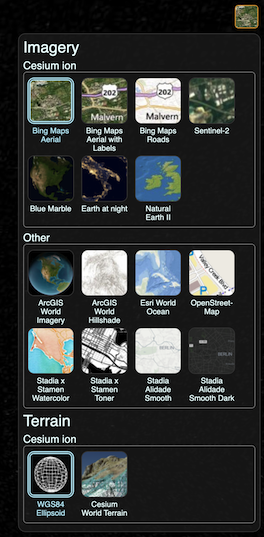
BaseLayerPicker 的下拉面板已打开。 BaseLayerPicker with its drop-panel open.
BaseLayerPicker 是一个单按钮小部件,显示可用图像和地形提供程序的面板。选择影像后,将创建相应的影像图层并将其插入作为影像集合的基础图层;拆除现有基地。选择地形后,它将替换当前的地形提供者。可用提供程序列表中的每个项目都包含一个名称、一个代表性图标和一个工具提示,用于在悬停时显示更多信息。该列表最初是空的,必须在使用前进行配置,如下例所示。 The BaseLayerPicker is a single button widget that displays a panel of available imagery and terrain providers. When imagery is selected, the corresponding imagery layer is created and inserted as the base layer of the imagery collection; removing the existing base. When terrain is selected, it replaces the current terrain provider. Each item in the available providers list contains a name, a representative icon, and a tooltip to display more information when hovered. The list is initially empty, and must be configured before use, as illustrated in the below example.
默认情况下,BaseLayerPicker 使用示例提供程序的默认列表进行演示。值得注意的是其中一些提供商,例如 By default, the BaseLayerPicker uses a default list of example providers for demonstration purposes. Notably some of these providers, such as Esri ArcGIS and Stadia Maps,具有单独的服务条款,并需要进行生产使用身份验证。 , have seperate terms of service and require authentication for production use.
| 名称 Name | 类型 Type | 说明 Description | ||||||||||||||||||||||||
|---|---|---|---|---|---|---|---|---|---|---|---|---|---|---|---|---|---|---|---|---|---|---|---|---|---|---|
container |
Element | string | 此小部件的父 HTML 容器节点或 ID。 The parent HTML container node or ID for this widget. | ||||||||||||||||||||||||
options |
object |
具有以下属性的对象: Object with the following properties:
|
抛出: Throws:
-
DeveloperError :文档中不存在 ID 为“container”的元素。 : Element with id "container" does not exist in the document.
示例: Example:
// In HTML head, include a link to the BaseLayerPicker.css stylesheet,
// and in the body, include: <div id="baseLayerPickerContainer"
//   style="position:absolute;top:24px;right:24px;width:38px;height:38px;"></div>

//Create the list of available providers we would like the user to select from.
//This example uses 3, OpenStreetMap, The Black Marble, and a single, non-streaming world image.
const imageryViewModels = [];
imageryViewModels.push(new Cesium.ProviderViewModel({
     name: "Open\u00adStreet\u00adMap",
     iconUrl: Cesium.buildModuleUrl("Widgets/Images/ImageryProviders/openStreetMap.png"),
     tooltip: "OpenStreetMap (OSM) is a collaborative project to create a free editable \
map of the world.\nhttp://www.openstreetmap.org",
     creationFunction: function() {
         return new Cesium.OpenStreetMapImageryProvider({
             url: "https://tile.openstreetmap.org/"
         });
     }
 }));

 imageryViewModels.push(new Cesium.ProviderViewModel({
     name: "Earth at Night",
     iconUrl: Cesium.buildModuleUrl("Widgets/Images/ImageryProviders/blackMarble.png"),
     tooltip: "The lights of cities and villages trace the outlines of civilization \
in this global view of the Earth at night as seen by NASA/NOAA's Suomi NPP satellite.",
     creationFunction: function() {
         return Cesium.IonImageryProvider.fromAssetId(3812);
     }
 }));

 imageryViewModels.push(new Cesium.ProviderViewModel({
     name: "Natural Earth\u00a0II",
     iconUrl: Cesium.buildModuleUrl("Widgets/Images/ImageryProviders/naturalEarthII.png"),
     tooltip: "Natural Earth II, darkened for contrast.\nhttp://www.naturalearthdata.com/",
     creationFunction: function() {
         return Cesium.TileMapServiceImageryProvider.fromUrl(
             Cesium.buildModuleUrl("Assets/Textures/NaturalEarthII")
         );
     }
 }));

//Create a CesiumWidget without imagery, if you haven't already done so.
const cesiumWidget = new Cesium.CesiumWidget("cesiumContainer", { baseLayer: false });

//Finally, create the baseLayerPicker widget using our view models.
const layers = cesiumWidget.imageryLayers;
const baseLayerPicker = new Cesium.BaseLayerPicker("baseLayerPickerContainer", {
    globe: cesiumWidget.scene.globe,
    imageryProviderViewModels: imageryViewModels
});
另见: See:
成员 Members
获取父容器。 Gets the parent container.
获取视图模型。 Gets the view model.
方法 Methods
销毁小部件。如果从布局中永久删除小部件,则应调用。 Destroys the widget. Should be called if permanently removing the widget from layout.
返回: Returns:
如果对象已被销毁,则为 true,否则为 false。 true if the object has been destroyed, false otherwise.